Table of Contents
AI face-swapping tools can place a consenting person's face into a photo, prerecorded clip, GIF, or live camera feed. The right choice depends less on a “realism” ranking than on the media you need to edit, whether processing is local or cloud-based, and what happens to uploaded biometric images.
Only use a face you own or have clear permission to use. Do not present a synthetic result as evidence, impersonate someone, evade identity checks, create intimate material, or use a public figure's likeness to mislead viewers. Label realistic edited media when its synthetic nature may not be obvious.
How to choose a face-swap tool
- Input and output: confirm whether the tool handles still images, GIFs, uploaded video, or a live camera.
- Consent controls: read the service's prohibited-use rules and make sure every identifiable person has agreed to the edit.
- Privacy: check how uploaded faces and generated files are stored, used, and deleted. Avoid uploading private or sensitive portraits if the policy is unclear.
- Export restrictions: free access may limit resolution, duration, credits, watermarks, or commercial rights. Check the live product page before starting a project.
- Quality: test the same source and target on a short sample. Lighting direction, head angle, occlusion, facial hair, glasses, motion blur, and compression affect the result.
- Disclosure: retain watermarks and add a visible “AI-edited” label for realistic public-facing work.
Invideo AI Face Swap: AI-powered video transformations
Invideo AI face swap is an AI-powered tool that helps creators create face swap videos while maintaining natural-looking facial expressions and movements. It is designed for creative projects, social media content, and visual storytelling where users want to experiment with different face transformations.
The tool helps users create engaging variations of existing videos and explore new creative ideas without requiring advanced editing skills. It can be used for personalized content, character-based videos, and other AI-powered video experiments.
The quality of the output depends on the source image or video. Use clear footage with good lighting and review the final result carefully to ensure facial alignment, expressions, and overall visual consistency before publishing.
Choose it for: creating AI face swap videos for social media, creative projects, and personalized video content.
Check first: source material quality, consent for using faces, and platform guidelines before sharing generated content.
Higgsfield: cloud tools for images and video
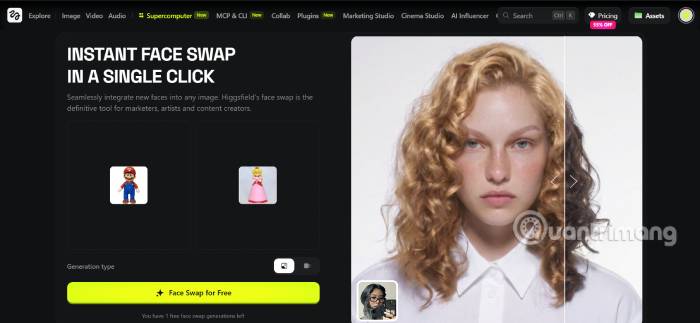
Higgsfield is a browser-based creative suite with separate face, character, and video workflows. Its current apps page is the best place to confirm which swap tools are available. It suits creators who want a web workflow alongside generation, relighting, upscaling, and other media tools.
Use a clear, front-facing source portrait and a target whose head angle and lighting are reasonably similar. Character-swap features may alter more than the face, so check hands, hair, accessories, clothing logos, and background details before publishing.
Choose it for: a unified browser workflow for image and video experiments.
Check first: current credits, export rights, retention policy, and whether the selected feature swaps only a face or regenerates a larger part of the subject.
Pixlr AI Face Swap: quick still-image edits
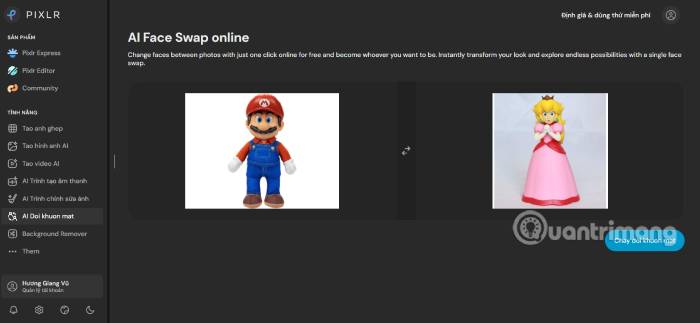
Pixlr is primarily an online photo editor, making its face-swap option convenient when the next step is cropping, adjusting color, adding text, or resizing for a post. It is a better fit for still images than for a demanding video pipeline.
After generation, zoom in to inspect the hairline, ears, jaw, teeth, glasses, and skin around the eyes. A result can look convincing as a thumbnail while showing obvious seams at full size. Save an untouched copy of the target image before making additional edits.
Choose it for: a fast browser-based swap followed by ordinary photo editing.
Check first: output resolution, watermark and credit limits, and the service's policy for uploaded portraits. Use our guide to AI photo enhancement tools if the result needs noise reduction or upscaling after the swap.
Deep-Live-Cam: local, real-time experimentation
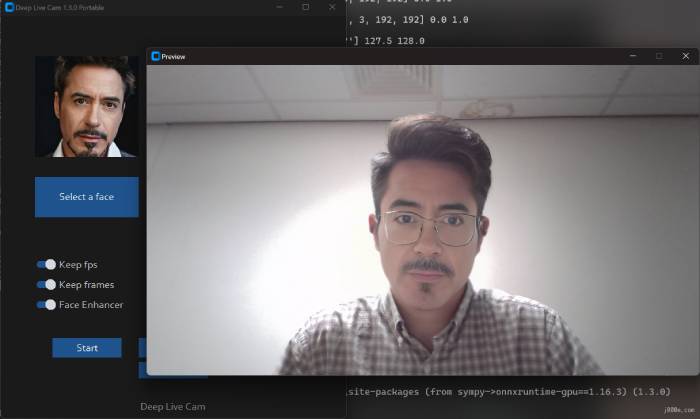
Deep-Live-Cam is an open-source project for real-time camera and prerecorded-video face replacement. Its official repository contains the source, license, installation information, content restrictions, and ethical-use notice. The project explicitly tells users to obtain consent and label shared output as a deepfake.
Running locally can offer more control over media files, but it is not automatically private or safe. Installation involves code and model files from external sources, and acceleration varies by operating system and GPU. Verify the repository URL, review release notes and open issues, scan downloaded files, and do not disable safeguards.
Real-time output can fail when the subject turns away, covers part of the face, moves quickly, or is lit unevenly. A virtual camera also adds setup complexity and can expose the synthetic feed to the wrong application if configured carelessly.
Choose it for: technically supervised, consent-based local tests or live creative effects.
Check first: hardware support, dependency versions, license obligations, source authenticity, and whether your streaming platform allows altered identity effects.
Reface and Unboring: template-led mobile and web creation
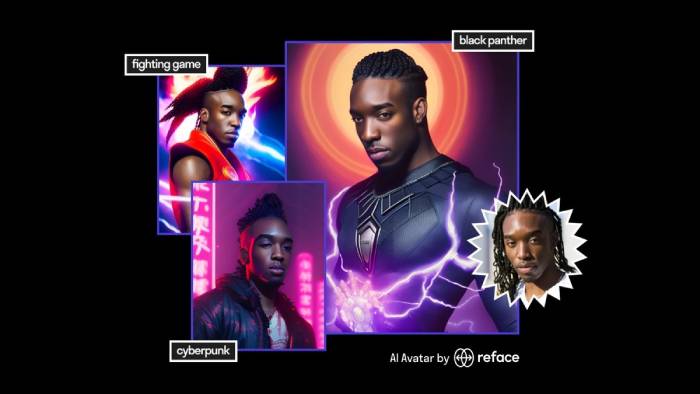
Reface focuses on consumer-friendly photo, video, and GIF transformations. Its Unboring face-swap page provides a browser workflow, while the Reface product also targets mobile use. Templates make it useful for clearly playful content without requiring a full editor.
Template libraries can include recognizable characters, costumes, and entertainment imagery. A tool accepting an upload does not grant rights to the target material, music, character, or person's likeness. Review the terms before commercial use and avoid implying an endorsement.
Choose it for: quick, template-based memes, GIFs, and short social edits.
Check first: subscription renewal terms, export quality, watermarking, upload retention, and rights to every source asset.
Fotor AI Face Swap: face swapping inside a general editor
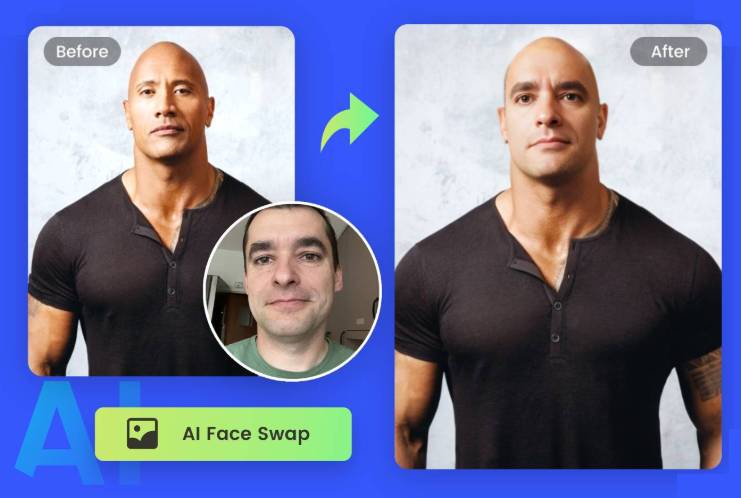
Fotor combines face swapping with a wider set of online photo-editing tools. That can be practical when a swap is only one part of a design and you also need background edits, text, color changes, or a different canvas size.
Do not assume “free” means unlimited or unrestricted. Credit allowances, download resolution, commercial terms, and supported media can change. Test the current web app with non-sensitive images and inspect the checkout screen before uploading a production asset.
Choose it for: occasional still-image swaps within a general editing workflow.
Check first: current photo versus video support, multi-face handling, plan limits, and the privacy policy.
How to get a cleaner result
- Use a sharp source portrait with the entire face visible and a neutral expression.
- Choose a target with a similar head angle, focal length, age presentation, and lighting direction.
- Crop only after generation unless the tool specifies an input ratio.
- Inspect individual frames in video, especially during turns, blinks, hand movements, and scene cuts.
- Correct color and contrast gently; aggressive skin smoothing often makes the composite less believable.
- Export a short proof, review it on a second screen, and get the depicted person's approval.
- Add disclosure before sharing. Keep the original files and consent record with the project.
Protect your face data and viewers
A face image is more sensitive than an ordinary background photo because it can identify a person. Use the minimum-resolution source required, remove unrelated people from the frame, strip location metadata when appropriate, and delete cloud projects you no longer need. Do not upload identification documents or images used for account verification.
If a suspicious image is circulating, a reverse image search may help locate earlier versions, but visual inspection alone cannot prove whether media is authentic. Preserve the file and context, check the original publisher, and avoid amplifying an unverified clip.
Related Articles
 The Best Face-swapping Apps: What You Need to Know12 minutes read
 TOP AI Tools for Creating Realistic Videos from Photos8 minutes read
 4 Top Face Swap Sites: Best Options Compared7 minutes read
 Swap Sim: 5 Tips to Prevent Sim Swapping7 minutes read
 6 AI Image Creation Tools for the Most Realistic Results: Expert Selection Guide7 minutes read
 The Face Editor on Google Photos Explained: Features and How It Works3 minutes read
Reader Comments 0
Sign in with email or Google to join the discussion.