Table of Contents
This guide compares 3 leading Best Music Cutter Software, focusing on useful features, compatibility, ease of use, and overall value.
Here are top 3 best music cutting software, lightweight capacity with intuitive interface you can easily perform music cutting.
Mp3DirectCut software
mp3DirectCut is a free music cutter software, which helps you cut audio files from a complete music track. In addition, you can also copy or paste a piece of music from another audio file into your existing music, without losing the quality of the original Audio files.
mp3DirectCut provides many features for editing and editing the trimmed sounds, you can use the default parameters provided or change the parameters to get the best quality audio output.
Mp3DirectCut lets users easily perform audio editing operations on Windows operating systems, supporting a variety of audio file formats.
Features of mp3DirectCut:
- Cut, copy, paste paragraphs quickly.
- Support for audio formats: MP3, WAV, AAC.
- Change audio volume, noise, normalization.
- Record MP3s with ACM or Lame encoder.
- MPEG navigation is fast and easy.
- Support Layer 2 (DVD / DVB audio).
- CUE sheet support.
- Support for AAC.
- Batch processing.
- Use the command line.
- Unicode support.
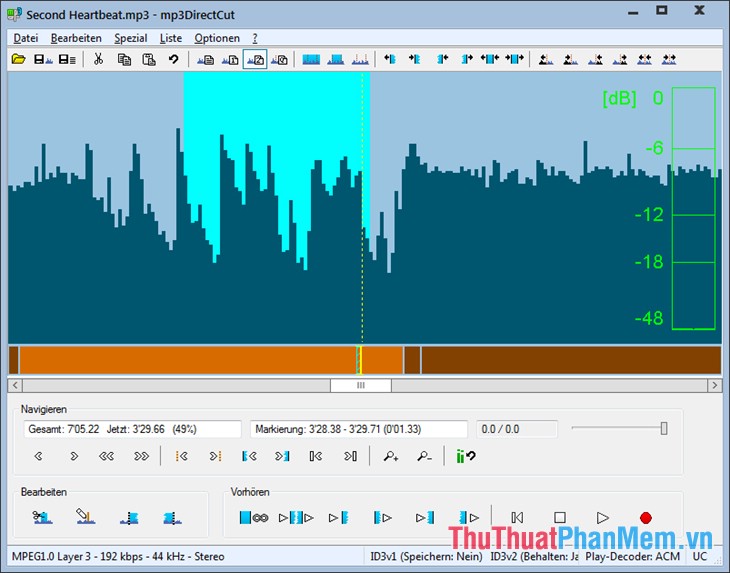
You can download the software at the link http://mpesch3. de1. cc/mp3dc. html
Free MP3 Cutter Software
Free MP3 Cutter is a software to support professional mp3 music cutting on computers that many people choose and use. You can create multiple ringtones by cutting a piece of music in a favorite song. It supports audio formats: MP3, WAV, WMA, OGG.
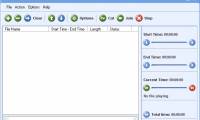
Free MP3 Cutter has a simple interface, you can easily manipulate and perform music cutting quickly.
Features of Free MP3 Cutter:
- Cut audio from complete audio file.
- Support many audio formats: MP3, WAV, WMA, OGG.
- Provides many special sound effects: sound effects increase / decrease (Fade in / Fade out), echo effects (Echo), audio amplification (Amplifier), music mixing effects (Mixer).
- Free MP3 Cutter helps you extract the entire audio output from a CD.
- Works with multiple sounds at the same time.

You can download it at the link http://mp3-tools. com/free-mp3-cutter. html
Free MP3 Cutter and Editor software
Free MP3 Cutter and Editor is software designed to help you cut and make some minor adjustments to your MP3 and WAV tracks.
In addition to the main feature of cutting music, this software also helps you change the volume of music files accordingly, convert audio into Stereo or mono format depending on your needs.
With an easy-to-use intuitive interface, editing music, cutting mp3s with Free MP3 cutter and Editor is quite simple and almost new users can do quite well after just a few steps.
Features of Free Mp3 Cutter and Editor
- Supports two music formats, mp3 and wav.
- Delete the audio track from the music file (Delete Selected feature).
- Delete unselected tracks from the music file (Delete Unselected feature).
- Change the music volume (Change Volume).
- Increase the volume to the maximum level (Maximize Volume).
- Support increase / decrease audio (Fade In / Fade Out).
- Convert audio from Stereo / Mono.
- Listen to the edited music first.

You can download the software at the link http://www. musetips. com/free-mp3-cutter-and-editor. html
So you can choose 1 of the 3 software that the article has introduced to download and use. You will quickly cut your favorite music and ensure the best sound quality, I wish you success!
FAQ
How should I choose among Best Music Cutter Software?
Compare compatibility, essential features, ease of use, security, support, and total cost rather than choosing only by popularity.
Are free options suitable for everyday use?
Free tools can be sufficient for basic needs, but advanced features, commercial use, or priority support may require a paid plan.
What should I check before installing or using one?
Verify the official source, system requirements, recent updates, privacy practices, and support for your device and file types.
Related Articles
 5 Cutting Software, Best Free Music Composer and Download Link6 minutes read
 2 the Best Free Software for Cutting and Joining Music5 minutes read
 How to Edit and Cut MP3 Music Using Free MP3 Cutter and Editor5 minutes read
 Instructions for Cutting MP3 Files6 minutes read
 Cut Music Online with the Online Audio Cutter Tool6 minutes read
 Instructions for Cutting Online Video Using Online Video Cutter Tool6 minutes read
Reader Comments 0
Sign in with email or Google to join the discussion.