Table of Contents
In February 2022, Microsoft released a set of new experiences for the original version of Windows 11. The release introduced a US preview of Android apps through the Amazon Appstore, improved several taskbar features, and delivered redesigned Notepad and Media Player apps. The Android component has since been retired, so this article should be read as a record of that release rather than a current installation guide.
What arrived in the February 2022 release
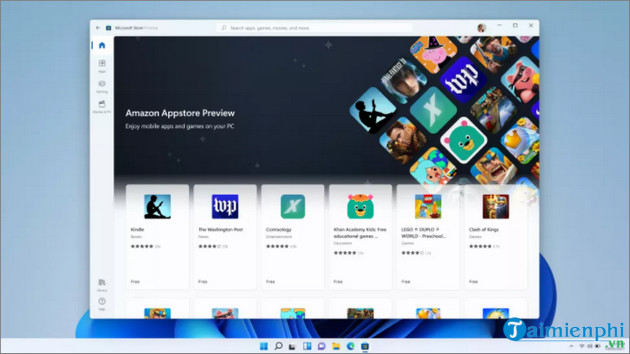
Android apps through the Amazon Appstore preview
The update's headline feature was a public preview of Android apps on Windows 11 in the United States. It used the Windows Subsystem for Android (WSA), the Microsoft Store, and an Amazon Appstore catalog. This was not the full Google Play Store, and app availability was limited by the Amazon catalog and regional support.
Current status: Microsoft ended support for WSA and the Amazon Appstore on Windows 11 on March 5, 2025. New users should not expect to install Android apps through that retired Windows feature. If you still need Android software on a PC, compare maintained options in TipsMake's guide to Android emulators for computers, then check each product's current publisher, system requirements, privacy terms, and update status.
Taskbar improvements
The release restored weather information on the taskbar and added features aimed at online meetings, including microphone mute controls and easier window sharing for supported communication apps. Availability could depend on the app, account, device configuration, and staged rollout.
Redesigned Notepad and Media Player
Notepad received a Windows 11-style interface, dark mode, improved find and replace, and multi-level undo. The redesigned Media Player provided music and video libraries, playlist management, and migration from Groove Music. Both apps were delivered through the Microsoft Store and continued to evolve after this release.
How users received the features
The operating-system changes were distributed through Windows Update, while Notepad and Media Player updates came through the Microsoft Store. Microsoft also used staged rollouts, so eligible PCs did not necessarily receive every component on the same day.
On a current Windows 11 PC, use Settings > Windows Update > Check for updates for supported system updates, and open Microsoft Store > Library > Get updates for app updates. Do not search for the 2022 package solely to obtain newer versions of these apps; current builds include many subsequent changes.
What remains relevant today
The redesigned apps and the broader pattern of delivering Windows features between major annual releases remain relevant. The Android-app integration does not. Articles or videos that still instruct new users to install WSA from the Microsoft Store are outdated and may point to unofficial packages that carry security risks.
If Windows Update fails while installing a current package, use the Windows 11 update error guide rather than applying fixes intended for a 2022 build. Check the installed release with winver so any troubleshooting steps match the actual Windows version.
Why this update mattered
The February 2022 release showed Microsoft's shift toward delivering some Windows 11 features and inbox-app changes outside a single annual feature update. It also illustrates why old feature announcements need status notes: taskbar and app changes can evolve, while a major platform component such as WSA can later be discontinued.
Related Articles
 5 Extremely Effective Ways to Fix the Frozen Taskbar Error4 minutes read
 How to Turn Off Automatic App Updates on Android3 minutes read
 Update Android App: How to Updating Android Apps3 minutes read
 Windows 10 April Update 2018 Update Makes Taskbar Invisible3 minutes read
 How to Change the Number of Flashing Applications on the Taskbar4 minutes read
 How to Fix the Windows 10 Taskbar Crashes Error4 minutes read
Reader Comments 0
Sign in with email or Google to join the discussion.