Table of Contents
The motherboard is a crucial component that connects all the hardware parts of a computer. To ensure stable system operation, you need to install the correct drivers for your motherboard.
Need to find drivers for your motherboard but don't know how to check your motherboard information? Follow the detailed instructions below to learn how to do it easily.
How to read the driver names on the motherboard
Open your computer and check the specifications on the motherboard. For example, as shown in the image below, you will know:
- Manufacturer: (here it's Gigabyte)
- Motherboard model number (here it's GA-G31M-ES2C)
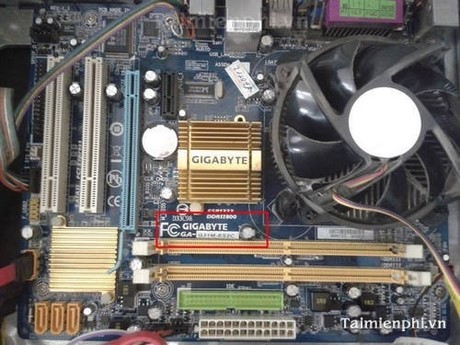
After accurately identifying the motherboard name, the next step is to go to the manufacturer's website and download it.
How to download drivers
(You can choose one of the following two options)
Method 1: Quick and convenient
Description: Instead of downloading each driver individually, you only need to install the network (LAN) driver to connect to the internet. Then, use Driver Easy software to automatically scan and install all missing drivers.
- Advantages: Automatically detects and installs all necessary drivers.
- Disadvantages: Requires an internet connection after installing network drivers.
Steps to follow:
Step 1: Identify the motherboard manufacturer and visit their official website.
For example: If your motherboard is Gigabyte, visit their homepage at www.gigabyte.com.
Step 2: Search for and download the driver from the manufacturer's support page.
Select Support & Download => Downloads .
Search by motherboard name. For example, if your motherboard is a G31 series , type G31 into the search box and press Search .
Step 3: Select the appropriate driver for your motherboard.
The results list will show motherboards using the G31 chipset. Please select the correct model to ensure compatibility.
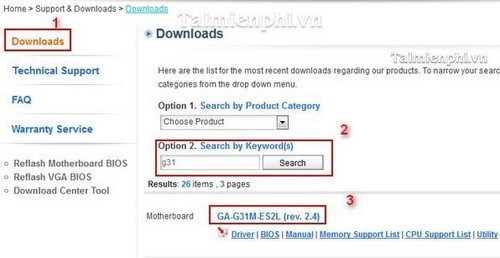
Step 4: After selecting Motherboard, on the new page, select Support & Download.
Here:
- Download type : Select the type of driver to download to your computer.
- Choose your OS : Select the version of the operating system your computer is using (here I chose Windows XP 64-bit).
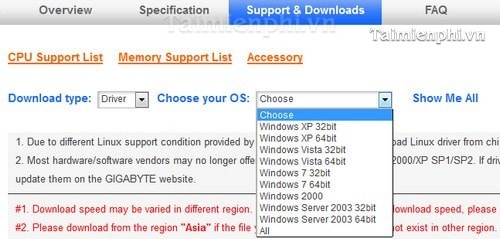
After selecting your operating system version, the website will display the drivers you can download, including: Audio, Chipset, LAN, etc., with information about: Driver name - Version - Size - Release date - Download
For this first method, you select LAN and download the LAN driver to your computer.
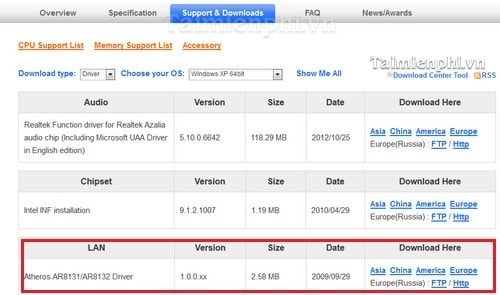
After installation, restart your computer and use Driver Easy as described in Method 1.
Method 2: Download and install all drivers manually.
This method is similar to steps 1, 2, 3, and 4 of method 1, but instead of just downloading the network (LAN) driver, you will download all the important components such as Chipset, VGA, Audio, etc., and manually install each item.
- Advantages: Suitable when you want to control the installation process or avoid using automated software. -
Disadvantages: Installing each driver individually will take more time than method 1.
After reinstalling the operating system, updating drivers can be time-consuming, especially if you no longer have the original installation files. With the instructions above, you can easily download and install all drivers in two ways: automatically using software or manually from the manufacturer's website. To save time, prioritize installing network drivers first, then use Driver Easy or a similar tool to scan and update any missing drivers.
Related Articles
 How to Check the Mainboard Model and Motherboard Manufacturer11 minutes read
 How to Disassemble an Acer Aspire ES1-532G Laptop7 minutes read
 The Terms You Need to Know When Buying a Motherboard24 minutes read
 Things to Know When Choosing to Buy Mainboard13 minutes read
 Are You Sure You Have Read the Names of These 15 Technology Brands Correctly?7 minutes read
 How to Find and Downloading Drivers for the Computer in 3 Steps4 minutes read
Reader Comments 0
Sign in with email or Google to join the discussion.