Table of Contents
This article provides a clear overview of Speed Up Internet Access on Windows, with the main facts, useful context, and practical details organized for easy reading.
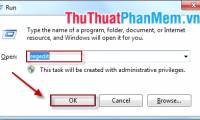
Step 1 : Open the Run dialog box by pressing Windows + R key combination or click Start -> Run (in Windows XP), Start -> type Run in the Search Programs and Files box (in Windows 7) and press Enter. Then enter the gpedit. msc command in the Open section of Run and click OK .

Step 2 : Local Group Policy Editor window appears, go to the Administrative Templates folder in the Computer Configuration section to find the Network section, and then click QoS Packet Scheduler . At the QoS Packet Scheduler window on the right side of the screen double click the Limit Reservable Bandwidth line.

Step 3 : In the Limit Reservable Bandwidth window you may notice that this mode is set to NotConfigured but you can still set the parameters by selecting Enable . Next in the Options section, select Bandwidth limit (%) and enter the value 0. Click OK to save the setting.

Step 4 : Restart the computer so that the changed values are set. Now your computer is considered to have completely booted 100% of its inherent bandwidth already.
FAQ
What is the main focus of Speed Up Internet Access on Windows?
The article explains the most important facts, context, and practical details related to Speed Up Internet Access on Windows.
Who may find this information useful?
It is useful for readers who want a clear overview, practical context, and a better understanding of the subject.
What should readers verify before taking action?
Check current product versions, official requirements, regional availability, and any details that may have changed since the original publication.
Related Articles
 How to Change DNS to Surf Faster, Speed up Internet17 minutes read
 Increase the Speed of Internet Access Effectively4 minutes read
 Speed Up Internet Access with Auslogics Internet Optimizer4 minutes read
 How to Speed Up Internet on Windows 106 minutes read
 Speed up Internet Connection on Windows 10 Computers5 minutes read
 Measure Your Internet Speed Online, No Software Required19 minutes read
Reader Comments 0
Sign in with email or Google to join the discussion.