Table of Contents
The following guide provides a clear overview of Deleted, with the most relevant background, details, and practical takeaways.
Deleted Overview
- You are using Microsoft Outlook and pressing Shift + Delete to delete a message.
- You are working with an Internet Message Access Protocol 4 (IMAP4) client or some other client and do not transfer deleted messages to Deleted Items.
By default, the Recover Deleted Items function is only used for the Deleted Items folder in the user's private folder. The hard deleted elements cannot be recovered. To enable Recover Deleted Items to be executed on all e-mail folders (such as Sent Items, Drafts, Outbox and Inbox), you must make the following changes on the register:
- Start Registry Editor ( Regedt32. Exe ).
- Locate and click on the following key in the register: HKEY_LOCAL_MACHINESOFTWAREMicrosoftExchangeClientOptions
- On the Edit menu, select Add Value. Then add the register value as follows: Value name: DumpAlwaysOn Data type: DWORD Value data: 1
- Close the Registry Editor.
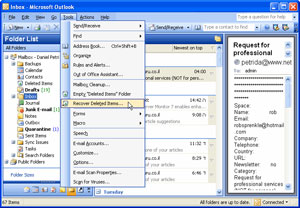 You can use an administrator's computer or a user when making this change. Then, start Outlook, click Deleted Item Recovery on the Tools menu. A list of hard-erased elements during retention on the server (server) is displayed. If you are an administrator, you can set this function for all user workstations. To do so, use your computer to change the registry for all user workstations, then open the created user's mailbox as an added mailbox. You can restore deleted items from the user's mailbox folder. Note : If you are an administrator and want to open another user's mailbox to restore user-specific items, your Windows NT account must assign User permissions to the user's mailbox object. . You must add that user's mailbox to your own profile:
- Go to Control Panel > Mail
- Select the Services property and double-click Microsoft Exchange Server
- Select the Advanced tab> Add to add a mailbox to your profile
Function to recover deleted items in Outlook 98, Outlook 2000, Outlook 2002. In Outlook 98, the Recover Deleted Items function is only used for Mail folders (such as Deleted Items, Drafts, Inbox, Outbox and Sent Items). As a result, items that are hard deleted in non-mail folders (such as Contacts and Notes) cannot be recovered. In Outlook 2000 and Outlook 2002, this function is applied to all folder types. If you make the registry changes as described in the previous section, you can restore the hard deleted items in the external mail folder.
FAQ
What is the main topic of Restore Hard Deleted Elements in Outlook?
The following guide provides a clear overview of Deleted, with the most relevant background, details, and practical takeaways.
Why is Deleted important?
Deleted Overview You are using Microsoft Outlook and pressing Shift + Delete to delete a message.
What should readers remember about Deleted?
You are working with an Internet Message Access Protocol 4 (IMAP4) client or some other client and do not transfer deleted messages to Deleted Items.
Related Articles
 Automatically Delete Items in the Deleted Items Folder When Exiting2 minutes read
 How to Recover Deleted Photos on Android Device?10 minutes read
 How to Recover Deleted Apps on Windows 11 Computer8 minutes read
 How to Recover Deleted Files from Your Computer17 minutes read
 Trick to Recover Android Data Is Lost5 minutes read
 How to Recover Deleted Images and Videos on Android Phones6 minutes read
Reader Comments 0
Sign in with email or Google to join the discussion.