Table of Contents
Compare Google Sheets, Zoho Sheet, LibreOffice Calc, Thinkfree Office, and AI-assisted tools for formulas, collaboration, offline work, and Excel file compatibility.
Before switching: Free tiers, macros, add-ins, pivot-table behavior, offline access, and XLSX formatting vary. Test complex workbooks and automation before moving a critical process.

If you're looking for a free alternative to Microsoft Excel, here are some free spreadsheet tools options worth trying.
Google Sheets
If you already have a Google account, don't overlook Google Sheets. Essentially, Google Sheets is Google’s browser-based spreadsheet app as a spreadsheet application; it emphasizes browser-based collaboration and has a free consumer tier. You don't need to download anything to your personal computer.
Google Sheets looks quite similar to Excel. However, as you can see, it actually works within a web browser. It has most of the same functionality as Excel, including various chart types and the ability to create formulas, so it's a pretty good alternative if you want to save a little money compared to the cost of using Microsoft Excel previously.
Furthermore, you can actually use Google Sheets anywhere, as long as you have an internet connection. This makes working remotely on your spreadsheets easier than ever, as you can be sure that your files are also automatically backed up online.
Zoho Sheet
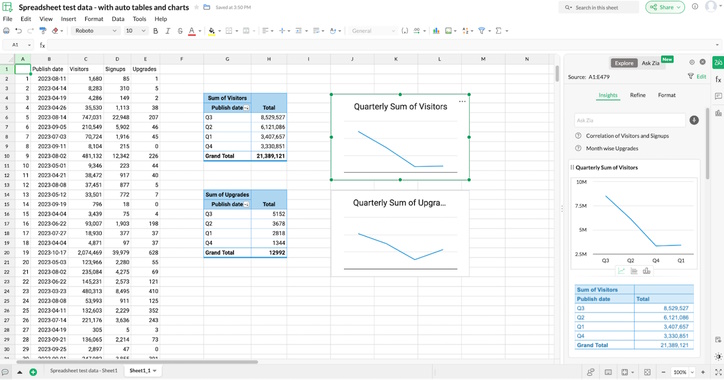
Google Sheets may be the most popular online spreadsheet application, but Zoho Sheets has more features and is completely free. It's a great free Excel alternative if you're looking for a powerful solution.
Zoho Sheets' interface and usage are similar to Google Sheets, so you'll quickly get used to and become proficient in its functions. Like Excel, Zoho Sheets integrates a wealth of features, with over 350 functions—more than Google Sheets.
It supports advanced features such as conditional formatting, aggregate tables, and data validation. You can integrate data from external sources by clicking Data > Link External Data and then uploading a CSV file, RSS or Atom feed, or website. You can then control how often Zoho Sheet queries the source for updates.
LibreOffice Calc
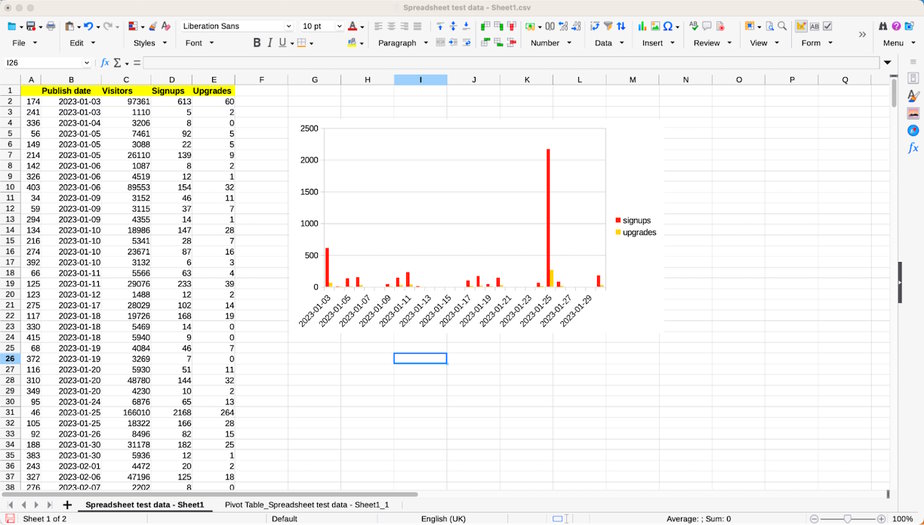
LibreOffice Calc is another free spreadsheet software that works similarly to Excel. It's a program that can be downloaded and run locally on your personal computer, and it works on Windows, Mac OSX, and Linux operating systems.
Calc is compatible with Microsoft Excel files. In other words, if you already have Microsoft 365, you can easily open, edit, and save Excel spreadsheets in Calc without losing the original formatting or functionality. Calc includes a range of additional features for businesses and individuals, such as flexible cell formatting and spreadsheet templates. It also includes more advanced features such as data integration from programming languages like Python and JavaScript, and allows you to retrieve raw data from external databases.
Thinkfree Office
Thinkfree Office is a web-based productivity suite that includes a spreadsheet application compatible with Microsoft Excel. It offers collaborative editing features, allowing multiple users to work on a document simultaneously in real time. Because it's built on a cloud platform, Thinkfree Office allows users easy access from various devices without requiring local installation. However, it may not be the best choice for business users or those needing a more intelligent application than just a spreadsheet.
AI-powered spreadsheet tools
This is a new type of Excel alternative that has emerged with the development of generative artificial intelligence (AI). Popular AI tools like ChatGPT and Google Gemini can perform powerful tasks such as collecting data from various websites and aggregating it into spreadsheets created within a native interface. Additionally, performing complex tasks like creating or modifying formulas requires downloading or pasting the results into another spreadsheet tool like Google Sheets or Excel.
There are many dedicated AI tools for spreadsheets on the market, some free and offering free trials, such as Excel GPT and Numerous.ai.
However, with any AI tool, it's crucial to remember to carefully verify the results. AI can sometimes present data inaccurately, so it's essential to double-check every calculation, formula, and result. These tools work best when used as assistants rather than as replacements for traditional spreadsheet software.
Related Articles
 These Are Some Free Software Options That Can Replace Microsoft Word6 minutes read
 5 Best Alternatives for Microsoft Excel6 minutes read
 4 Free Spreadsheet Software That Can Replace Micorsoft Excel: Best Options6 minutes read
 The Best Free Tool of Microsoft27 minutes read
 Link Download Microsoft Excel 20197 minutes read
 How to Convert Apple Numbers Documents to Microsoft Excel5 minutes read
Reader Comments 0
Sign in with email or Google to join the discussion.