Table of Contents
This updated guide examines Office 365 Has Officially Added the Xlookup Function for Excel and organizes the essential facts, background, and practical takeaways in clear American English.
XLOOKUP was first announced in August 2019 as an alternative to VLOOKUP, promising to bring improvements and drastic changes to one of the most popular Excel calculation functions. Last November, Microsoft announced that XLOOKUP is being actively tested with Office Insiders, and so far, it can be confirmed that the test has completed as planned.
Although introduced as a successor to VLOOKUP, but in fact XLOOKUP can also be used instead of HLOOKUP, because it is the perfect combination and sum between the main features of both functions.. In other words, you can use XLOOKUP to search for values both vertically and horizontally on a spreadsheet.
Not stopping there, XLOOKUP can also find the values on the left of the cell where you insert the function, helping you not to be restricted to previously used functions. This is a nice improvement because, as we all know, the limitation of VLOOKUP is that the result returned by the function can only be one column to the right of the first column in the table, similar to HLOOKUP, It is also possible to return only a single row below the first row in the lookup table, and these restrictions can sometimes be difficult for users. In addition, XLOOKUP also supports insert and delete columns, so the changes you make to your spreadsheet will not affect the results.
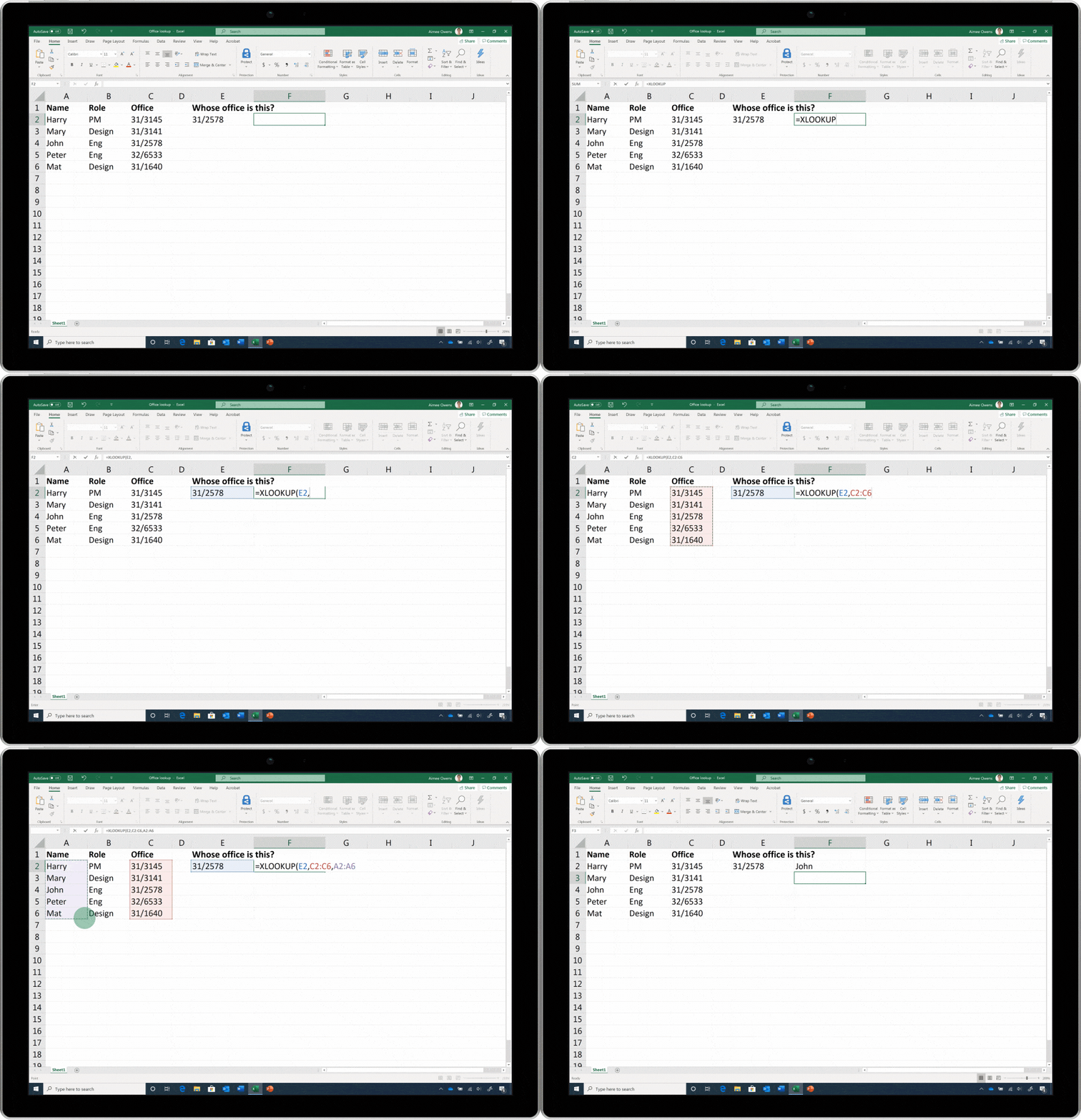
If you still want to use the old VLOOKUP and HLOOKUP functions, use them as usual because these functions are still available, at least for the time being. However, Microsoft encourages users to take the time to learn, get acquainted, and then switch to using the new XLOOKUP function simply because it is faster and more effective.
TipsMake has an article on how to use XLOOKUP function, please refer:
FAQ
What is Office 365 Has Officially Added the Xlookup Function for Excel about?
It provides a structured overview of xlookup Office 365, explains the main context, and highlights practical takeaways for readers.
Why does this topic matter?
Understanding the main concepts helps readers evaluate the issue, avoid common mistakes, and make better-informed decisions.
How should readers use this information?
Use the guidance as a practical starting point, confirm details that may have changed, and follow current product, safety, or security recommendations.
Related Articles
 How to Use the Xlookup Function in Excel?8 minutes read
 The Index Function in Excel: Formulas and Usage9 minutes read
 How to use the VALUE function in Excel - A function to4 minutes read
 Basic Excel Functions That Anyone Must Know20 minutes read
 How to Use Hlookup Function on Excel: Excel Hlookup Function4 minutes read
 How to Use the SUM Function to Calculate Totals in Excel8 minutes read
Reader Comments 0
Sign in with email or Google to join the discussion.