Table of Contents
Bootstrap 5 input groups place text, controls, or buttons beside a form field in one connected component. Wrap the elements in input-group, use input-group-text for non-interactive add-ons, and keep the field's visible label outside the group.
Create a basic input group
This username field adds an @ prefix and a domain suffix. The label identifies the field, while aria-describedby associates both add-ons with it:
<label class="form-label" for="username">Username</label>
<div class="input-group mb-3">
  <span class="input-group-text" id="usernamePrefix">@</span>
  <input class="form-control" id="username" name="username"
    type="text" autocomplete="username"
    aria-describedby="usernamePrefix usernameDomain">
  <span class="input-group-text" id="usernameDomain">@example.com</span>
</div>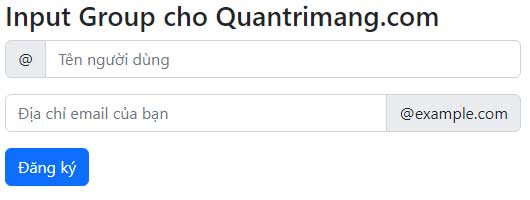
An add-on supplies context, but it does not automatically replace a label. The Bootstrap input-group documentation recommends placing labels outside the group.
Change the size of the whole group
Add input-group-sm or input-group-lg to the group wrapper. Do not repeat sizing classes on each child:
<div class="input-group input-group-sm mb-3">
  <span class="input-group-text" id="smallLabel">Small</span>
  <input class="form-control" type="text"
    aria-label="Small example" aria-describedby="smallLabel">
</div>

<div class="input-group mb-3">
  <span class="input-group-text" id="defaultLabel">Default</span>
  <input class="form-control" type="text"
    aria-label="Default example" aria-describedby="defaultLabel">
</div>

<div class="input-group input-group-lg">
  <span class="input-group-text" id="largeLabel">Large</span>
  <input class="form-control" type="text"
    aria-label="Large example" aria-describedby="largeLabel">
</div>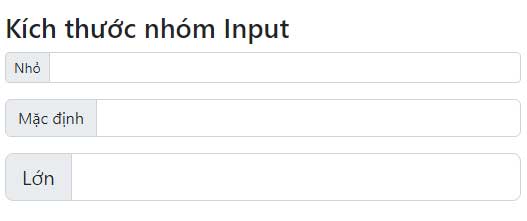
Use multiple inputs or add-ons
Bootstrap can display two inputs in one visual group. Give each field its own accessible name:
<fieldset>
  <legend class="form-label">Contact name</legend>
  <div class="input-group">
    <span class="input-group-text">Name</span>
    <input class="form-control" name="firstName" type="text"
      autocomplete="given-name" aria-label="First name">
    <input class="form-control" name="lastName" type="text"
      autocomplete="family-name" aria-label="Last name">
  </div>
</fieldset>
Multiple inputs are supported visually, but Bootstrap's validation styling is designed for groups with one input. Separate complex fields into individual groups when each needs its own error state.
<label class="form-label" for="price">Price</label>
<div class="input-group">
  <span class="input-group-text" id="currency">USD</span>
  <span class="input-group-text" id="symbol">$</span>
  <input class="form-control" id="price" name="price"
    type="number" min="0" step="0.01"
    aria-describedby="currency symbol cents">
  <span class="input-group-text" id="cents">.00</span>
</div>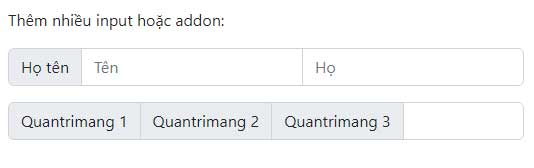
Add a checkbox or radio button
A check or radio control can sit inside input-group-text. If it has no visible adjacent text, give it a precise aria-label:
<label class="form-label" for="notificationEmail">
  Notification email
</label>
<div class="input-group mb-3">
  <div class="input-group-text">
    <input class="form-check-input mt-0" type="checkbox"
      aria-label="Enable email notifications">
  </div>
  <input class="form-control" id="notificationEmail"
    name="notificationEmail" type="email"
    autocomplete="email">
</div>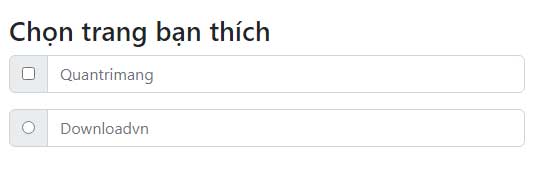
Use this pattern only when the relationship between the option and field is clear. A conventional labeled checkbox above the input may be easier to understand in a long form.
Add a button to an input group
Place a normal Bootstrap button before or after the field. Use type="submit" only when the button should submit its enclosing form; otherwise use type="button".
<form action="/search" method="get">
  <label class="form-label" for="siteSearch">Search the site</label>
  <div class="input-group">
    <input class="form-control" id="siteSearch" name="q"
      type="search" placeholder="Search articles">
    <button class="btn btn-primary" type="submit">Search</button>
  </div>
</form>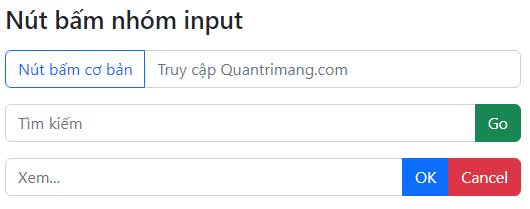
The button's visible text should describe the action. If an icon-only button is unavoidable, add an accessible name with aria-label.
Add a dropdown button
A dropdown toggle can be a direct child of input-group; it does not need a separate dropdown wrapper. Bootstrap's JavaScript bundle must be loaded for the menu to open.
<label class="form-label" for="searchTerm">Search catalog</label>
<div class="input-group">
  <button class="btn btn-outline-secondary dropdown-toggle"
    type="button" data-bs-toggle="dropdown"
    aria-expanded="false">
    Category
  </button>
  <ul class="dropdown-menu">
    <li><button class="dropdown-item" type="button">All</button></li>
    <li><button class="dropdown-item" type="button">Books</button></li>
    <li><button class="dropdown-item" type="button">Software</button></li>
  </ul>
  <input class="form-control" id="searchTerm" name="q"
    type="search" aria-label="Catalog search term">
  <button class="btn btn-primary" type="submit">Search</button>
</div>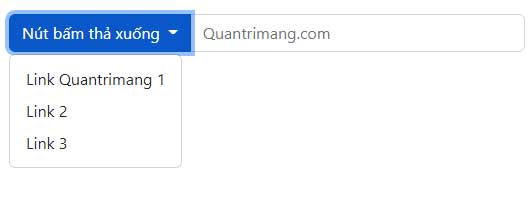
If selecting a category changes a form value, update a hidden field or a real select element in the application logic. A menu item alone does not submit a named value.
Combine a floating label and input group
Bootstrap 5 also supports form-floating inside an input group:
<div class="input-group">
  <span class="input-group-text" id="handlePrefix">@</span>
  <div class="form-floating">
    <input class="form-control" id="handle" name="handle"
      type="text" placeholder="Username"
      aria-describedby="handlePrefix">
    <label for="handle">Username</label>
  </div>
</div>
For invalid feedback in this pattern, place the feedback inside the input group but outside form-floating, and add has-validation to the group.
Common input-group mistakes
- Using an add-on as the only label: keep a visible label outside or provide an accessible name when the design cannot show one.
- Sizing individual children: apply
input-group-smorinput-group-lgto the wrapper. - Expecting a dropdown to work with CSS alone: load
bootstrap.bundle.min.js. - Combining too many controls: split complicated tasks into separately labeled fields, especially when validation is required.
- Forgetting mobile width: test long add-on text and buttons on narrow screens; input groups wrap by default.
- Using the wrong button type: a plain button inside a form should normally declare
type="button".
Use a capable HTML editor to check the structure and matching IDs. If you are selecting a toolkit for a new interface, compare Bootstrap with other CSS frameworks.
Related Articles
 Lesson 16: List Groups in Bootstrap 56 minutes read
 Lesson 42: Large Grid in Bootstrap 54 minutes read
 Lesson 38: Grid Systems from Stacked to Horizontal in Bootstrap 54 minutes read
 Lesson 30: Flexing in Bootstrap 59 minutes read
 Lesson 15: Pagination in Bootstrap 54 minutes read
 Lesson 4: Typography in Bootstrap 512 minutes read
Reader Comments 0
Sign in with email or Google to join the discussion.