Table of Contents
This guide provides a practical overview of Is the WAN Port of the Router Connected to the Computer, including its main features, benefits, limitations, and important considerations.
The functions of the router
Routers allow clients on the local network to communicate with clients on other networks. When a client wants to send data to another network, it forwards that data to its router. The router checks the destination IP address of the data and forwards it to another router closer to the destination.
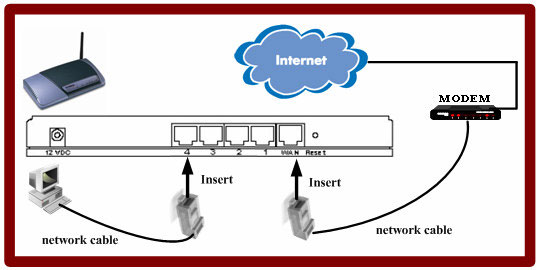 Routers allow clients on the local network to communicate with clients on other networks
A data packet may need to be forwarded several times throughout the journey. The data eventually arrives at the destination network router and is forwarded to the correct local client.
Ports on the router
Router network ports fall into two main categories: WAN and LAN. The WAN port is always used by the router to forward traffic to other routers, while the LAN port is used to communicate with internal clients.

If a computer is connected to the router's external WAN port rather than one of the LAN ports, the router forwards traffic to that computer, thinking that traffic will leave the network. There is no way for computers to forward data, so traffic will never reach the destination.
Types of WAN ports
The shape of a WAN port and what can be connected to it largely depends on the type of router in question. Some routers require external modems to communicate over public infrastructure, such as telephone lines or cables. In this case, the WAN port will probably use Ethernet cable.
However, some routers have a modem feature that allows them to connect directly to external lines. These routers often have WAN ports of the same size and shape as a telephone jack or a regular cable TV port.

Many WAN ports
Most routers in the small office or at home only have a single WAN port. However, some router models have 2 or more WAN connections. These WAN connections can be used together to improve network performance or strength.
For example, most 2-WAN routers support failover, where one WAN port is connected to an active external line and the other is linked to another WAN connection as a backup.
When needed, you can convert the WAN port to LAN on the router.
FAQ
What should I know about Is the WAN Port of the Router Connected to the Computer?
Focus on the key features, requirements, limitations, and practical use cases explained in this guide.
How do I get the best results with Is the WAN Port of the Router Connected to the Computer?
Follow the recommended steps, use current software or information, confirm compatibility, and review settings before major changes.
Are there any risks or limitations?
Potential limitations depend on compatibility, data quality, cost, privacy, support, and how the product or method is used.
Related Articles
 6 Simple Steps to Install Port Forwarding on the Router17 minutes read
 3 Reasons Why You Shouldn't Use Your Router's USB Port to Back up Data9 minutes read
 Why Does the Router Have a USB Port?5 minutes read
 How to Set Up Port Forwarding on a Router10 minutes read
 How to Set up Port Forwarding on Netgear Router4 minutes read
 How to Convert WAN Port to LAN on Router3 minutes read
Reader Comments 0
Sign in with email or Google to join the discussion.