Table of Contents
Many iPhone 17, 17 Pro, 17 Pro Max, and iPhone Air users are reporting intermittent Wi-Fi issues due to the new N1 chip, causing disruptions to CarPlay and connectivity experiences.
iPhone 17 Wi-Fi Error Overview
The newly launched iPhone 17 series brings many changes, notably the appearance of the N1 chip - Apple's 'homegrown' chip in charge of Wi-Fi, Bluetooth and Thread (IoT connection). The mobile modem part is still provided by an external partner. However, the first users quickly reported annoying errors related to Wi-Fi connection.
All four new models, including the iPhone 17, iPhone 17 Pro, iPhone 17 Pro Max, and iPhone Air , are reportedly affected. Specifically, when unlocking the device, the Wi-Fi connection will drop for a moment and then automatically reconnect. This may not sound too serious, but in reality, it causes many trouble, especially for those using Apple CarPlay . Since CarPlay depends on a stable Wi-Fi connection to the car, this bug causes the system to shut down, affecting navigation, music listening, and hands-free calling — extremely dangerous if the driver tries to handle it while driving.
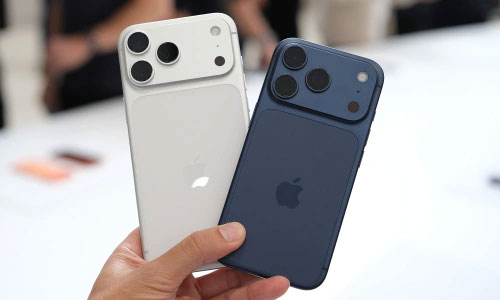
Some users believe that this phenomenon may be related to The Apple Watch , because the network dropout often occurs when the watch is paired and unlocked at the same time. However, there is no solid evidence to confirm it. It is likely that the 'culprit' lies in the new N1 chip. Previously, iPhone versions still relied on Broadcom modems for Wi-Fi and Bluetooth connections, while the iPhone 16e tested going further by using Apple's own modem to handle all connections, including cellular. With the iPhone 17, Apple is not 'doing it all', but these problems show that the N1 chip is still having problems in the early stages.
It should also be mentioned that it is not uncommon for newly launched Apple products to have some minor bugs. Usually, the company will quickly release a software patch to fix it. Hopefully, this is just a temporary software error, not a hardware problem. Users should pay attention to upcoming updates to thoroughly handle this problem.
FAQ
What should you know about iPhone 17 wi-fi error?
In practical terms, many iPhone 17, 17 Pro, 17 Pro Max, and iPhone Air users are reporting intermittent Wi-Fi issues due to the new N1 chip, causing disruptions to CarPlay and connectivity experiences.
Why does iPhone 17 wi-fi error matter?
The article highlights that however, the first users quickly reported annoying errors related to Wi-Fi connection.
What is the main takeaway?
The main takeaway is that all four new models, including the iPhone 17, iPhone 17 Pro, iPhone 17 Pro Max, and iPhone Air , are reportedly affected.
Related Articles
 How to Set up Carplay to Connect iPhone to Car5 minutes read
 How to Fix Apple Carplay Not Working Error6 minutes read
 Apple CarPlay Will Soon Support Streaming Video from iPhone to Car3 minutes read
 6 Tricks to Make Apple Carplay Better: Practical Guide7 minutes read
 How to Turn on Google Maps for Carplay on iPhone5 minutes read
 6 Ways to Fix Wi-Fi Connection Errors on iPhone 65 minutes read
Reader Comments 0
Sign in with email or Google to join the discussion.