Table of Contents
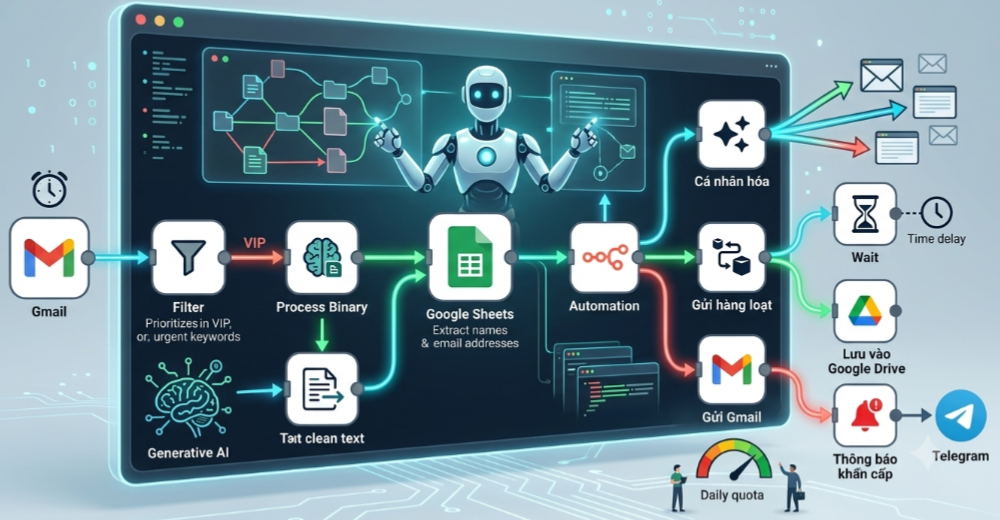
To connect Gmail to n8n, create a Google OAuth 2.0 credential, authorize the Gmail account, and select that credential in a Gmail or Gmail Trigger node. n8n Cloud may provide a managed sign-in flow. A self-hosted n8n instance usually requires your own Google Cloud project, Gmail API, OAuth consent configuration, and web client ID.
Do not use an account password or paste OAuth tokens into workflow fields. Store authentication in n8n’s credential system and request only the Gmail access scopes the workflow needs.
Before you start
- An n8n Cloud workspace or a self-hosted n8n instance reachable at a stable HTTPS URL.
- A Google account. For Google Workspace, an administrator may need to approve the OAuth app or Gmail scopes.
- Permission to create a Google Cloud project if you use self-hosted n8n.
- A clear choice between sending mail, reading mail, labeling messages, or triggering workflows from new messages.
Use a dedicated work account or service mailbox for production automation. A person’s everyday inbox creates ownership and continuity problems when that employee changes roles or revokes access.
Option 1: connect Gmail in n8n Cloud
If the Gmail credential offers a managed Sign in with Google option:
- Add a Gmail or Gmail Trigger node to a workflow.
- Under Credential to connect with, choose Create new credential.
- Select the managed Google sign-in option.
- Choose the correct Google account and review the requested permissions.
- Approve only if the scopes match the workflow.
- Save the credential, return to the node, and run a small test.
If the managed option is unavailable or your Workspace policy blocks it, use the self-hosted/custom OAuth procedure below.
Option 2: create Gmail OAuth credentials for self-hosted n8n
1. Copy n8n’s OAuth redirect URL
- In n8n, create a Google OAuth2 single-service or Gmail credential.
- Copy the OAuth Redirect URL shown in the credential dialog.
- Keep the dialog open so you can paste the client ID and secret later.
The redirect URL is generated from your n8n public base URL. If it contains localhost, an internal hostname, or HTTP on a public production site, fix the n8n URL and reverse-proxy configuration before continuing.
2. Create or select a Google Cloud project
- Open the Google Cloud Console.
- Select an existing project dedicated to the automation, or create a new one.
- Record the project name and owner so the credential can be maintained later.
3. Enable the Gmail API
- In the project, open APIs & Services and the API Library.
- Search for Gmail API.
- Open it and choose Enable.
An enabled OAuth client is not enough: n8n’s Gmail nodes will fail if the Gmail API itself is disabled for the project.
4. Configure the OAuth consent screen
- Open the project’s Google Auth Platform or OAuth consent configuration.
- Enter the application name and required support/contact details.
- Choose the appropriate audience. An Internal app is limited to eligible users in one Google Workspace organization; an External app can authorize allowed accounts outside it.
- Add test users if the app remains in testing.
- Request only the scopes needed for the n8n operations you plan to use.
Gmail scopes can be sensitive or restricted. Wider access can require additional review before an external app is used broadly. For one organization, prefer the narrowest feasible scopes and follow the Workspace administrator’s app-access policy.
5. Create a web OAuth client
- Open the project’s OAuth client page and choose Create client.
- Select Web application.
- Give the client a recognizable name such as n8n production Gmail.
- Under Authorized redirect URIs, paste the URL copied from n8n exactly.
- Create the client and securely copy the Client ID and Client Secret.
The redirect URI must match character for character, including protocol, host, path, port, and trailing slash. A mismatch causes the Google redirect_uri_mismatch error.
6. Finish the credential in n8n
- Return to the n8n credential dialog.
- Paste the Google client ID and client secret.
- Save, then choose Sign in with Google or Connect my account.
- Select the intended mailbox and approve the listed scopes.
- Save the credential and give it a name that identifies the account and environment.
Create a safe Gmail sending test
- Create a new workflow with a Manual Trigger.
- Add an Edit Fields or Set node containing a test recipient, subject, and body.
- Add a Gmail node.
- Select the authenticated credential.
- Choose the message-sending resource and operation shown in your n8n version.
- Map the test recipient, subject, and body.
- Send only to an address you control.
- Confirm the message content, sender, formatting, and delivery before activating the workflow.
Do not begin with a spreadsheet of real recipients. First prove one message, then a small controlled batch, and only then a production volume that complies with Google’s account limits and anti-spam rules.
Trigger a workflow from incoming Gmail
- Add a Gmail Trigger node.
- Select the Gmail credential.
- Choose the event or polling behavior available in your n8n version.
- Narrow the trigger with a label or Gmail search filter when possible.
- Test with a message from a controlled sender.
- Add a deduplication key such as the Gmail message ID before any external side effect.
A trigger that scans the entire inbox can create noise and unnecessary API calls. A dedicated label—applied by a Gmail filter—creates a clear boundary between ordinary mail and automation input.
Process attachments safely
An incoming-message workflow can download attachments, but attachments are untrusted input.
- Allow only required MIME types and file extensions.
- Set size limits before downloading or forwarding.
- Store files in a quarantine location and scan them with an approved security service.
- Do not execute macros, scripts, archives, or binaries from email.
- Remove sensitive attachment contents from logs.
- When sending content to an AI service, confirm that organizational privacy and retention policies allow it.
Batching, waiting, and Gmail limits
Adding a short delay does not make bulk mail legitimate or guarantee inbox placement. Gmail and Google Workspace apply sending, recipient, API, and anti-abuse limits, and those limits can vary by account type and policy.
Use Loop Over Items, batching, and Wait nodes to control throughput and recover from rate limits—not to disguise automated behavior. For newsletters or marketing campaigns, use a compliant email service that provides consent management, unsubscribe handling, reputation controls, and bounce processing.
- Stop when the API returns a quota or rate-limit response.
- Retry transient errors with backoff rather than immediately repeating every send.
- Record a unique send key so a retry cannot send the same message twice.
- Cap each run and alert an owner when the cap is reached.
- Honor unsubscribe and suppression lists before generating a message.
Useful Gmail workflow patterns
Label and route support mail
Trigger from a dedicated label, extract the sender and subject, create a support ticket, then add a processed label only after the ticket API confirms success.
Send approved reminders
Read due records from a database, filter for consent and valid addresses, send in controlled batches, and write the Gmail message ID back to the source record.
Save invoice attachments
Filter by trusted sender and attachment type, scan the file, store it in an approved document location, and create a review task. Do not let AI output automatically approve a payment.
Draft, do not automatically send
For generated replies, create a Gmail draft and route it to a person for review. Draft-first design reduces the risk of hallucinated, inappropriate, or misdirected messages.
Troubleshooting
redirect_uri_mismatch
Copy the redirect URL from the current n8n credential again and replace the URI in the Google web client. Check HTTPS, hostname, port, path, and trailing slash.
Gmail API has not been used or is disabled
Enable the Gmail API in the same Google Cloud project that owns the client ID, wait briefly for propagation, then retry.
Access blocked or app not verified
Confirm the user is in the app’s test-user list or eligible internal Workspace audience. For wider external use, review Google’s verification requirements for the selected Gmail scopes.
Administrator policy enforced
The Workspace administrator has restricted one or more scopes or third-party apps. Provide the client ID and requested scopes to the administrator; do not switch to a personal account to bypass policy.
invalid_grant or repeated reauthorization
The refresh token may be expired or revoked, the app may still be in testing, the client configuration may have changed, or the account’s access was removed. Reconnect after correcting the root cause.
Works locally but not behind a proxy
Set n8n’s public editor/webhook URL and proxy headers correctly so the generated OAuth callback uses the public HTTPS address. Keep the URL stable after authorization.
Duplicate emails after a retry
Make the send step idempotent. Check a source-record flag or unique key before sending, and write the Gmail message ID immediately after a successful operation.
Production checklist
- Dedicated Google account or mailbox with an accountable owner.
- HTTPS and a stable n8n public URL.
- Least-privilege Gmail scopes.
- Encrypted n8n credentials and protected encryption key backups.
- No secrets or full message bodies in routine logs.
- Deduplication before sends and external updates.
- Failure alerts, retry limits, and a manual recovery process.
- Consent, unsubscribe, and retention rules where applicable.
- A small staged rollout before full volume.
Related Articles
 How to Connect Gmail to n8n via Google Cloud Console9 minutes read
 Instructions for Gmail Users - Part 416 minutes read
 How to Change Your Gmail Password: Step-by-Step Guide3 minutes read
 Discover Useful Gmail Features7 minutes read
 Instructions to Add Gmail to Outlook 2013 Via POP Protocol2 minutes read
 Comprehensive Gmail Security Guide8 minutes read
Reader Comments 0
Sign in with email or Google to join the discussion.