Table of Contents
This practical guide explains how to take screenshots and record videos in hdr mode on iOS 26. Follow the steps in order, review the requirements first, and use the troubleshooting notes when a setting or option does not work as expected.
The most obvious difference is that screenshots are displayed with rounded corners instead of rectangular like on iOS 18. In particular, you can take photos in HDR (High Dynamic Range) mode to preserve light and color details.
Enable HDR Screenshots on iOS 26
The highlight of the updated screenshot features in iOS 26 is that you can take screenshots in HDR (High Dynamic Range). Apple has added a new 'Screenshots' page in the Settings app. You can follow these steps to enable HDR screenshots in iOS 26:
- Open the Settings app on iOS 26.
- Go to General Settings > Screenshot .
- Select the HDR option in the Format section.
- Press the Home + Volume Up button combination to take a screenshot.
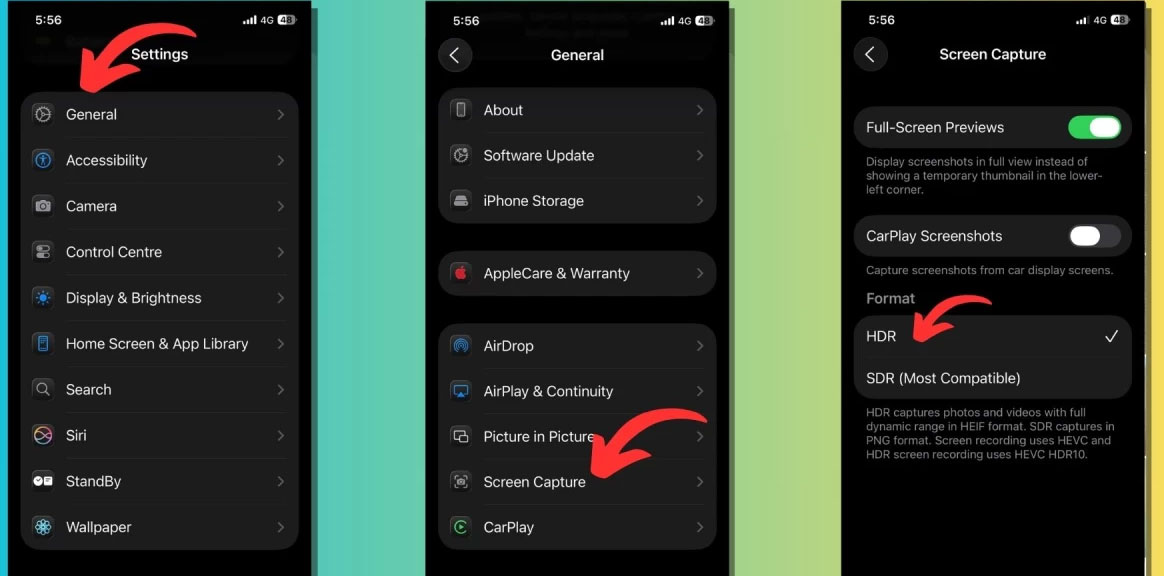
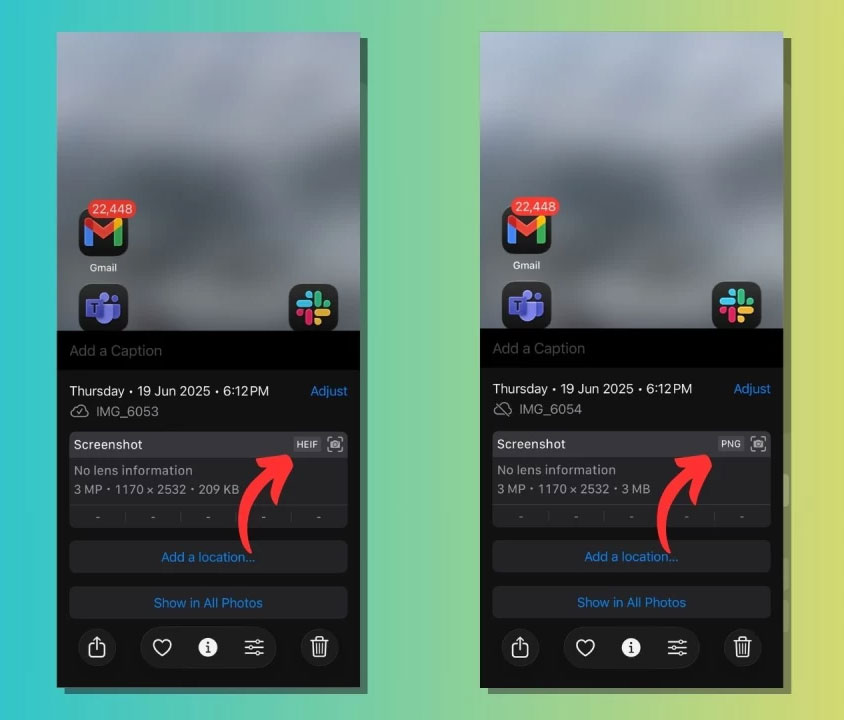
The next time you take a screenshot on your iPhone, it will be captured in full dynamic range and saved in HEIF format. In other words, if you take a screenshot of an existing photo or video in HDR, the feature will preserve those details.
SDR quality, on the other hand, saves screenshots in PNG format and offers greater compatibility. As shown in the image below, you can check if a screenshot was taken in HDR by swiping up on the screenshot in the Photos app to open the photo details.
Record iPhone screen video in HDR mode on iOS 26
Not only for taking screenshots, HDR option is also available for screen recording. Such files are saved in HEVC HDR10 format, while screen recordings taken in SDR mode are saved in HEVC format. After switching to HDR option using the above steps, you can use the same old steps to record your iPhone screen; this option is available in Control Center.
Enable full screen preview by default
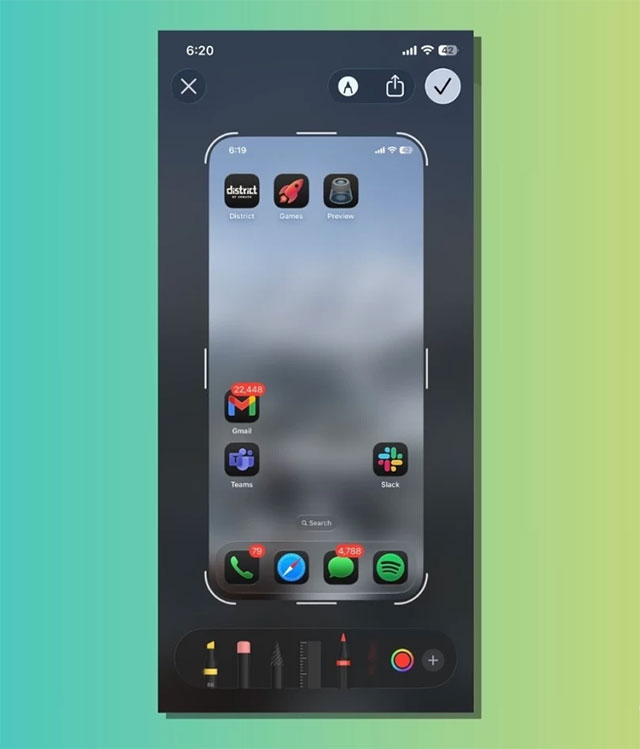
When you turn on the "Full Screen Preview" toggle on the Screenshots page, iOS 26 will display screenshots in full screen view instead of showing a thumbnail in the lower left corner that disappears after a few seconds.
The full interface allows you to quickly edit or annotate the screenshot and share it with friends across different apps. Additionally, you can disable the toggle and enable this interface by tapping on the temporary thumbnail that appears after taking a screenshot.
Using Visual Intelligence on Screenshots
The iPhone screenshot tool also supports improved Visual Intelligence (available on iPhone 15 Pro and later). You can select objects in your screenshot and search for relevant content in apps that integrate with Visual Intelligence.
These screenshot updates for iOS 26 are available for testing now through the developer beta program on supported iPhone models. Apple is expected to release the first public beta of iOS 26 next month. If you plan to install the developer beta on your device, be aware that early builds can be unstable, and make sure you back up your data first just in case.
FAQ
What should you know about enable HDR Screenshots on iOS 26?
The highlight of the updated screenshot features in iOS 26 is that you can take screenshots in HDR (High Dynamic Range). Apple has added a new 'Screenshots' page in the Settings app. You can follow these steps to enable HDR screenshots in iOS 26:
What should you know about record iPhone screen video in HDR mode on iOS 26?
Not only for taking screenshots, HDR option is also available for screen recording. Such files are saved in HEVC HDR10 format, while screen recordings taken in SDR mode are saved in HEVC format. After switching to HDR option using the above steps, you can use the same old steps to record your iPhone screen; this option is.
What should you know about enable full screen preview by default?
When you turn on the "Full Screen Preview" toggle on the Screenshots page, iOS 26 will display screenshots in full screen view instead of showing a thumbnail in the lower left corner that disappears after a few seconds.
What should you know about using Visual Intelligence on Screenshots?
The iPhone screenshot tool also supports improved Visual Intelligence (available on iPhone 15 Pro and later). You can select objects in your screenshot and search for relevant content in apps that integrate with Visual Intelligence.
Related Articles
 How to Use Snagit to Easily Capture Screenshots, Record Videos, and Edit Them3 minutes read
 How to Capture Screen and Record Video on Nintendo Switch Game Console10 minutes read
 How to Record Videos on a Chromebook4 minutes read
 How to Record Videos of Tik Tok Through: Record Tik Tok Videos5 minutes read
 How to Rotate Computer Screen13 minutes read
 How to Record, Record Skype Calls and Record Skype Videos in Windows 103 minutes read
Reader Comments 0
Sign in with email or Google to join the discussion.