Table of Contents
WiFi Universal Key is a very interesting application available on both Android and iPhone. Basically, installing and using WiFi Universal Key on your phone is extremely simple. The application works by sharing the WiFi password of the place you're logged into – that is, a place you visit and ask the owner for the WiFi password, or even your own home WiFi password.
Using WiFi Universal Key on your phone
Downloading and using WiFi Universal Key on your phone is easy; all you need to do is download WiFi Universal Key to your phone first.
Step 1
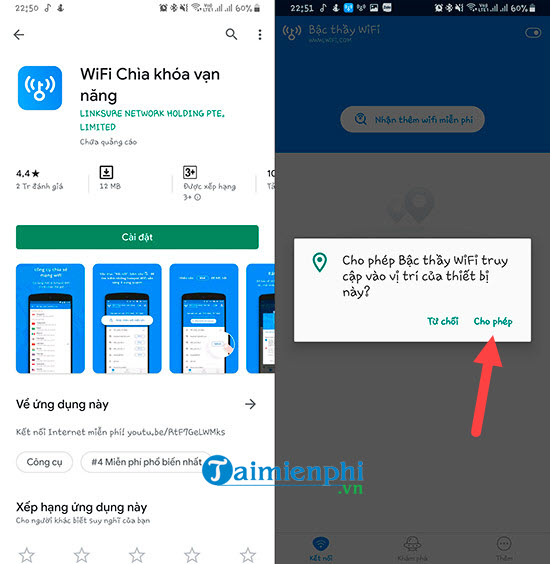
Basically, users just need to download the WiFi Universal Key app from the app store to their phone. After downloading, go to > allow WiFi Universal Key to access your location . This is a necessary condition for use.
Step 2
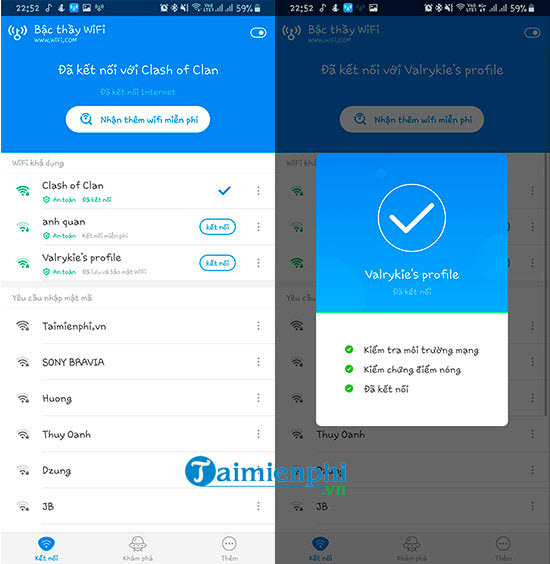
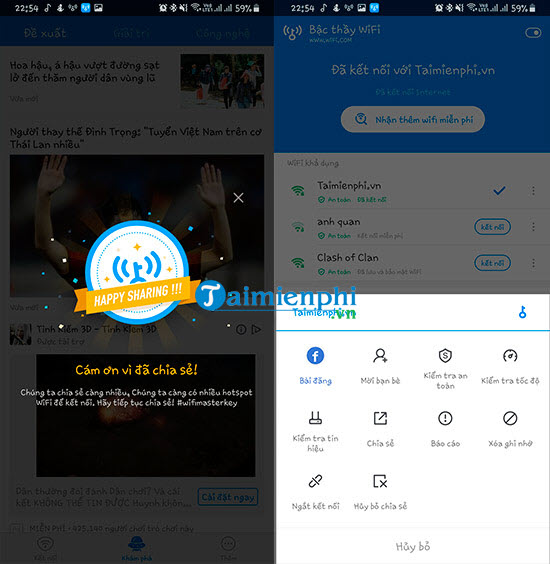
Next, you will see the system automatically scan all Wi-Fi networks, and for any Wi-Fi network with a connection icon and a security message, you can click on it to connect without having to enter a password.
Step 3
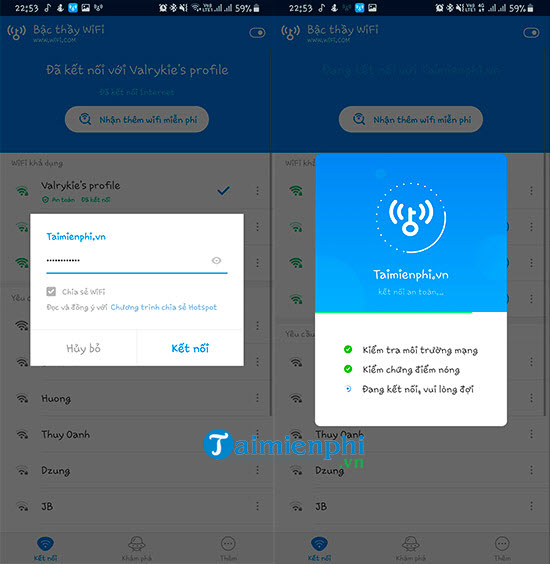
Of course, you can also share your WiFi if you want, although sharing your home WiFi isn't ideal, right?
Step 4
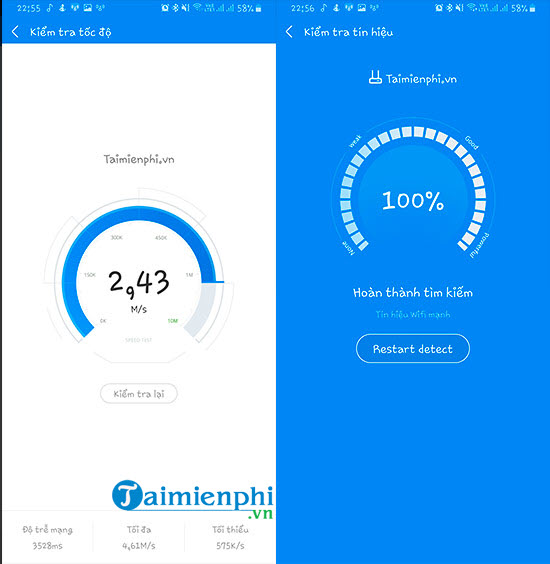
And of course, with WiFi networks that use a WiFi Universal Key to connect or share, we also have many other features such as checking speed or checking signal strength.
Step 5
Checking the speed or signal strength will assess the quality of the WiFi you are accessing, and from there we can find the best quality WiFi.
With the Universal WiFi Key, you can access hundreds, even thousands, of free WiFi networks throughout Vietnam, as long as they have been shared by other users. This sharing has both good and bad aspects, so you should think carefully before deciding to share your WiFi. Additionally, you should make it a habit to change your WiFi password at home or work to prevent unauthorized access.
Sharing your WiFi password is always a no-no when you're connecting anywhere, so you should only share it when you're using a device like a laptop for short-term use.
For example, on a laptop, we can create a WiFi hotspot on Windows 10; this is a basic feature that anyone can use. Refer to the instructions on how to create a WiFi hotspot on Windows 10 here.
Related Articles
 Install Universal Key on Laptop3 minutes read
 How to Play Wi-Fi on Lumia Phones3 minutes read
 Wi-Fi 5, Wi-Fi 6 vs. Wi-Fi 6E: Key Differences7 minutes read
 What Is Wi-Fi 6E? How Is Wi-Fi 6E Different from Wi-Fi 6?3 minutes read
 How Does the Universal Control Feature on macOS Monterey6 minutes read
 Access Point Wi-Fi: How to Using Your Phone as a Wi-Fi Hotspot3 minutes read
Reader Comments 0
Sign in with email or Google to join the discussion.