Table of Contents
A QQ account can be used for Tencent messaging, groups, file transfer, and sign-in to some Chinese games and services. Registration normally requires a phone number that can receive an SMS code. A Gmail address is not a requirement.
Tencent increasingly directs new users to register in the mobile QQ app. An official English web form may also be available, but support for overseas numbers can vary by country, carrier, device, and Tencent’s current anti-abuse checks. Do not buy an account or use a temporary SMS number if your own number is rejected.
What you need before registering
- A phone number you control long term and that can receive international or service SMS messages.
- The official QQ mobile app or Tencent’s official registration page.
- A unique password stored in a password manager.
- Access to the phone during registration and later account recovery.
A QQ account does not automatically make every Chinese game available. A game may have its own region, age, real-name verification, identity, payment, or licensing requirements. Follow the game publisher’s rules rather than trying to bypass them.
Method 1: Register in the official QQ mobile app
- Open the official QQ website and use its download links, or verify that the app-store publisher is Tencent.
- Open QQ and choose the registration option, usually labelled 注册 or Sign up.
- Select your country or region code if it is offered, then enter a real mobile number. Follow the form’s example for international formatting.
- Read the QQ service terms and privacy policy, then request the SMS verification code.
- Enter the code only in the official QQ app. Complete any additional anti-abuse check shown on the device.
- Choose a nickname and strong password when prompted.
- After registration, record the assigned numeric QQ ID. This number is commonly used as the account identifier.
Menus may be displayed primarily in Chinese. Do not install a modified “English QQ” package from an unknown website; unofficial APKs can steal the phone number, password, or verification code.
Method 2: Try Tencent’s official web registration form
If the web flow is available in your location, open Tencent’s English QQ registration page. Confirm that the address is on the qq.com domain and uses HTTPS before entering any information.
The screenshots below show a previous version of the web form. Current labels and the order of steps may differ.
- Select the correct country or region code.
- Enter the mobile number and request a verification code.
- Complete the captcha or other verification displayed by Tencent.
- Enter the SMS code, accept the applicable terms, and finish registration.
- Save the QQ ID that Tencent assigns, along with your recovery information.
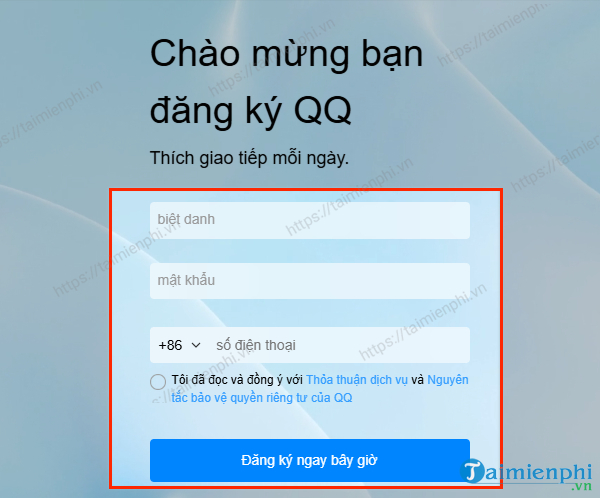
A previous QQ web registration form. Use the current labels shown on Tencent’s site.
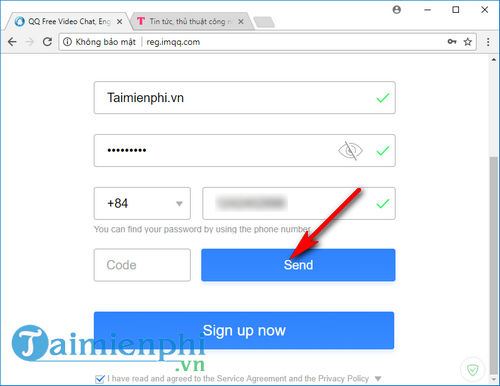
Request the verification code only after checking the phone number and country code.
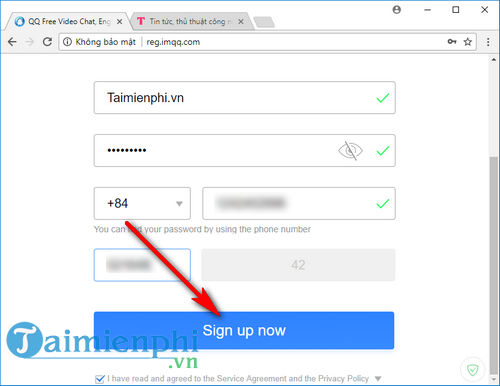
Never send the verification code to another person or paste it into a third-party site.
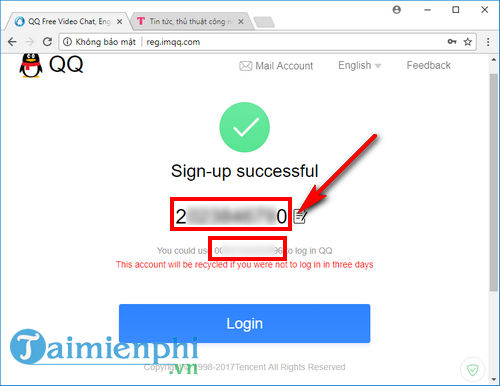
Record the assigned QQ ID privately; do not rely on this screenshot’s older layout.
If the verification code does not arrive
There is no reliable “best time of day” that guarantees successful registration. Repeated attempts can trigger a temporary limit, so use the cooldown shown by Tencent instead of requesting codes continuously.
- Check that the country code and phone number are correct.
- Confirm that the SIM can receive ordinary and international service messages and that the inbox is not full.
- Disable SMS filtering temporarily or check the blocked/spam message folder.
- Use the current official app and a normal network connection. Avoid VPNs, proxies, emulators, and automation during sign-up because they can resemble abusive registration traffic.
- Restart the phone and try the official mobile flow if the web form fails, or vice versa.
- If Tencent says the number, country, device, or attempt is unsupported, stop and use the official help route rather than trying to evade the restriction.
Overseas-number availability can change. The fact that a country appears in an older selector does not guarantee that every carrier or number range will pass current verification.
Avoid unsafe workarounds
- Do not buy a “ready-made” QQ account. The seller may retain recovery access, and the account may have been created with stolen information or may already be restricted.
- Do not use a public SMS-receiving site. Anyone who sees the code may be able to take the account, and the number can later be reused.
- Do not rent another person’s identity. Real-name requirements belong to the game or service and may have legal and account consequences.
- Do not pay a stranger to “unlock” registration. Tencent may ask for additional verification, but a stranger asking for your code or password is not a legitimate verifier.
Secure the QQ account after sign-up
- Store the numeric QQ ID and password in a password manager.
- Bind only recovery options that you control and keep them current.
- Review login devices and sign out sessions you do not recognize.
- Never share an SMS code, QR login approval, password, or recovery code.
- Use a different password from your email, game, and social accounts.
- Download desktop and mobile updates from Tencent or the official app store.
Tencent’s QQ terms describe the QQ ID as the account used across supported services, including messaging and some online games. Read the current QQ account terms before registering.
Using QQ to sign in to a game
On the game’s official sign-in screen, choose the QQ option and authorize the correct QQ account. Verify the publisher and domain before scanning a QR code or entering credentials. A QQ login does not prove that the game supports your region or that progress can move between QQ, WeChat, guest, Android, and iOS accounts.
Check these details before investing time or money:
- the game’s official region and language;
- whether QQ login is supported on your platform;
- real-name, age, and play-time rules;
- server and cross-save limitations;
- payment methods and refund policy; and
- whether the account can be recovered outside mainland China.
For background on the platform, see TipsMake’s overview of major Chinese social networks. If you are looking for Asian game listings rather than a QQ account, the older TapTap guide explains the alternative store concept, though you should install the current official version rather than the legacy build named in that article.
Registration is complete only when you can sign in again with the assigned QQ ID and your recovery options work. Test that before linking the account to a game.
Related Articles
 Instructions to Register, Create a Garena Account to Play Online Games3 minutes read
 Quickly Register to Play Age of Empires 4K Upgrade Version of the Graphic5 minutes read
 Basic Chinese Chess Play: How to Identify and Move Each Piece10 minutes read
 How to Play the Game Overwatch 4 Days for Free on Tet5 minutes read
 Chinese Translation Applications on Quality Phones8 minutes read
 How to Create a VTC Account: Complete Guide6 minutes read
Reader Comments 0
Sign in with email or Google to join the discussion.