Table of Contents
The best recovery method depends on what happened to the Word document. A saved file that was deleted should be checked in the Windows or OneDrive Recycle Bin. A document that was never saved may still have an AutoRecover copy. A file that was overwritten is more likely to be recoverable through OneDrive, SharePoint, or File History versioning.
| What happened? | Try first |
|---|---|
| A saved local file was deleted | Windows Recycle Bin |
| A OneDrive or SharePoint file was deleted | The service’s web Recycle Bin |
| Word or Windows closed before the document was saved | Document Recovery, then Recover Unsaved Documents |
| A saved file was replaced or unwanted changes were saved | Version History or File History |
| The file was permanently deleted from a local drive | Stop writing to the drive, check backups, then consider Windows File Recovery |
1. Restore a deleted local Word file from Recycle Bin
- Open Recycle Bin from the Windows desktop or search for it from Start.
- Use the search box or sort by deletion date to find the .doc or .docx file.
- Right-click the document and select Restore.
Windows returns the file to the folder from which it was deleted. If you do not remember that location, search for the filename after restoring it. A file removed with Shift+Delete, deleted from some removable drives, or purged from Recycle Bin will not appear here.
2. Check the OneDrive or SharePoint Recycle Bin
If the document was stored in a synced OneDrive folder, deleting it on the computer can also delete the cloud copy. Sign in to the correct OneDrive account on the web, open Recycle bin, select the file, and choose Restore. Microsoft’s OneDrive restore guide covers personal, work, and school accounts.
Documents shared through Teams may actually be stored in OneDrive or SharePoint. For a file from a Teams channel, open the channel’s shared files in SharePoint and check that site’s Recycle Bin. Work or school retention policies can differ, so contact the administrator promptly if the file is missing.
3. Recover a document that was never saved
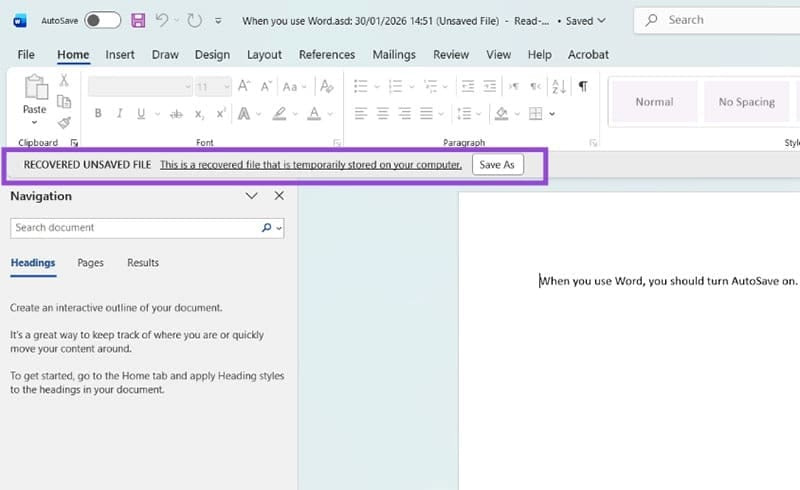
If Word or Windows closed unexpectedly, reopen Word first. The Document Recovery pane may appear automatically and list the versions Word recovered. Open the newest plausible copy, inspect it, and immediately use Save As with a new filename.
If the recovery pane does not appear:
- In Word for Windows, open File > Info > Manage Document > Recover Unsaved Documents. Depending on the Word version, you may also find Recover Unsaved Documents at the bottom of File > Open.
- Choose the candidate file and select Open.
- Check the document carefully; an AutoRecover copy may not contain the latest changes.
- Select Save As in the notification bar and save it to a known folder.
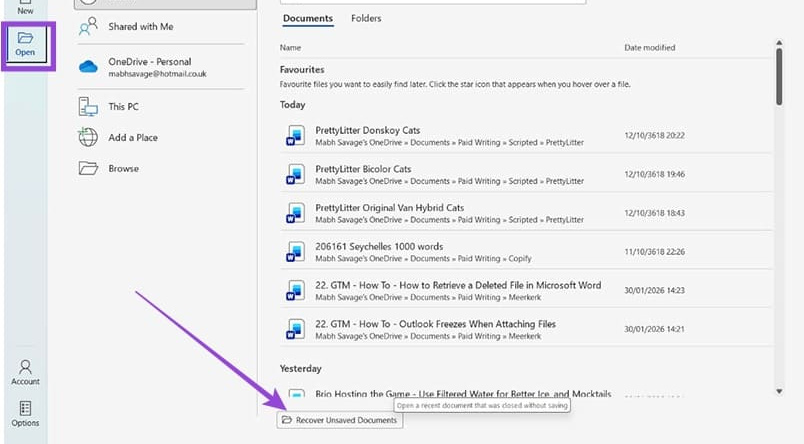
AutoRecover is for unexpected interruptions and recent unsaved work. It is not a substitute for saving, and it cannot guarantee that a copy exists after you intentionally discard a document. Microsoft’s Word recovery instructions document the current path.
4. Restore an earlier version of a Word file
If the file still exists but important text was overwritten, do not keep editing the only copy. Save a duplicate first, then check version history.
For a file stored in OneDrive or SharePoint
- Open the document.
- Select the document name in the title bar and choose Version History, or open File > Info > Version History.
- Open an older version in a separate window.
- Copy the missing content into a new file, or select Restore if you are sure that version should become current.
Microsoft explains that Office version history depends on where the file is stored and on the organization’s library settings.
For a local file protected by File History
Open File Explorer, go to the folder that contained the document, right-click the folder, and select Restore previous versions. This works only if File History or another compatible backup created an earlier copy. Preview or restore to a separate location first so you do not overwrite a good version. TipsMake’s Windows File History guide explains how to browse its saved versions.
5. If the local file was permanently deleted
Stop saving, downloading, or installing anything on that drive. Deleted data may remain recoverable until new data overwrites the same storage blocks; continuing to use the drive reduces the chance of recovery. Check external backups and cloud storage before running recovery software.
Microsoft provides the command-line Windows File Recovery app for local internal drives, external drives, and USB devices when Recycle Bin cannot help. The recovered files must be written to a different drive. The tool does not recover data directly from cloud storage or network shares.
If the document is business-critical, the drive is failing, or you are unsure how to preserve it, stop using the device and consult a reputable recovery specialist. Repeated scans and writes can make a difficult recovery worse.
Improve the chance of recovery next time
- In Word, open File > Options > Save, enable Save AutoRecover information every, and keep the last AutoRecovered version when closing without saving.
- Save new documents early instead of working for a long time in an unnamed file.
- For Microsoft 365, store active documents in OneDrive or SharePoint and use AutoSave when appropriate.
- Keep an independent, versioned backup. Cloud synchronization can copy a deletion to every synced device.
- Test recovery by restoring a sample to a separate folder. TipsMake’s backup basics guide explains why a verified second copy matters.
Start with the least invasive method: Recycle Bin, Document Recovery, or version history. Use low-level recovery only after the normal copies and backups have been exhausted.
Related Articles
 How to Recover Deleted Files on Linux8 minutes read
 How to Recover Deleted Files on Microsoft Teams4 minutes read
 How to Use Foremost to Recover Deleted Files in Linux5 minutes read
 How to Recover Deleted Data or Secure Format11 minutes read
 How to Recover Accidentally Deleted Files in Os X7 minutes read
 How to Recover Deleted Files from the Recycle Bin5 minutes read
Reader Comments 0
Sign in with email or Google to join the discussion.