Table of Contents
How to Know Android Smartphones Running Jelly Bean or Kitkat? is easier to understand when the core ideas are paired with practical examples. The sections below explain the topic clearly, highlight useful steps, and point out details that can prevent common errors.
Many new users of smartphones choose to buy Android smartphones, because there are many choices about models and prices. However, many people ask their smartphone to run any operating system version.
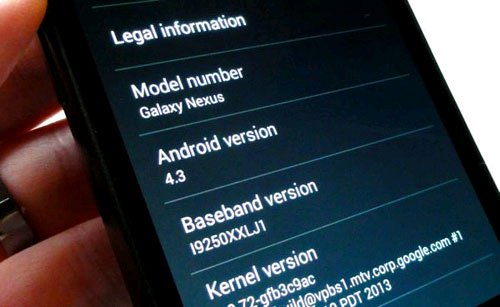
Here are the simple steps to know which version of your Android smartphone is running the operating system version. Note that some Android smartphones may be slightly different, depending on the manufacturer and model.
- First, go to Settings , then scroll down to the bottom of the menu and go to ' About phone '.
- Look below the phone information list until you see the ' Android version ' line, the number listed below this line is the Android operating system version running on your device.
Also, want to know which version of the latest Android operating system can be used? Go to ' System updates ' on the ' About phone ' page; If there is an update there, you should download it now.
If the phone is using an old version of Android, but there is no update version available? As such, you can find out when your phone model has received a new Android update, by understanding it on Google, your phone model may not be able to run the latest operating system version.
FAQ
What is How to Know Android Smartphones Running Jelly Bean or Kitkat??
Many new users of smartphones choose to buy Android smartphones, because there are many choices about models and prices.
Why is How to Know Android Smartphones Running Jelly Bean or Kitkat? important?
A clear understanding of How to Know Android Smartphones Running Jelly Bean or Kitkat? helps you make informed decisions, avoid common mistakes, and use the relevant tools or techniques more effectively.
How should beginners approach How to Know Android Smartphones Running Jelly Bean or Kitkat??
Start with the fundamental concepts, follow the examples step by step, and test each change in a safe environment before applying it to important systems or data.
Related Articles
 Only 1/4 of Devices Running Android Support Android Wear3 minutes read
 Tablet, Asus Smartphones Can Go to Android 5.0 First3 minutes read
 Configure and Use Google Now on Android7 minutes read
 More Than 64 Million Devices Will Be Killed by Chrome3 minutes read
 Instructions for Installing Android 4.4 Kitkat on Your Computer4 minutes read
 Kitkat Accounts for Nearly 18% of All Android Devices4 minutes read
Reader Comments 0
Sign in with email or Google to join the discussion.