Table of Contents
Learning how to add music to WhatsApp status doesn't have to be complicated. This updated guide presents a clear workflow, practical checks, and troubleshooting advice you can use while completing the process.
Key Takeaways
- Follow the steps to add music to WhatsApp status.
- Follow the recommended steps in order to avoid common mistakes with add music to WhatsApp status.
- Review compatibility, settings, or requirements before making changes.
How to Add Music to WhatsApp Status
Step 1:
On the WhatsApp application interface, select Status then select My Status to post status as usual.

Step 2:
In the video or image posted on WhatsApp status, select the music note icon to insert music into the status.

Step 3:
Now the music store interface on WhatsApp is displayed for us to search for the song we want to insert into the status on WhatsApp. Users enter keywords directly into the search bar and the results are displayed immediately below.

Step 4:
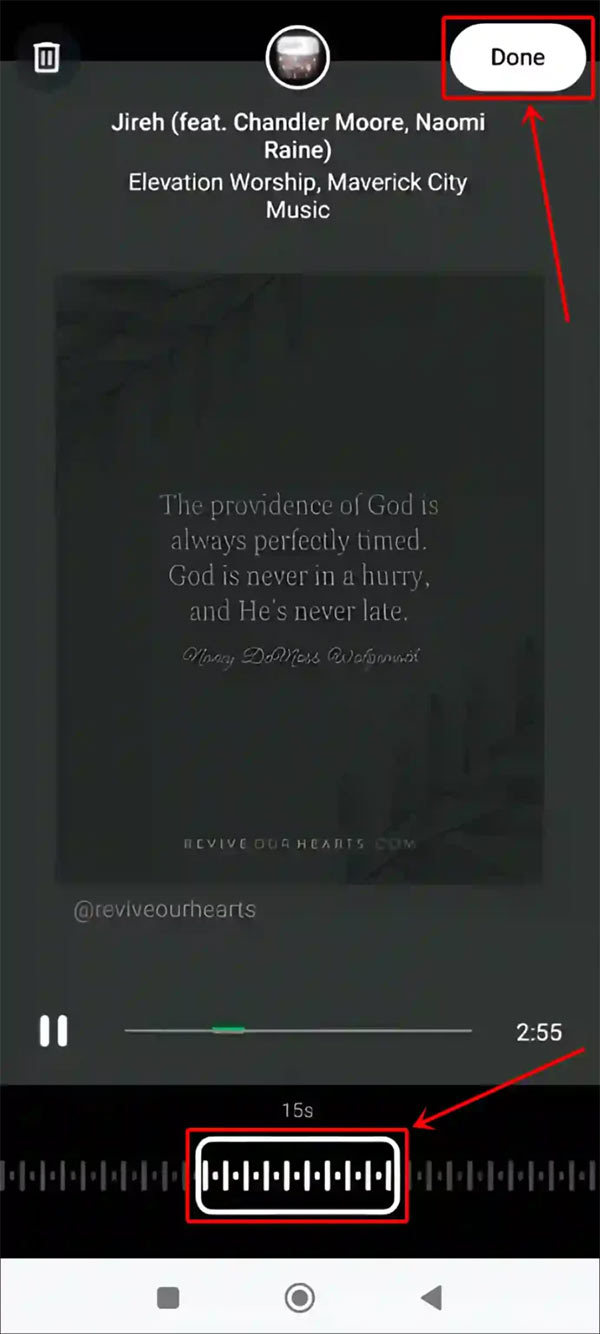
Next, select the music you want to insert into your WhatsApp status and press Done to complete the operation. Finally, add other elements to the status and post as usual.
Final Thoughts
The most reliable way to handle add music to WhatsApp status is to follow the process in order, verify each important setting, and test the result before moving on. Use the guidance above as a practical reference, then adjust the details for your device, software version, or specific goal.
FAQ
What should I check before I add music to WhatsApp status?
Use the latest available software, confirm that your device meets the requirements, and make sure you have the necessary permissions, account access, or backup before changing anything.
Why might I be unable to add music to WhatsApp status?
Common causes include outdated software, missing permissions, incompatible settings, incomplete setup steps, or a temporary network problem. Recheck the process from the beginning and restart the app or device if needed.
Is it safe to add music to WhatsApp status?
It is generally safe when you use official tools, review every permission, and back up important data before making system-level or account-level changes.
Related Articles
 Instructions for Posting Status on Whatsapp4 minutes read
 How to Hide and Share Status with Someone on Whatsapp3 minutes read
 How to Combining Photos to Post on WhatsApp Status4 minutes read
 How to Block Ads in WhatsApp Status3 minutes read
 How to Post Question Status on WhatsApp3 minutes read
 How to Turn Off Online Status on Whatsapp3 minutes read
Reader Comments 0
Sign in with email or Google to join the discussion.