Table of Contents
In iOS 26, Apple has a useful new feature that notifies users that the iPhone camera lens needs to be cleaned if it is dirty, ensuring the quality of the camera and the quality of the photos taken. iOS 26 will monitor the light coming in for signs of reduced sharpness or blur, which can be a sign of a dirty lens. When activated, you will see a separate warning to clean the camera lens. Here are instructions for turning on the iPhone camera cleaning notification.
Instructions to enable iPhone camera cleaning notification
Open Settings on iPhone then select the Camera app to proceed with adjustment.
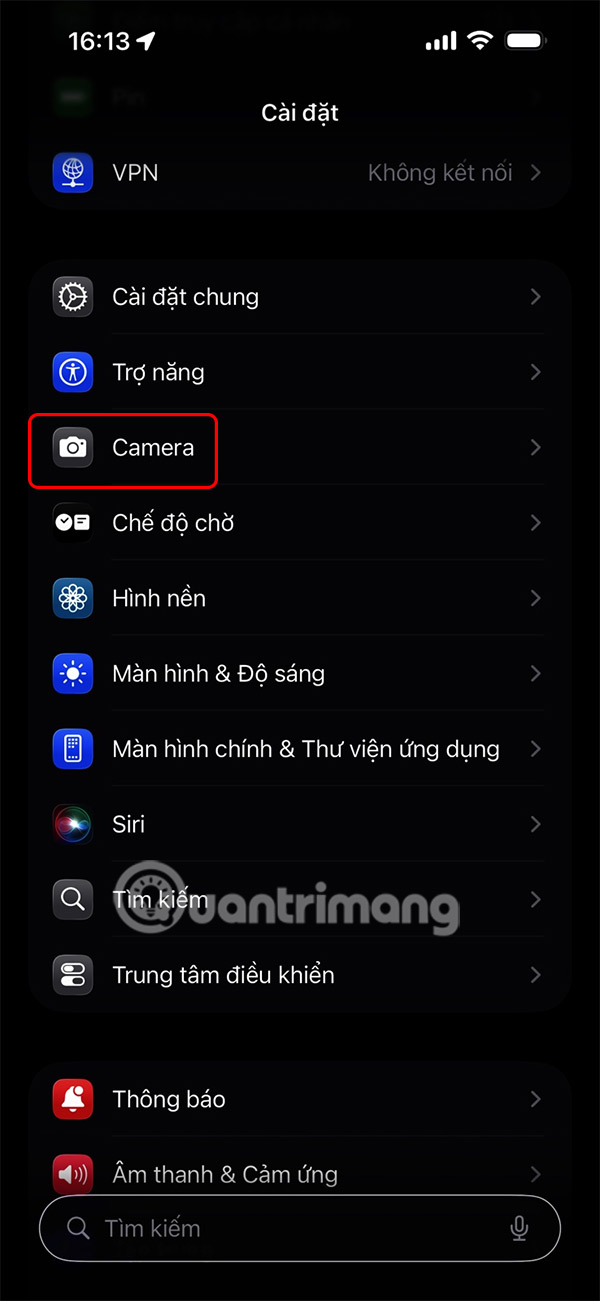
Go to the camera settings interface on your iPhone. Now you need to turn on the Lens Cleaning Suggestion setting .
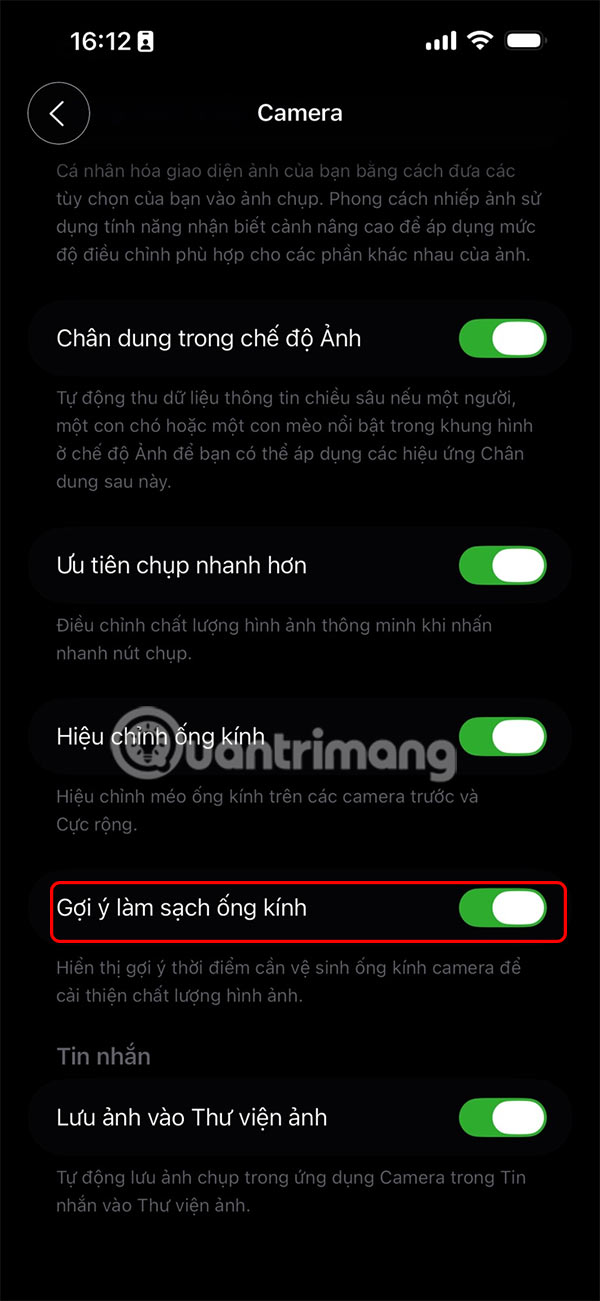
Once enabled, your iPhone will analyze image quality and display a notification in the Camera app when it detects that the rear camera lens needs cleaning.
Along with this feature, the camera in iOS 26 also changes its interface with a more minimalist navigation bar.
Final Thoughts
Following the steps in order and checking version-specific settings should make it easier to Turn on iPhone Camera Cleaning Notification. If an option looks different, verify the device, app, or operating-system version before changing additional settings.
FAQ
What is the best way to Turn on iPhone Camera Cleaning Notification?
Start with the requirements described in the article and follow the steps in order. In iOS 26, Apple has a useful new feature that notifies users that the iPhone camera lens needs to be cleaned if it is dirty, ensuring the quality of the camera and the quality of the photos taken.
What should you know about Instructions to enable iPhone camera cleaning notification?
Open Settings on iPhone then select the Camera app to proceed with adjustment.
What should you do if the instructions do not match your screen?
Check the device, software version, account permissions, and regional settings. Interfaces can change after updates, so use the closest matching option and consult the official support documentation when necessary.
Related Articles
 How to Clean the Selfie Camera6 minutes read
 How to Customize Notifications on iPhone6 minutes read
 7 Mistakes or Mistakes When Cleaning the Camera8 minutes read
 How to Turn Off All Notifications When Calling on iPhone: Step-by-Step Guide3 minutes read
 How to Turn Off Audio Capture on iPhone Lock iOS 104 minutes read
 Instructions for Cleaning the Whole iPhone10 minutes read
Reader Comments 0
Sign in with email or Google to join the discussion.