Table of Contents
Minecraft is a sandbox role-playing game with many versions, each differing in several aspects. The two most widely known versions are the Java Edition and the Bedrock Edition. The Bedrock Edition is available on consoles and also serves as the basis for the Minecraft Pocket Edition for mobile devices (now known as Minecraft).
How to download Minecraft Bedrock Edition on Windows 10/11
1. Download Minecraft Bedrock Edition from the official website.
Step 1: Access the official Minecraft website HERE .
Step 2: Download Minecraft for Windows 10 or Windows 11.
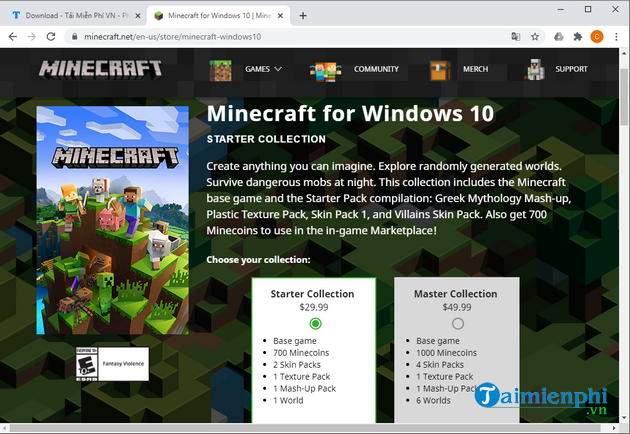
Step 3: Choose your desired game version.
Step 4: Complete the payment process.
Step 5: The download process will begin.
2. Download Minecraft Bedrock Edition from the Microsoft Store
Step 1: Open the Microsoft Store on your PC.
Step 2: Search for Minecraft for Windows 10 or Minecraft for Windows 11. Or you can access it faster using the download link below:
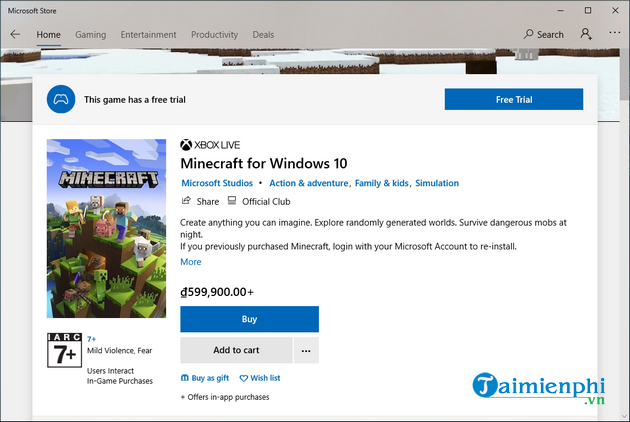
Step 3: Select the version and click Buy.
Step 4: Complete the payment process.
Step 5: The download process will begin.
Players can also choose a trial version to experience it for free. This way, they can decide whether the Java or Windows version of Minecraft suits their preferences better before purchasing the game. Android and iOS users can download Minecraft 1.21 and play the game on their phones.
==> Download Minecraft 1.21 APK in Vietnamese for Android
==> Download Minecraft 1.21 for iPhone here
3. PC System Requirements for Playing Minecraft Bedrock Edition
Before that, don't forget to check if your computer meets the system requirements to download and play Minecraft Bedrock Edition. Here are the minimum system requirements for Minecraft Bedrock Edition (Windows 10):
- CPU: Intel Pentium 4 1.6GHz / AMD Athlon XP 1600+
- GPU: AMD Radeon HD 3200 or NVIDIA GeForce 4 MX 440
- RAM: 500 MB
- Free space: 1 GB
- DirectX 8 compatible graphics card
Therefore, you can download Minecraft Bedrock Edition to your computer from the Microsoft Store or the official Minecraft website. Just follow the simple steps as instructed above, and you can start exploring the magical world of blocks on your computer.
Additionally, players can also search for some survival games similar to Minecraft for more exciting experiences through the top Minecraft-like games list. Discover the top 7 Minecraft-like games highly rated by the professional gaming community here.
Related Articles
 Minecraft Pocket Edition - Minecraft Pocket Edition Download7 minutes read
 Instructions to Download and Install Mods for Minecraft Pocket Edition7 minutes read
 How to Download Minecraft for Free: Practical Guide6 minutes read
 How to Install Shader in Windows 10 Minecraft Bedrock4 minutes read
 Minecraft Bedrock Codes, Minecraft Bedrock Cheats7 minutes read
 TOP Maps to Play in Minecraft Pocket Edition8 minutes read
Reader Comments 0
Sign in with email or Google to join the discussion.