Table of Contents
Learning how to create birthday invitations on a computer or phone doesn't have to be complicated. This updated guide presents a clear workflow, practical checks, and troubleshooting advice you can use while completing the process.
Key Takeaways
- Learn how to create birthday invitations online.
- Follow the steps to create a birthday invitation on thiepmung.
- Follow the recommended steps in order to avoid common mistakes with create birthday invitations on a computer or phone.
1. Create Birthday Invitations Online
Below are some card templates for use on both computers and phones. Some vertical card templates are suitable for you to make on the phone more easily. We will adjust the % level on each card to change the zoom level for easy manipulation. Enter the content and click the Save image button to download the card as a PNG image.
Birthday invitation template 1
Birthday invitation template 2
Birthday invitation template 3
Birthday invitation template 4
Birthday invitation template 5
Birthday invitation template 6
2. How to Create a Birthday Invitation on Thiepmung
First, you access the link below to open the birthday invitation card topic on the website thiepmung. Here are some birthday invitation card templates for you to choose from.
https://thiepmung.com/thiep-moi-sinh-nhat-c42
We select a birthday invitation card template that we like. In the content input interface, you enter according to the website's requirements. Each type of card will have a different content input form. You click the Create image button after entering the content.
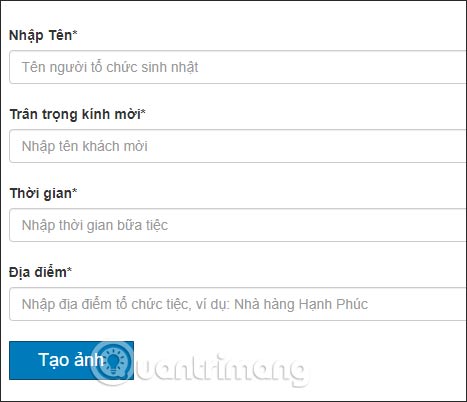
As a result, you will get a birthday card with the content you entered. We click the Save button below to download the card and send it to them.

Final Thoughts
The most reliable way to handle create birthday invitations on a computer or phone is to follow the process in order, verify each important setting, and test the result before moving on. Use the guidance above as a practical reference, then adjust the details for your device, software version, or specific goal.
FAQ
What should I check before I create birthday invitations on a computer or phone?
Use the latest available software, confirm that your device meets the requirements, and make sure you have the necessary permissions, account access, or backup before changing anything.
Why might I be unable to create birthday invitations on a computer or phone?
Common causes include outdated software, missing permissions, incompatible settings, incomplete setup steps, or a temporary network problem. Recheck the process from the beginning and restart the app or device if needed.
Is it safe to create birthday invitations on a computer or phone?
It is generally safe when you use official tools, review every permission, and back up important data before making system-level or account-level changes.
Related Articles
 How to Create Invitations in Microsoft Word: Practical Guide6 minutes read
 Facebook Launches Birthday Stories Feature, Which Helps Create Greeting Cards for Friends3 minutes read
 The Animation of Happy Birthday Adds Meaning4 minutes read
 How to Make Invitations on Microsoft Word7 minutes read
 Super Cool and Funny Statuses and Greetings: Happy Birthday13 minutes read
 The Best and Most Meaningful Birthday Wishes7 minutes read
Reader Comments 0
Sign in with email or Google to join the discussion.