Table of Contents
Whether you have a bunch of tabs open in Safari and want to add them to a document, you can simplify the process by copying all the open website addresses at once.
Whether you have a bunch of tabs open in Safari and want to add them to a document, you can simplify the process by copying all the open website addresses at once. This way, you don't have to manually copy each open link. In just a few taps, all the open URLs will paste into other apps. Here's how to copy the URL of all open tabs in Safari
How to copy URL of open tabs on Safari iPhone
Step 1:
Open Safari on your iPhone then click on The 3 dots icon In the address bar, select All tabs .

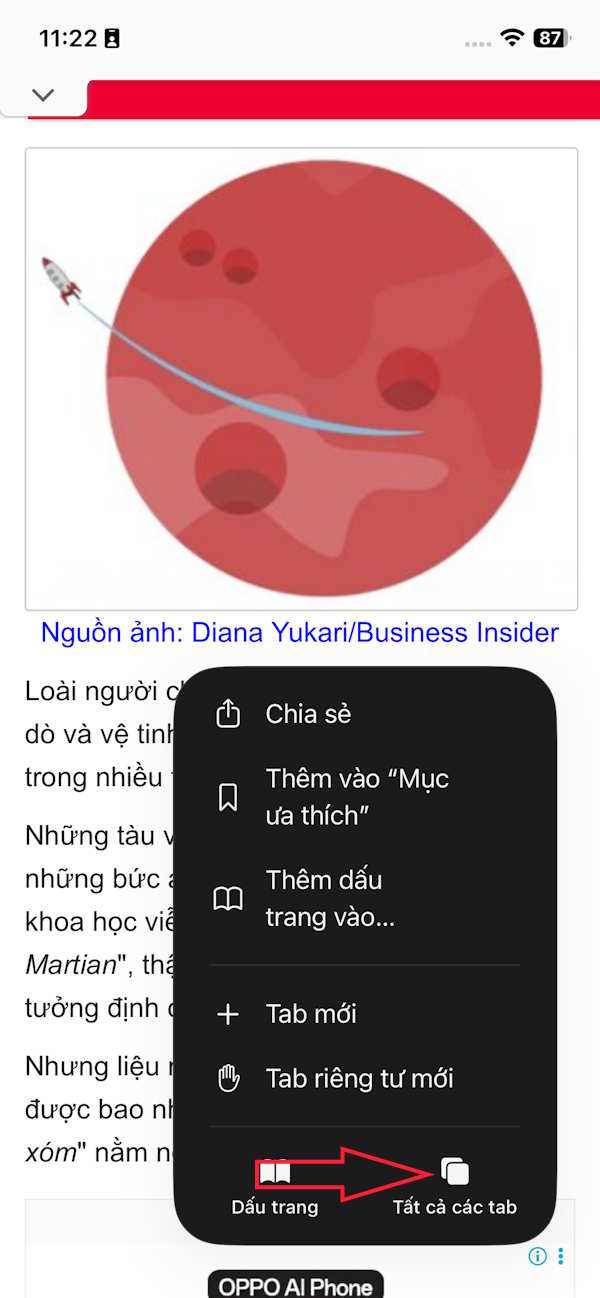
Step 2:
Display all open tabs on the Safari iPhone browser. Now You should Click on the 3 dots icon In the right corner of the interface. Display the menu, we select Copy n link To copy the URL of the open tabs on Safari.


Step 3:
Now just Paste it into any application And you will see the URL of the tabs open on Safari iPhone.

Instructions to copy URL of open tabs in Safari Mac
In Safari on macOS, click the sidebar icon in the upper left corner of the window. You can also press Shift + Command + L to display the sidebar.
Right-click the profile name or tab group and select Copy Links. All the URLs for open tabs will be copied to your Mac's clipboard.

Open any app and press Command + V to paste all links into one app. If you use Command + Option + Shift + V to paste, it will show the website name and full URL in text.
FAQ
How do you copy URL of all open tabs in safari: step-by-step guide?
In practical terms, whether you have a bunch of tabs open in Safari and want to add them to a document, you can simplify the process by copying all the open website addresses at once.
What should you check before getting started?
Review the requirements, compatible device or software version, and any warnings described in the guide before making changes.
What should you do if the steps do not work?
Repeat the steps in order, confirm that your app or system is up to date, and review the troubleshooting details provided above.
Related Articles
 How to Automatically Close Old Safari Tabs - Choose When to Close3 minutes read
 How to Bookmark Multiple Tabs Open in Safari on Iphone, Ipad3 minutes read
 Instructions for Fast Copying Urls of Open Tabs in Firefox Browser3 minutes read
 How to Open Recently Closed Tabs on iPhone or iPad5 minutes read
 No More Worrying About Lost Safari Tabs with These Simple Tricks Explained7 minutes read
 How to Show or Hide Tab Bar on Safari for iPad3 minutes read
Reader Comments 0
Sign in with email or Google to join the discussion.