Table of Contents
This updated guide explains how to Contact the CDC through clear steps, practical examples, and important checks that help prevent common errors.
By Phone
-
Call 1-800-CDC-INFO (1-800-232-4636)[2]X Trustworthy Source Centers for Disease Control and PreventionMain public health institute for the US, run by the Dept. of Health and Human Services Go to source . This is the main phone number for the CDC, and you can call this number to ask questions about diseases and how to prevent them, and for general health advice.
- This number is only staffed from 8am - 8pm Eastern Time, and it is available in English or Spanish.
- Currently, this number is available for Coronavirus questions 24/7, but it is available in English only.
-
Call 1-888-232-6348 for the TTY number[3]X Trustworthy Source Centers for Disease Control and PreventionMain public health institute for the US, run by the Dept. of Health and Human Services Go to source . If you are death or hard of hearing, then you can call this number for the same service as the main one.
- This number is staffed from 8am - 8pm Eastern Time, and it is available in English or Spanish.
- Currently, this number is available for Coronavirus questions 24/7, but it is available in English only.
By Email
-
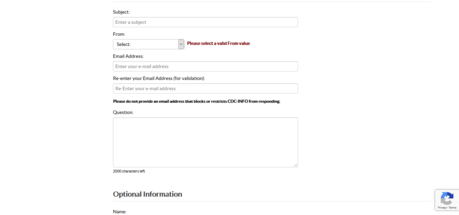 Navigate to the CDC-INFO contact form. The CDC does not provide a general email address, so you need to use the form on their website to email them.
 -
 Enter the subject of your email into the "Subject" box.
 -
 Select the best category that describes you in the From box. This will help the CDC better answer your question.
 -
 Type your email address into the Email Address and Email confirmation box.
 -
 Type your question into the Question box. This box allows you to type a maximum of 2000 characters.
 -
 Enter any optional information into the boxes in the Optional Information section. This can help the CDC better understand who is contacting them, and it will help them answer your question.
- If you are associated with a public health agency, then you should fill out this section, and check the appropriate box.
-
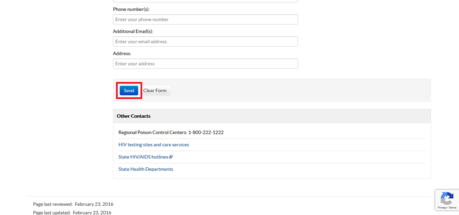 Click Send. This will send your message to the CDC. You should get a response at the email address that you provided.
Contacting the CDC Through Other Methods
-
Contact the CDC through Facebook. The CDC allows you to message them on Facebook through Facebook messenger. To contact the CDC through here, navigate to their Facebook page, and then click the Message button.
-
Send a letter to the CDC. If you may need to send a letter to the CDC through the mail, then you can send it to the following address: Centers for Disease Control and Prevention 1600 Clifton Road Atlanta GA 30329 USA [4]X Trustworthy Source Centers for Disease Control and PreventionMain public health institute for the US, run by the Dept. of Health and Human Services Go to source
-
Learn about job opportunities at the CDC. If you may need to apply for a job at the CDC, or learn about job opportunities, then you can visit jobs. cdc. gov.
-
Request a CDC representative to attend your event with the Request a Speaker form. If you are hosting an event and you want a CDC representative to attend it, then you can use this form to ask the CDC to send someone.
FAQ
What is the easiest way to Contact the CDC?
Start with the requirements in this guide, then follow each step in order. Check the result after every major change so problems are easier to identify.
Can beginners follow these instructions?
Yes. The process is organized into practical steps, and you can repeat any step before moving forward.
What should I check if the method does not work?
Confirm your software or device version, permissions, settings, file format, and internet connection when the task depends on online services.
Related Articles
 The Note When Wearing Contact Lenses5 minutes read
 Instructions on How to Share Contacts in Microsoft Outlook6 minutes read
 Unexpected Discovery: Teenagers Wearing Contact Lenses Who Wear Bad3 minutes read
 How to Hide Contact Information on Instagram: Step-by-Step Guide3 minutes read
 How to Adjust Contact Photo Privacy on iPhone3 minutes read
 How to Contact Microsoft: Complete Guide9 minutes read
Reader Comments 0
Sign in with email or Google to join the discussion.