Table of Contents
This practical guide explains how to connect an hd video player to an hdtv with clear steps and useful context. It also covers common requirements, potential problems, and the details that can help you get better results.
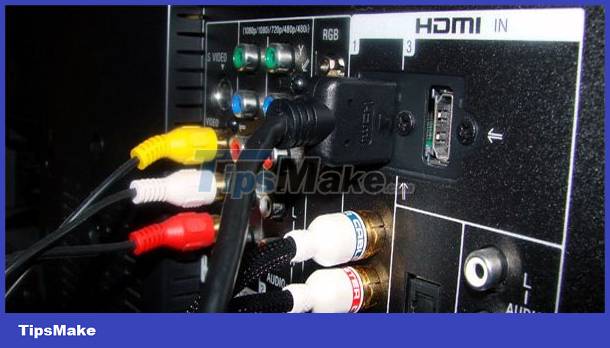 How to connect an HD Video player to an HDTV
The HDMI standard allows the transmission of high-quality video and audio signals through a single cable, making connection very easy and convenient. The following are ways to connect an HD Video player to an HDTV.
first
Connect Via HDMI Port
Connecting through the HDMI port is a common connection for devices that support HDMI ports.
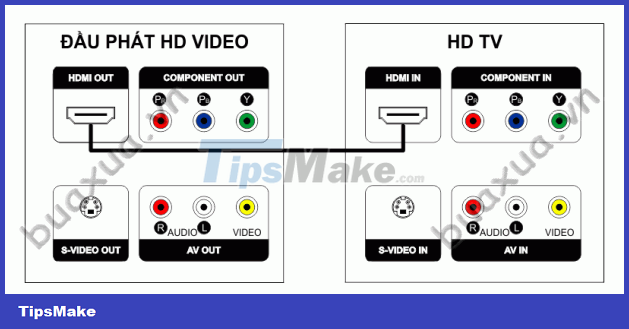 Connect via HDMI port
This type of connection uses a common HDMI signal cable for video and audio. This cord may not be supplied with the device, in which case you will need to purchase an additional HDMI connection cable.
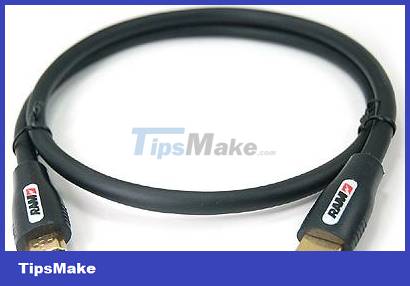 Standard HDMI connection cable
Note that you can plug in any end, but you must rotate the correct position of the plug and the HDMI port to be able to plug it in.
2
Connect from DVI Port to HDMI Port
This is how to connect when the transmitter only has a DVI port - Digital Video Interface, this is a port to communicate digital video signals with a TV with an HDMI port.
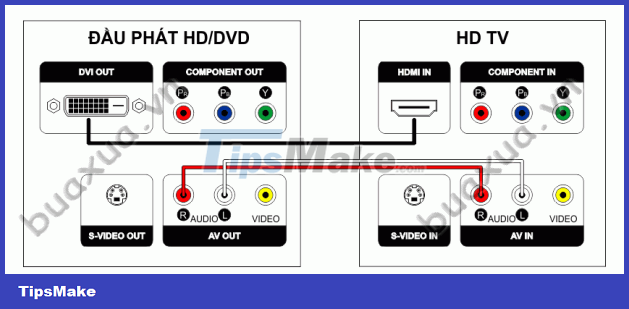 Connect from the DVI port of the player to the HDMI port of the TV
This type of connection uses a signal conductor with one end being the DVI standard and the other being the HDMI standard. You can buy this cable at any electronics or computer store.
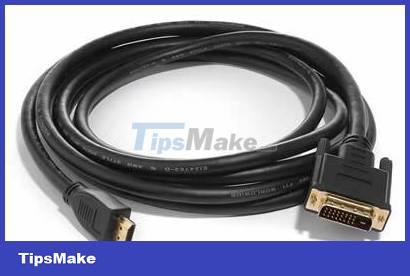 DVI-HDMI. signal connection cable
In addition, because the DVI-HDMI port only transmits image signals, an additional audio cable is required - Audio includes two red and white wires to transmit audio signals for the left two channels L/Left and the right channel - R/Right.
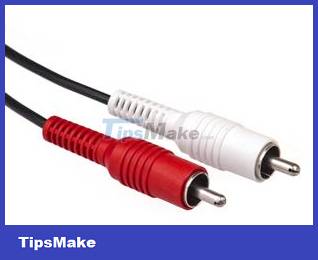 Audio signal connection wire
- Connecting in this way, when plugged in, pay attention to rotate the DVI cord to the correct position of the pins to avoid breaking the small pins inside.
3
Connection from DVI Port to HDMI/DVI. Port
Normally you can connect video and audio signals from the player's DVI port to any HDTV's HDMI port, but if the HDTV has dedicated HDMI/DVI and Audio ports for DVI connections, you must plug into this port.
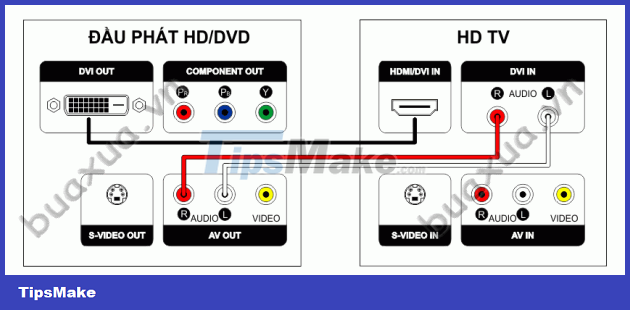 Connection from DVI port to HDMI/DVI. port
In addition to the HDMI connection for a high-quality signal, you can still connect in the usual ways, but the signal will be of lower quality. See instructions How to connect a VCD/DVD player to a TV
Conclusion
Understanding Connection makes it easier to compare options, avoid common mistakes, and apply the information in this guide more effectively. Review the relevant requirements before making changes or choosing a solution.
FAQ
How do you connect an hd video player to an hdtv?
Follow the steps in this guide in order, confirm the required settings or tools, and verify the result before making additional changes.
Is it safe to connect an hd video player to an hdtv?
It is generally safe when you follow the recommended instructions, use trusted tools, and avoid changing settings you do not understand.
What should you do if the process does not work?
Recheck the requirements, restart the device or application when appropriate, and review each step for missed settings or compatibility issues.
Related Articles
 How to Connect VCR to TV: Complete Guide9 minutes read
 Should I Use HDTV Instead of a Computer Monitor?7 minutes read
 How to Connect a VCD/DVD Player to a TV5 minutes read
 Why Are NTSC and PAL Still Important to HDTV: Key Facts9 minutes read
 8 Tips to Make VLC the Best Open-source Media Player9 minutes read
 Advanced Tricks Use VLC Media Player15 minutes read
Reader Comments 0
Sign in with email or Google to join the discussion.