Table of Contents
Starting with Phone Link app version 1.25091.39.0 and above, you can view Android apps in extended screen mode on your Windows PC.
When the Phone Link app on your PC is linked to your Android phone, you can instantly access Android apps installed on your mobile device right on your Windows 10 or Windows 11 PC. Starting with Phone Link version 1.25091.39.0 or later, you can view Android apps in full screen mode on your Windows PC. Here's how to enable this feature.
How to open Android apps full screen on Windows
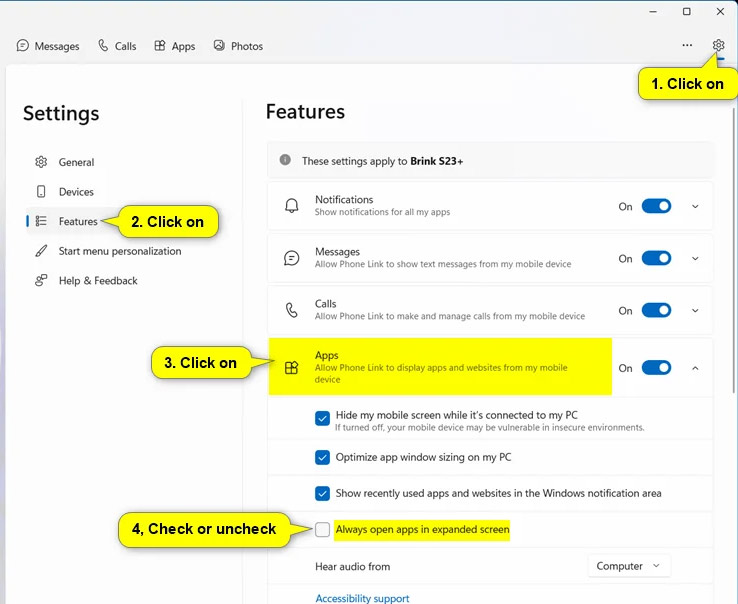
Open the Phone Link application on your computer and click on The gear icon . Next, Select Features And click on Apps To make adjustments.
Now you just need To select Always open apps in expanded screen To always open Android apps in wide screen on the computer.
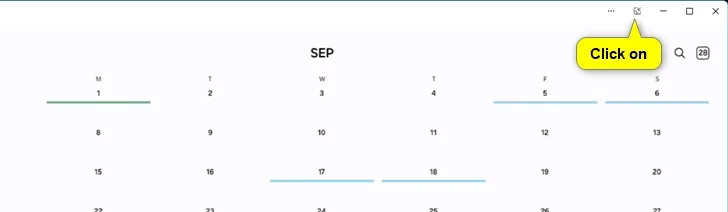
As a result, when opening an Android application on your computer, you just need to click on The expand icon To open the application on Windows wide screen.
FAQ
How do you always open Android apps full screen on Windows: step-by-step guide?
In practical terms, starting with Phone Link app version 1.25091.39.0 and above, you can view Android apps in extended screen mode on your Windows PC.
What should you check before getting started?
Review the requirements, compatible device or software version, and any warnings described in the guide before making changes.
What should you do if the steps do not work?
Repeat the steps in order, confirm that your app or system is up to date, and review the troubleshooting details provided above.
Related Articles
 10 Open Source Android Apps You Can't Live Without8 minutes read
 Click: How to Swipe Between Apps on a Mac3 minutes read
 8 Best Lock Screen Apps for Android: Lock Screen App for Android7 minutes read
 10 Best Best Android Screen Lock Apps, Best for You8 minutes read
 Steps to Run Android Apps on Windows 115 minutes read
 9 Best Windows Apps for Minimalists Who Still Want Full Control6 minutes read
Reader Comments 0
Sign in with email or Google to join the discussion.