Table of Contents
This article examines Google Confirms the Dark Mode on Android Will Save More Battery. It presents the main facts, practical implications, and key points in a clearer, easier-to-follow format.
Understanding Google Confirms the Dark Mode on Android Will Save More Battery
Compared to traditional LCD screens, OLED displays on smartphones have some outstanding advantages, one of which is to save battery when displaying black. Because the pixels of the OLED panel when displayed in black turn off completely, while the LCD backlight is always on, even when displayed in black.
This is true for both iPhone and Android smartphones. Google has also confirmed that the new Dark Mode launches on Android 9.0 Pie, which can help Android smartphones save more battery power. In particular, the tech giant has released data comparing the power consumption of white background and black background color on the Pixel so that we can clearly see the effect of color on battery life.
 The Pixel when in black screen mode with maximum brightness significantly saves battery power compared to maximum brightness and white background.
Google claims, when watching videos on the YouTube application, the dark background mode saves 43% of the battery at 100% brightness compared to the white background mode (normal mode). At the same time, Google acknowledged its mistake when encouraging developers to use white in designs.
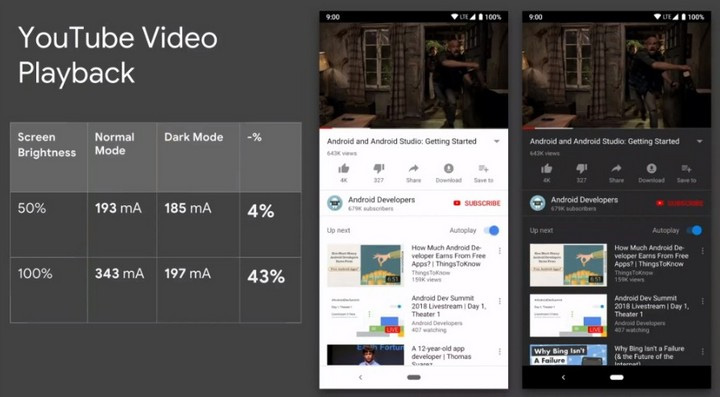
Now, Google has realized that mistake and is actively modifying it. Google has put Dark Mode in applications like YouTube and Android Messages. In the future, the company's other apps like Phone, Google Feed or even the Quick Settings area, App Drawwer may also be supported with the dark background interface. But applying the Dark Mode to the system interface is the same as Samsung has recently done with the One UI interface, which is probably quite far away.
The dark background interface not only saves significant battery life (which we can see in Google's experiment on Pixel), but it also helps users feel comfortable and comfortable reading the word for a long time.
- Microsoft Office supports dark background mode on macOS Mojave.
- 11 tips for maximum battery saving for your phone.
- 12 best battery saving apps today for Android.
FAQ
What is the main point of Google Confirms the Dark Mode on Android Will Save More Battery?
Compared to traditional LCD screens, OLED displays on smartphones have some outstanding advantages, one of which is to save battery when displaying black. Because the pixels of the OLED panel when displayed in black turn off completely, while the LCD backlight is always on, even.
Why is Google Confirms the Dark Mode on Android Will Save More Battery important?
Google Confirms the Dark Mode on Android Will Save More Battery matters because it can affect how readers understand, choose, use, or respond to the subject discussed in the article.
What should readers verify about Google Confirms the Dark Mode on Android Will Save More Battery?
Check the date, product or software version, compatibility, and any current guidance before acting, especially when technology, security, health, or pricing is involved.
Related Articles
 Experience the Main Dark Mode on Android 9 Pie3 minutes read
 How to Turn on Dark Mode on Google Keep and Google Calendar3 minutes read
 Android Q Will Have Dark Mode (Dark Mode) Throughout the System3 minutes read
 Google Is About to Launch the Dark Mode Interface but Not Update for Android Users3 minutes read
 Why Doesn't Dark Mode Help Improve Battery Life on Your Laptop?6 minutes read
 Instructions for Setting up and Using 'Battery Saver Mode' on7 minutes read
Reader Comments 0
Sign in with email or Google to join the discussion.