Table of Contents
If Microsoft Copilot will not load or respond, first determine whether the problem affects your connection, account, or Windows app. Work through the checks below in order, testing Copilot after each change. These steps address the standalone app; a missing feature inside a work application may need a separate account or administrator check.
1. Check the connection and error message
Open another website to confirm that the computer is online. If several sites fail, resolve the connection problem before changing Copilot settings. Record the exact Copilot error and whether the app opens, accepts a prompt, or fails while generating the response.
Try Copilot in a browser with the same account. If the browser version works, focus on the installed app. If both fail, an app reset may not help: the issue may involve the account, network, or service.
2. Restart the app, then the computer
Close and reopen Copilot. Save other work before restarting Windows if the problem remains. For an app that will not close normally, see how to restart Windows applications.
3. Compare devices and accounts carefully
Test the same account on another device you control, if one is available. If it works there, the first device or its network is more likely to be involved. If only one account is affected, check that you are signed into the intended account and that it has access to the feature you need.
Do not treat a different account's features as proof that your account is broken. Account types, permissions, and subscriptions can differ. For a managed work or school account, ask the administrator to check access rather than changing shared settings yourself.
4. Repair or reset the Windows app
In Windows 11, go to Settings > Apps > Installed apps. Find Copilot, open its three-dot menu, and look for Advanced options. Not every installation offers these controls. If they are absent, use the app's supported update or reinstall route instead of applying instructions for a different app.
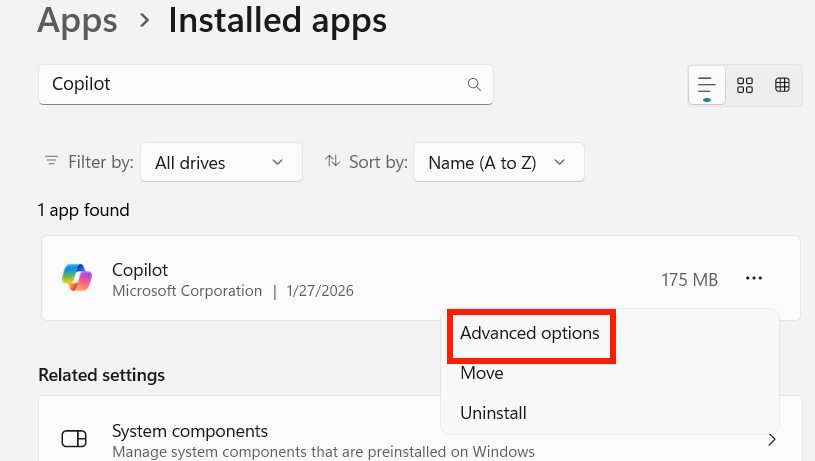
Select Repair if available, then reopen Copilot and test it. If repair does not help, read the warning beside Reset before proceeding. Reset clears the app's local data and settings, and you may need to sign in again. Save any unsent text first.
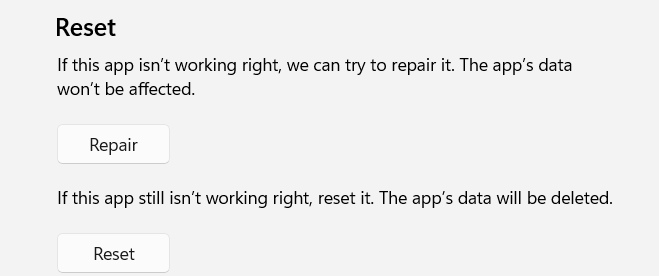
Microsoft documents this sequence in its Windows app repair instructions. For screenshots of the general reset workflow, see how to reset an installed Store app.
5. Avoid deleting shared sign-in caches as a routine fix
The screenshots below show the local-data approach in the earlier version of this guide. They are retained for reference, but deleting OneAuth or IdentityCache should not be a general Copilot troubleshooting step. These folders relate to Microsoft sign-in data beyond a single Copilot window.
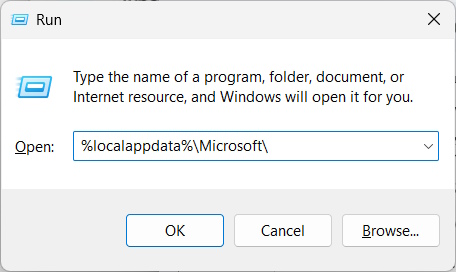
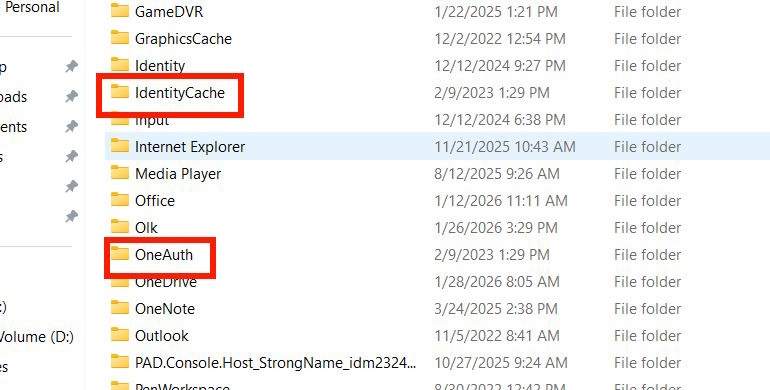
If the supported app repair options do not resolve the issue, contact Microsoft support or your organization's administrator. Provide the app version, Windows version, exact error, and the results of the browser and device tests. That information is more useful than repeatedly clearing local folders.
If the problem occurs specifically in the Edge sidebar, use the separate Copilot in Edge troubleshooting guide.
Related Articles
 What to Do If Copilot Doesn't Work on Edge?3 minutes read
 How Is Copilot Pro Different from Copilot? Should I Upgrade Explained7 minutes read
 7 Reasons Copilot Is Worth Using7 minutes read
 How to Fix Two-finger Scrolling Not Working on Windows: Practical Guide9 minutes read
 Fixing the Windows 10 Issue Where You Can't Change the Wallpaper/Background4 minutes read
 Overview of Copilot Studio11 minutes read
Reader Comments 0
Sign in with email or Google to join the discussion.