Table of Contents
Learn how to delete copilot history in edge Windows with clear steps, practical tips, and troubleshooting guidance for a reliable result.
How to delete Copilot chat history
You can manage and delete Copilot chat history from several places, including Microsoft Edge, the Copilot web app, and your Microsoft account privacy settings.
Access the Copilot website on your Edge browser. Then, look to the left side to find the conversation you want to delete, tap the three-dot icon , and select Delete from the menu that appears.
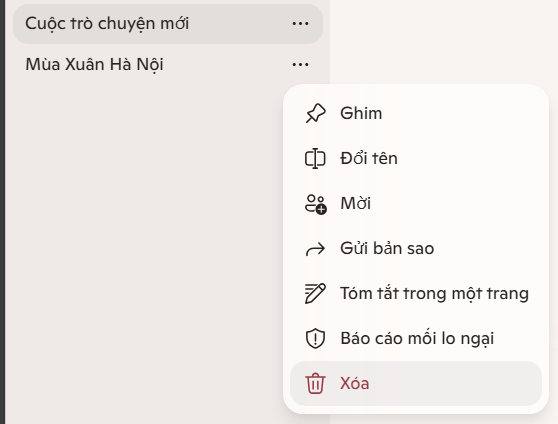
If you want to delete all conversations from Copilot at once, you need to delete all Copilot activity history from your Microsoft account.
Access the Copilot admin page using the link below.
- Copilot Admin Page
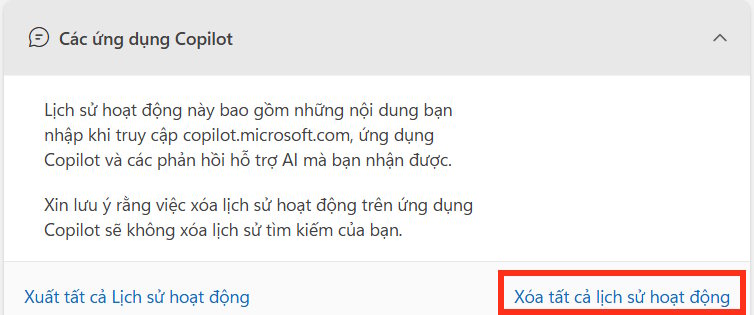
Log in to your Microsoft account, then in the Copilot applications interface, click Delete all activity history .
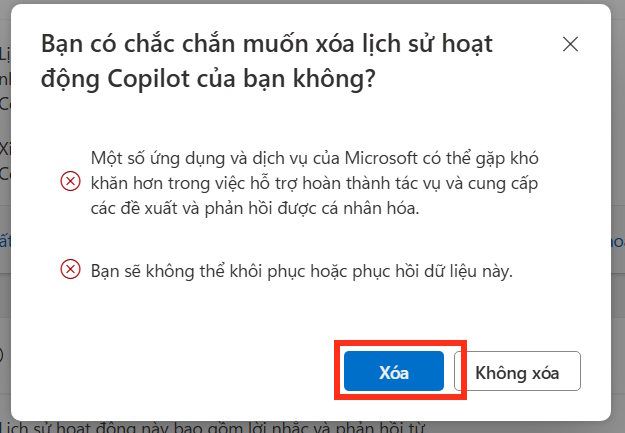
Press Delete below to proceed.
How to delete history on Microsoft 365 Copilot
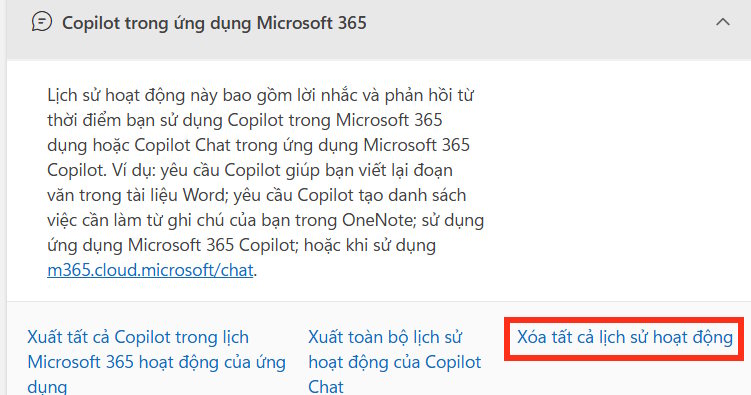
We will access the Microsoft account management page, then scroll down to the Copilot section in the Microsoft 365 app .
Continue by clicking on Delete all activity history .
How to delete browsing and search history on Copilot
Searches related to Copilot may also appear in your Bing search history or browsing activity, especially if you used Bing with Copilot-enabled search.
You can access it via the link below.
- Manage your browsing history on Copilot.
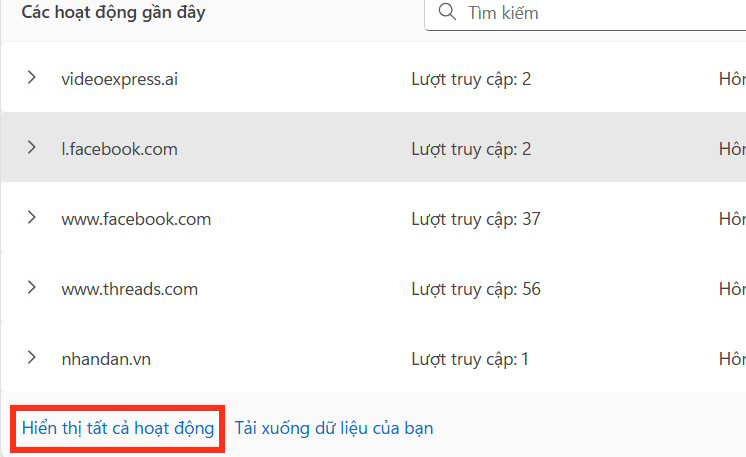
In the Browsing History or Search History interface , select Show all activity .
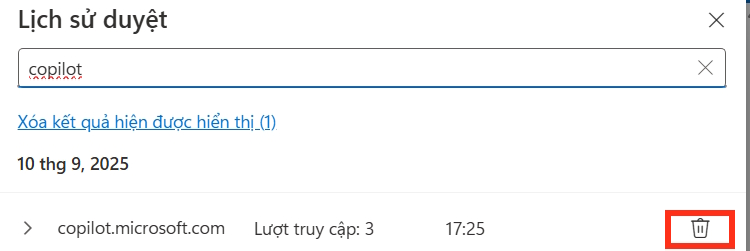
Enter the keyword "copilot" into the search bar to filter results related to Copilot. When results appear, click the trash can icon to delete them .
Final Thoughts
Use this guide as a practical checklist for how to delete copilot history in edge windows. Work through the steps in order, verify each result, and adjust the options to match your needs.
FAQ
What do you need before following this How to Delete Copilot History in Edge Windows guide?
Review the required tools, accounts, settings, or materials mentioned in the article. Learn how to delete copilot history in edge Windows with clear steps, practical tips, and troubleshooting guidance for a reliable result.
What are the main steps for how to delete copilot history in edge windows?
Follow the sections in order, especially How to delete Copilot chat history, How to delete history on Microsoft 365 Copilot, How to delete browsing and search history on Copilot. Complete each step before continuing and verify the result as you go.
What should you do if the process does not work as expected?
Recheck the prerequisites, update the relevant app or service, review the settings, and repeat the step that caused the issue. Use any troubleshooting notes included in the guide.
Related Articles
 Instructions for Deleting Microsoft Copilot Activity History3 minutes read
 Instructions on Disabling New Tab Copilot on Microsoft Edge3 minutes read
 How to Clear Search History on Microsoft Edge3 minutes read
 View and Delete Browsing History in Microsoft Edge Browser4 minutes read
 How to disable Copilot on Microsoft Edge in Windows 113 minutes read
 How to Clear Copilot Memory on Your Computer4 minutes read
Reader Comments 0
Sign in with email or Google to join the discussion.