Table of Contents
If you own a YouTube video or have the necessary permission, download the video through YouTube Studio and convert the local file to MP3. This is safer and more reliable than pasting a YouTube URL into an unknown converter. For music supplied by YouTube for creators, the Audio Library provides an official MP3 download.
YouTube’s Terms of Service restrict downloading or using content except when the service expressly permits it, the relevant rights holders authorize it, or applicable law allows it. A publicly viewable video is not automatically licensed for extraction or reuse.
Start with a file you are allowed to convert
- Your own upload: use YouTube Studio > Content > video menu > Download.
- A creator-provided download: use the official link and follow its license.
- Your original production file: prefer this over the YouTube copy because it may preserve better audio quality.
- A licensed stock or Audio Library track: keep the license and attribution information with the file.
If a video contains music, a performance, or a clip owned by someone else, owning the upload or having a copy does not necessarily give you the right to extract and reuse that component.
Method 1: Convert the local video with VLC
- Install VLC from its official VideoLAN source and open it.
- Choose Media > Convert/Save.
- Click Add and select the downloaded MP4 or other local video.
- Choose Convert/Save.
- Set the profile to Audio – MP3.
- Choose a destination filename ending in
.mp3, then click Start.
Play the result and compare its duration with the source. VLC menu labels can vary on macOS and by version.
Method 2: Convert with FFmpeg
For a file named input.mp4, this command creates a variable-quality MP3:
ffmpeg -i input.mp4 -vn -c:a libmp3lame -q:a 2 output.mp3-vn excludes video. -q:a 2 requests a high-quality variable bitrate; it does not restore detail already lost in YouTube’s compressed audio. If the filename contains spaces, quote the path.
For batch or business use, record the FFmpeg version and conversion settings so files can be reproduced. Do not run a command copied from an unknown source without understanding its input and output paths.
Download music from YouTube’s Audio Library
Open YouTube Studio and select Audio Library. Preview tracks and sound effects, filter by license or attribution requirements, and click Download for an eligible item. Google’s Audio Library guide states that downloads are supplied as MP3 files.
Read the license details for each track. Some Creative Commons music requires attribution, and permission for a YouTube project does not necessarily authorize every off-platform use.
YouTube Premium downloads are not MP3 files
When YouTube offers Download for offline viewing, the protected download stays inside the official YouTube or YouTube Music app. It is meant for offline playback under the account and plan conditions, not for use as a ringtone, an editable audio file, or a transferable MP3.
Why browser download controls are not a general solution
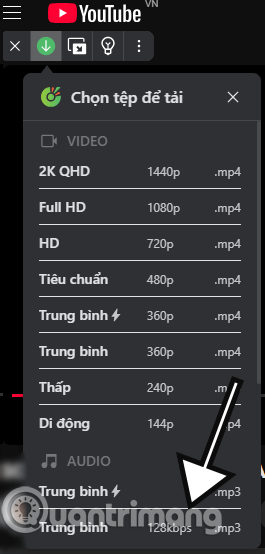
Some browsers have displayed media-detection controls, such as the legacy Cốc Cốc interface shown below.
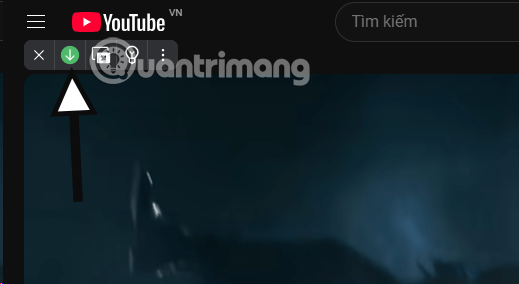
A detected audio option does not establish permission to download the content. Browser behavior can also change when YouTube changes its delivery format.
Avoid unknown YouTube-to-MP3 websites
Older tutorials list services that ask for a YouTube URL, advertise several bitrates, and then expose a generated download button.
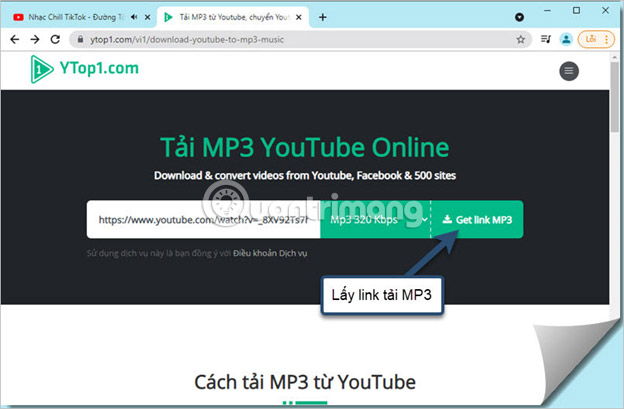
These sites are unstable and can create several risks:
- deceptive ads that imitate the real download button;
- browser-notification spam and redirects;
- unexpected executable, APK, or extension downloads;
- collection of URLs, device information, or account data;
- false “320 kbps” claims that merely transcode lower-quality source audio;
- copyright and YouTube-terms violations.
Do not enter a Google password, cookie, verification code, or payment information into a converter. A service that claims to need account access to convert a public URL is especially risky.
Check the MP3 after conversion
- Confirm the file opens in a trusted player and has the expected duration.
- Listen for clipping, missing channels, silence, or synchronization errors.
- Add title, artist, album, artwork, and copyright metadata only when accurate.
- Keep the original video and project file; MP3 is a lossy delivery format, not an archive master.
- Use a malware scan when a file came from any external source.
For speech, a moderate bitrate may be enough and creates a smaller file. For editing or long-term preservation, keep a lossless source such as WAV or FLAC when you control the original recording.
Related Articles
 How to Convert Audio from YouTube to MP3 Files on iPhone5 minutes read
 How to Download Audio Files from YouTube Videos on Coc Coc4 minutes read
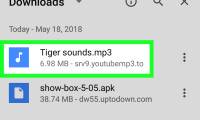 How to Convert YouTube Videos to MP3: Clear Instructions11 minutes read
 Convert CAD Files to PDF5 minutes read
 How to Convert MP4 Files to MP35 minutes read
 How to Convert a JPG File to PDF with Just One Operation3 minutes read
Reader Comments 0
Sign in with email or Google to join the discussion.