Table of Contents
This guide provides a clear overview of intel atom, including 1. Puppy Linux, 2. Lubuntu. Use it to understand the topic, compare the available options, and make a more informed decision.
Here are the best lightweight Linux distributions for netbooks with Intel Atom processors.
1. Puppy Linux

Puppy Linux boasts a very small size, only about 300MB, can run on flash drives and DVDs. You can even run an entire operating system from RAM. Doing so provides a speedy experience on any device, overcoming slow hard drive read-write speeds. This makes Puppy Linux one of the best Linux distributions for old PCs and netbooks.
Puppy Linux versions are based on long-term support releases of Ubuntu, so you can install this desktop for a long time, making it an ideal choice for netbooks with Atom processors.
2. Lubuntu

Lubuntu advertises itself as a distribution that is both lightweight and fast. It comes with the LXQt desktop environment and provides a good Linux desktop netbook for those who don't want to touch the computer too much.
System requirements are almost negligible. The Lubuntu website recommends 1GB of RAM for intensive web apps like YouTube, Facebook, and Google Docs.
3. Linux Mint (MATE or Xfce)

When it comes to Linux distributions, Mint is one of the more popular choices. This Ubuntu and Debian-based distro has a classy, modern, simple look, but is also quite user-friendly. Multimedia codecs and apps are easy to find.
There are several variants of Linux Mint available, where MATE and Xfce are great examples of Linux desktops for Intel Atom processors. Both are very suitable for netbooks and most low-end computers in general. Out of all the distros on this list, Mint is said to offer the most complete and functional experience.
4. Bunsenlabs
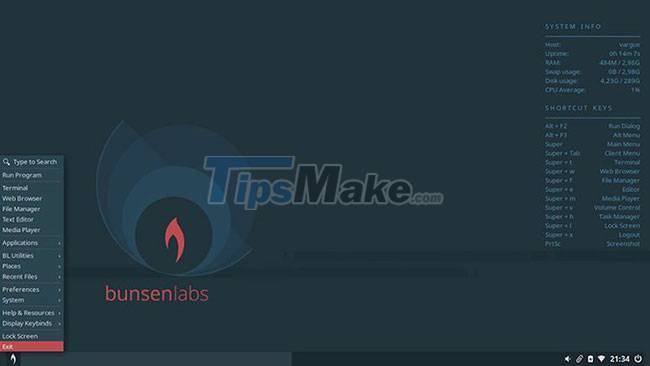
When lightweight Linux distributions started coming out, BunsenLabs was one of the best options.
While this Debian-based distro is great for Intel Atom processors, its spartan design may not be for everyone. You won't find this option as appealing as Lubuntu or Linux Mint.
5. Porteus
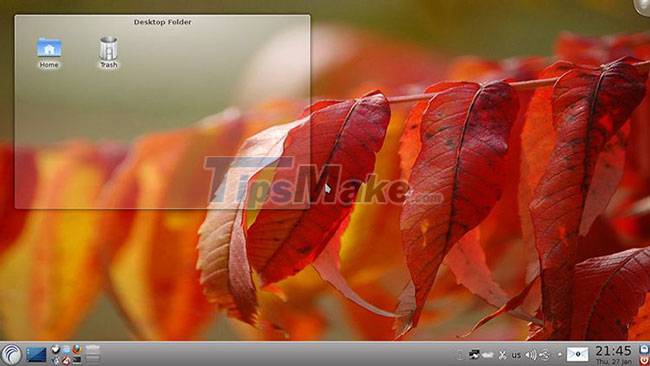
Small, fast, and able to boot from a variety of storage media, Porteus is one of the best Linux distributions for Intel Atom netbooks. At under 300MB, it's super efficient, comes in both 32 and 64 bit plans, and can even run from RAM.
Note that Porteus is modular, so instead of using a package manager and connecting to the internet during the initial installation, Porteus provides precompiled modules that you can enable or deactivate before installation.
All of this comes together in an efficient experience that boots in less than 30 seconds, making Porteus the leading Linux release for netbooks.
6. Bodhi Linux
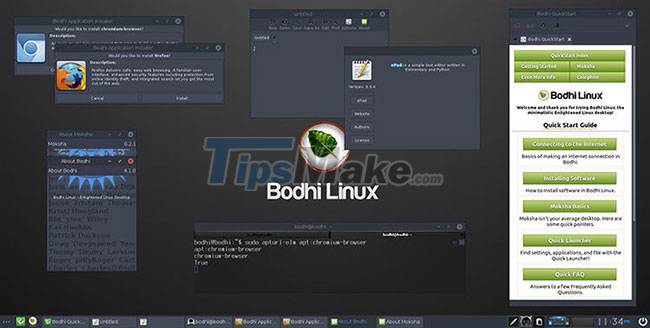
If your Intel Atom netbook is a secondary computer, why not use it to run software you're not willing to run on your main computer? Consider Bodhi Linux.
With Bodhi Linux running on a netbook, you can keep track of your work in progress on the fancy, relatively obscure Moksha desktop interface. It will convince you from comparable experiences like LXQt and Xfce.
Bodhi Linux requires at least 500MHz processor, 512MBRAM and 5GB of disk space. So you can easily install it on your netbook with Intel Atom processor like n270 series.
7. Wattos

If you're looking at lightweight Linux distributions, add wattOS to the list. The point of wattOS is to help Ubuntu get rid of all the unnecessary stuff, then add an i3 layered window manager on top. The "Microwatt" version requires only 192MB of RAM and 700MB of disk space.
If you prefer a more universal look, try the LXDE version. It requires a bit more RAM, but even on an Intel Atom netbook, this is probably not a big deal.
Conclusion
Understanding Intel Atom makes it easier to compare options, avoid common mistakes, and apply the information in this guide more effectively. Review the relevant requirements before making changes or choosing a solution.
FAQ
What is Intel Atom?
Here are the best lightweight Linux distributions for netbooks with Intel Atom processors.
Why is Intel Atom important?
Understanding Intel Atom helps you evaluate features, compatibility, performance, and potential limitations before you choose a product or follow a procedure.
What should you consider when using or choosing Intel Atom?
Consider your specific goal, compatibility requirements, available features, cost, security, and the practical recommendations described in this guide.
Related Articles
 3 Main Types of Linux Distributions That You Should Know7 minutes read
 The Intel Atom TM Dual-core Netbook Has Appeared4 minutes read
 10 Best Linux Distros for Developers9 minutes read
 Top 3 Distros for Linux for Beginners7 minutes read
 5 Pioneering Linux Distributions That Disappeared over Time7 minutes read
 June Will Have an Eee PC with an Intel Atom Chip3 minutes read
Reader Comments 0
Sign in with email or Google to join the discussion.