Table of Contents
Use this guide to understand Windows 8 application price from 1.5 usd to 1,000 usd and the factors that affect it. The information is organized to make the topic easier to apply in practice.
After knowing the release date of Windows 8, what many users are interested in is now applications. All current applications for Windows 8 Consumer Preview are free, but this will change when the full version of Windows 8 comes out. Meanwhile, besides many free applications on Windows Store, developers will also have the option of selling prices for their applications.
How Windows 8 Application Price from 1.5 USD to 1,000 USD Works
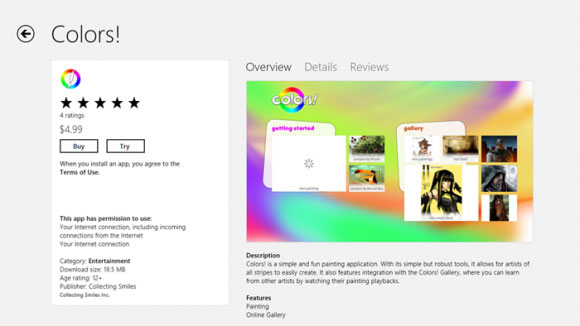 Photo: SlashGear
Microsoft has detailed pricing plans for Windows Store. In a post on the MSDN blog, Microsoft said, app prices can range from $ 1.49 to $ 999.99. In an effort to make the Windows Store stand out from all other app stores, developers won't have the option of pricing their app at $ 0.99.
The company also said it will support successful applications by charging only 20% for applications that generate revenue of $ 25,000 or more. However, until the app reaches $ 25,000, Microsoft will collect 30% as the industry standard.
In addition, Microsoft will adopt a " Pre-purchase " policy for the Windows Store, allowing developers to give users a 7-day free trial of their application, then decide whether to buy or not..
Microsoft is making some smart decisions with the Windows Store. A 20% charge on successful applications may make many developers give Windows Store priority in some cases, and allowing users to test for free before purchasing promises to have more download (download) more.
FAQ
What is the main benefit of Windows 8 application price from 1.5 usd to 1,000 usd?
The main benefit is a clearer understanding of the topic and a practical way to apply the information covered in this guide.
What should I check before using Windows 8 application price from 1.5 usd to 1,000 usd?
Confirm compatibility, review the required settings, protect important data, and use the latest supported version whenever possible.
What should I do if the result is different?
Repeat the steps carefully, verify permissions and version differences, and consult the product's official support documentation for changes not shown in the article.
Related Articles
 Microsoft Suddenly Raised the Price of Windows 10 Home Version to 139 USD3 minutes read
 Bitcoin Price Today 07/26/2025, Continuously Updated Bitcoin Price10 minutes read
 Rumors of Windows 8 Pro Cost 1.5 Million3 minutes read
 Selling Price of Windows 7 Laptop Plummeted4 minutes read
 Today's Bitcoin Price, Bitcoin Price Update Every Minute2 minutes read
 How Much Does Windows 7 Sell For?11 minutes read
Reader Comments 0
Sign in with email or Google to join the discussion.