Table of Contents
This curated overview of top 5 game boy advance (GBA) emulator apps on Android focuses on useful options, standout features, and details worth checking before making a choice.
1. GBA.emu
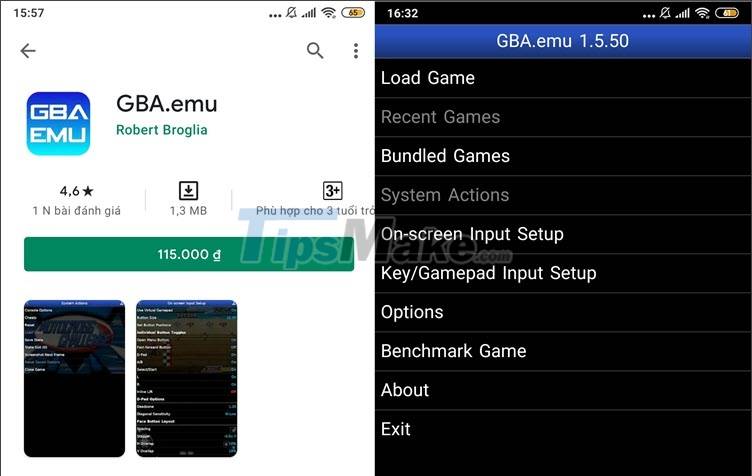
Simple, compact and reliable are the words used to describe the GBA.emu application. This application is packed with all the features needed in a GBA emulator such as saving, reloading the game screen, emulating BIOS, supporting cheats and some support for external joysticks. The application also supports thousands of different roms for you to easily play and install on your device.
- Application download link here.
2. My Boy! Free - GBA Emulator

My Boy! Free - GBA Emulator is a free GBA emulator that you can find on the Google Play store. This application supports OpenGL graphics decoding and BIOS emulation and you can play your favorite GBA games without BIOS files and the graphics are decent. Although there are a few minor bugs, the emulator still meets the basic needs that users need in a GBA emulator.
- Link to download the app here.
3. Pizza Boy GBA Free - GBA Emulator

The Pizzaboy GBA application is written and packaged in the C programming language - this gives it good stability and performance compared to other programming languages. Some light-medium games are well optimized on this application and can run at frame rates up to 60 FPS and of course your Android device must also have a corresponding strong configuration to push the number of FPS go to high place.
- Link to download the app here.
4. John GBA Lite
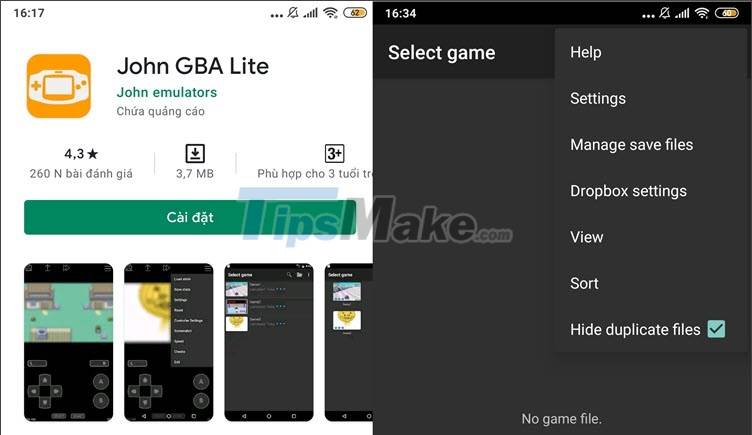
John GBA is one of my favorite GBA emulators. With the free version, you will be bothered by ads and cut out some advanced features but if you just need a lightweight emulator and can run your favorite GBA games well, John GBA is for you. reasonable choice that you should install.
- Link to download the app here.
5. VGBAnext - Universal Console Emulator

VGBAnext - Universal Console Emulator with a simple and easy-to-operate interface helps you get used to and run GBA games quickly. In addition, this application also supports some attractive features such as being compatible with Moga, iCade, Nyko PlayPad, Xperia Play, Sixaxis controllers and can save game soundtracks as MIDI music to make music. ringer for your device.
- Link to download the app here.
With the best GBA emulator apps for Android, you can enjoy your childhood games on your phone. Good luck!
Key Takeaways
Use the information above as a practical reference for top 5 game boy advance (GBA) emulator apps on Android. Review each step carefully, confirm any requirements, and choose the option that best fits your situation.
FAQ
What does this guide explain about Game Boy Advance (GBA) Emulator Apps on Android?
It explains the main concepts, practical considerations, and useful steps related to game boy advance (GBA) emulator apps on Android without requiring advanced knowledge.
Who can benefit from learning about Game Boy Advance (GBA) Emulator Apps on Android?
This information is useful for readers who want a clear overview, practical guidance, and reliable steps related to game boy advance (GBA) emulator apps on Android.
What should I check before applying this information?
Review the requirements, confirm that your device, software, or situation matches the instructions, and back up important data before making major changes.
Related Articles
 minutes read
 10 Best Game Boy Advance (GBA) Emulators for Android12 minutes read
 8 Best Free Terminal Emulator Apps for Android6 minutes read
 8 Best PSP - Play Station Portable Emulator Software for Android8 minutes read
 Emulate Android on PC with Leapdroid12 minutes read
 10 Best Android Emulator Software for Windows14 minutes read
Reader Comments 0
Sign in with email or Google to join the discussion.