Table of Contents
Microsoft Copilot includes two specialized agents for work that needs more than a quick chat response. Researcher creates structured, source-cited reports from the web and, for eligible work accounts, Microsoft 365 content the user can access. Analyst examines attached data, calculates statistics, identifies trends and outliers, and can produce tables, charts, and plain-language reports.
Use Copilot Chat for short questions and drafting. Choose Researcher for a multi-source investigation, and choose Analyst when the primary evidence is a spreadsheet or dataset.
Researcher vs Analyst
| Task | Researcher | Analyst |
|---|---|---|
| Primary purpose | Deep, multi-step research and synthesis | Data exploration and quantitative analysis |
| Typical inputs | Web sources and permitted files, emails, meetings, and chats | Attached files such as Excel workbooks and CSV data |
| Typical output | Structured report with citations, findings, and next steps | Statistics, trends, outliers, tables, charts, and written interpretation |
| Best for | Market scans, background briefings, policy research, and meeting preparation | Sales comparisons, budget variance, product performance, and forecasting exploration |
| Main risk | Weak or misread sources and incomplete research scope | Incorrect assumptions, dirty data, or misleading statistical interpretation |
Where to find the agents
- Sign in to the Microsoft Copilot app with the account that has the eligible subscription or organizational license.
- Open Agents or Tools in the navigation, depending on the current interface.
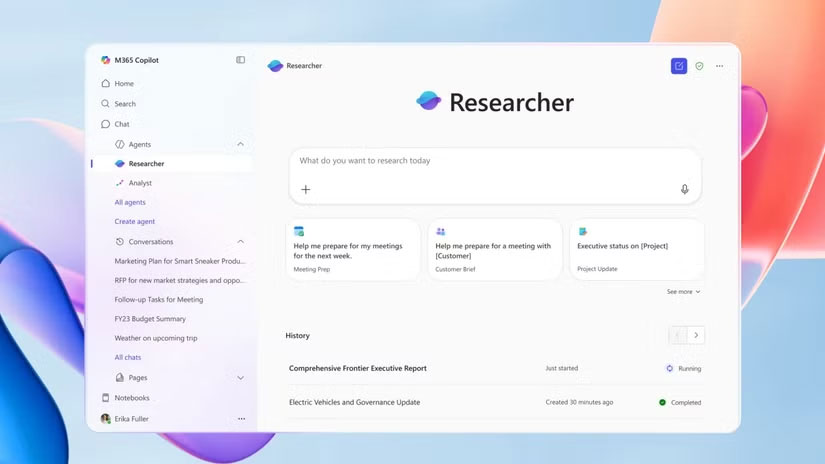
- Select Researcher or Analyst.
- If the agent is missing, confirm the account and license, then ask the Microsoft 365 administrator whether the capability is available for the organization.
Availability depends on the account. Microsoft currently lists Researcher for Microsoft 365 Premium subscribers and for business or enterprise users with a Microsoft Copilot add-on license. Analyst availability also depends on the subscription and administrator configuration. Usage allowances vary by plan; for example, Microsoft 365 Premium currently shares 25 monthly tasks across supported agents. Check the live plan page instead of assuming every account has the former “25 combined queries” rule.
How to use Researcher
- Open Researcher under Agents.
- Describe the decision or question, the intended audience, and the required depth.
- Define whether Researcher should use the web, workplace sources, or both.
- Answer any clarifying questions so the agent does not infer the wrong scope.
- Review the generated report, open its citations, and verify that each source supports the associated claim.
- Edit or share the report only after resolving unsupported conclusions and missing evidence.
A stronger Researcher prompt
Prepare a five-page briefing for our product leadership team on the European market for warehouse automation. Use public sources from the last 18 months and our permitted files in the “FY27 planning” SharePoint folder. Separate verified market facts from vendor claims. Include a competitor table, three uncertainties, and source links for every material claim. Do not use email or Teams chats.
This prompt specifies audience, time period, data boundary, output structure, and evidence standard. It is more reliable than asking Researcher to “research warehouse automation.”
How to use Analyst
- Open Analyst under Agents.
- Select the plus icon and attach one or more supported files from the device, OneDrive, or another available source.
- Describe the fields, units, date range, and business question.
- Tell Analyst how to treat blanks, duplicates, returns, canceled records, and outliers.
- Ask for the calculations and assumptions behind each conclusion, not only a chart.
- Export or reproduce important results in Excel, SQL, Python, or another auditable tool before making a high-impact decision.
A stronger Analyst prompt
Analyze the attached sales workbook. Compare net revenue and gross margin by region and quarter. Exclude rows where Status is “Canceled,” report missing values and duplicate Order IDs before calculating totals, and do not infer a currency conversion. Show the formulas or calculation logic, highlight the three largest quarter-over-quarter changes, and create one table and one clearly labeled chart.
Analyst can save time on exploration, but it does not remove the need to validate the source data. A chart can look convincing even when columns were misinterpreted or filters were applied incorrectly.
Researcher limitations to check
- Citations are not automatic proof. Open the source and confirm that it states what the report claims.
- Search scope can be incomplete. Important internal files may be missing, outdated, or inaccessible to the current account.
- Existing permissions still govern access. Copilot can surface content a user is already allowed to read, so overshared Microsoft 365 files remain an information-governance problem.
- Model and routing can change. Researcher is not permanently tied to the model names in its original 2025 announcement. Microsoft now also supports Anthropic models in Researcher when an administrator enables them.
- Current information still needs a date check. Confirm publication dates and distinguish an event date from the date a page was updated.
Analyst limitations to check
- Column names and data types may be ambiguous.
- Mixed currencies, time zones, fiscal calendars, and unit conversions require explicit instructions.
- Correlation does not establish causation.
- A forecast depends on its historical window, exclusions, seasonality, and assumptions.
- Workbook formulas, hidden sheets, filters, merged cells, and inconsistent formats can change the interpretation.
- Large or complex workbooks may need to be cleaned or split before analysis.
For other spreadsheet options, compare TipsMake's guide to AI tools for Excel analysis and charts.
Licensing, limits, and governance
Do not rely on the original launch price or language counts. Microsoft has changed consumer plans, business licensing, usage limits, model options, and the placement of these agents. Review the current Microsoft 365 AI limits for a personal subscription and your organization's licensing portal for work accounts.
For commercial tenants, Microsoft says Researcher and Analyst operate within the Microsoft 365 commercial data-processing boundary and inherit the suite's security, privacy, and compliance commitments. Administrators still need to review identity, file permissions, retention, web-search policy, model-provider options, and which users should have access.
The official Researcher guide and Analyst guide provide the latest navigation and supported-account details.
Video overview
Which one should you use?
- Use Copilot Chat for a quick answer, short summary, or draft.
- Use Researcher for a report that must combine several sources and show citations.
- Use Analyst when the answer should come primarily from structured data.
- Use both in sequence when Analyst finds a pattern and Researcher needs to investigate external or organizational context around it.
For a wider comparison of Microsoft workflows, see TipsMake's ChatGPT vs Microsoft Copilot guide. Whatever agent you choose, treat its output as a draft analysis that must be checked against the underlying files and sources.
Related Articles
 Instructions to Enable Hey Copilot Command Windows 113 minutes read
 Guide to Writing Research Reports on Copilot4 minutes read
 How to Use Copilot Vision to Analyze Screen Content4 minutes read
 How to Enable Copilot Actions on Windows 11: Step-by-Step Guide3 minutes read
 How to Enable and Disable Copilot in Outlook2 minutes read
 How to Enable and Use Hey Copilot in Windows 114 minutes read
Reader Comments 0
Sign in with email or Google to join the discussion.