Table of Contents
What Is SpeedFan?
This updated guide explores speedfan - PC hardware monitoring utility with practical details, clear explanations, and useful takeaways. SpeedFan is an easy-to-use utility tool for monitoring the performance and health of your PC's hard drives, fan speeds, and hardware temperatures. While Speed Fan can be intimidating for beginners, it is not too difficult to learn.
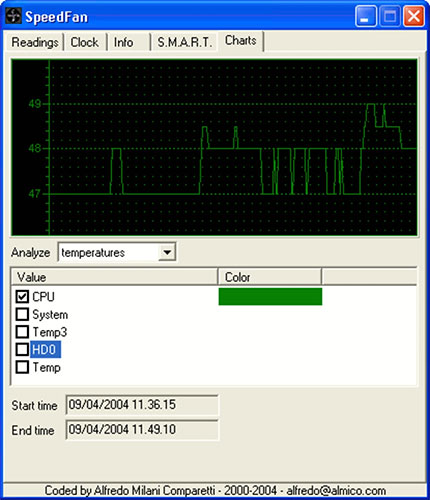
SpeedFan Features
Fan Speed Control and Performance Monitoring
SpeedFan is a useful utility that lets you assess the health and performance of your computer without much effort. Since you do not have to pay a dime to download SpeedFan, the program only offers basic functionality. That said, it is a good tool for keeping your PC running at peak performance. In the latest version, the developer has introduced recently released hardware performance measurement features.
The development team is quite active in releasing updates. When new hardware components are released on the market, SpeedFan will update to keep the measurements accurate. This lightweight program does not consume system resources and will continue to run in the background without affecting computer performance or slowing down other applications.
When used properly, SpeedFan is a great option to extend the life of your PC, display chip, processor, and other components. SpeedFan is available for Windows XP, Windows Vista, Windows 7, Windows 8, Windows 10, etc.
Is SpeedFan Simple to Use?
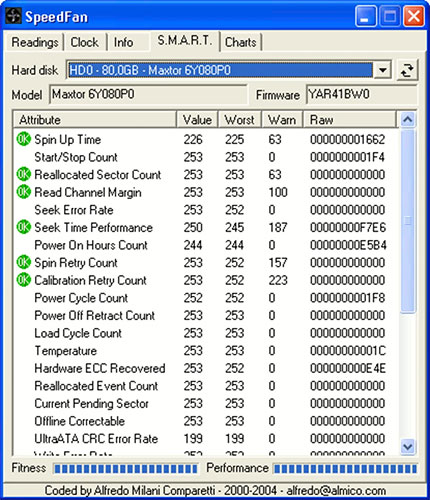
SpeedFan comes with a comprehensive interface that requires some basic technical skills. Before you start using the program, You need to learn its features and functions. Once you launch the installer, the first screen can be intimidating if you do not have much previous computer knowledge. Still, free tutorials are available in the SpeedFan download package.
Since most people use this tool to control fan speeds, it is a simple way to check the health of your PC. With this program, you can control the speed of the fan blades, adjust the air flow rate, and check the temperature inside your PC components. SpeedFan lets you turn your fans to higher speeds, keeping your hardware components cool.
What Is the Main Use of SpeedFan?
As mentioned earlier, SpeedFan's primary purpose is to monitor and control PC fan speeds. Still, the program comes with other basic features and acts as a full-fledged hardware monitor. It helps prevent components from overheating and displays general information about the health of your computer. Also, you can get a good idea of how your hard drive is performing. Over time, your computer can accumulate corrupted or redundant files. Still, SpeedFan will help you identify such issues and suggest fixes to address the problem areas.
If you are familiar with similar utility tools, you must know that SpeedFan will give you a great opportunity to troubleshoot your computer. Moreover, you can monitor the health of your components to find out about different issues. Since the tool comes with many video tutorials, you will not have any trouble navigating through the different features to keep your PC running smoothly.
In fact, SpeedFan can be used in conjunction with third-party hardware monitoring tools to test your PC for limitations. You can use the program to effectively monitor upgraded PC components, such as when building a PC for heavy gaming purposes. The right combination of tools can extend the life of your computer, prevent problems, and keep your PC in great condition.
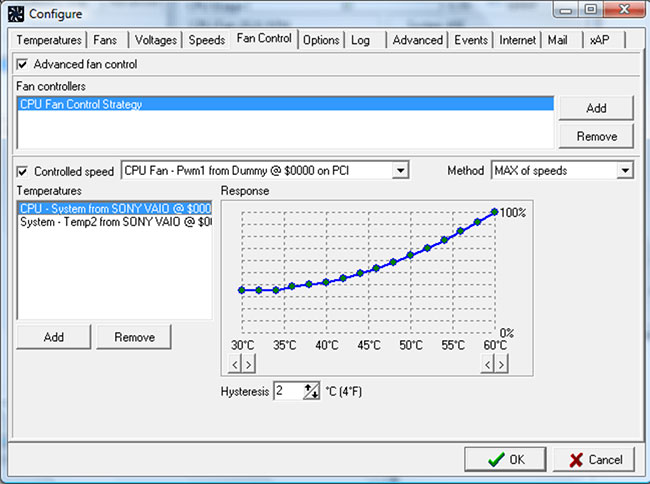
Keep Your PC in Great Shape
In short, SpeedFan is a good program for monitoring temperature sensors, fan speeds, and voltages in your Microsoft Windows computer. You can use SpeedFan to access SMART information and display the status of various hard drive components. SpeedFan also supports SCSI drives and can conveniently change the FSB on your hardware. Since the software controls the fan speed, you will be able to minimize noise and unnecessary distractions while you work. Overall, it is a great option for keeping your PC running smoothly.
Advantage
- Fan control
- Performance tracking
- Comes with instructions
- PC Troubleshooting
Disadvantages
- Making beginners feel overwhelmed
- Basic functions
FAQ
What is the main takeaway about SpeedFan - PC Hardware Monitoring Utility?
The key is to understand the core idea, compare the available options, and apply the practical guidance that matches your situation.
What should beginners know about SpeedFan - PC Hardware Monitoring Utility?
Start with the essential steps and terminology. Avoid changing advanced settings until you understand how they affect performance, privacy, cost, or compatibility.
How can I use this information in practice?
Follow the relevant section in order, test one change at a time, and confirm the result before moving to the next step or recommendation.
Related Articles
 How to Use SpeedFan to Check CPU Temperature and Fan Speed5 minutes read
 How to Use SpeedFan to Check and Adjust CPU Fan Speed4 minutes read
 Best Snmp Monitoring Software9 minutes read
 5 Useful Network Monitoring Tools9 minutes read
 10 Best Ping Monitoring Software and Tools18 minutes read
 5 Best Best Computer Monitoring and Monitoring Software 20206 minutes read
Reader Comments 0
Sign in with email or Google to join the discussion.