Table of Contents
Understanding save battery for iPhone 3g / 3gs is easier when the main points are organized clearly. This guide brings together the essential details and practical considerations.
1. Software : Use iTunes to install the latest iPhone operating system, to ensure the phone has the latest battery conservation features.
How Save Battery for iPhone 3G / 3GS Works
2. Turn off 3G connection when not in use : 3G connection will consume more power than 2G connection. Therefore, if using only 2G network, turn off 3G mode when not needed, by: Go to Settings -> General -> Network .
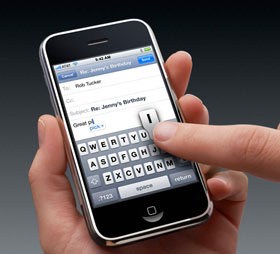 3. Location services : Applications that enable location services (GPS, mobile transceiver, Wi-Fi positioning) all affect battery usage. Turn off location services by going to Settings -> General -> Location Services And only turning it back on when using this service.
4. Automatic mail checking : Automatic email checking regularly also consumes your phone's battery quickly. So, put the iPhone in auto-check mode with lower frequency or manually check email. Users can perform the reinstallation by: Go to Settings -> Mail -> Auto Check .
5. Yahoo! Mail : If the customer has a Yahoo mail account, turn off the Push mail function when not needed. Open Settings, select Mail, select your Yahoo! your, select Advanced And set ' Use push mail ' in Off Mode.
6. Reduce the number of mail accounts : Delete unnecessary mail accounts. The smaller the number of mail accounts that the iPhone has to check, the less power it has to use.
7. Wi-Fi : turn off Wi-Fi when not in use ( Settings -> Wi-Fi -> Wi-Fi (ON / OFF).
8. Wave intensity : The amount of battery consumed increases in areas without waves. Even in standby mode, the phone constantly tries to communicate location, monitor the wave intensity and the networks that operate in the region. Therefore, Airplane Mode should be enabled in that condition (this mode will turn off the phone, Internet connection and Bluetooth) to increase battery life.
9. Bluetooth : Should turn off Bluetooth when not in use ( Settings -> General -> Bluetooth -> Bluetooth on / OFF).
10. Auto-lock : Set the iPhone to lock automatically after a short time as possible ( Settings -> General -> Auto-Lock ).
11. Manual Lock: Lock your phone when you're done using the Sleep / Wake Button.
12. Turn off the audio adjustment mode : If you regularly listen to music, turn off the audio adjustment mode ( Settings -> IPod -> EQ Off).
13. Brightness : Turn on Auto-Brightness mode for iPhone to adjust brightness automatically to a level that matches the current position ( Settings -> Auto Brightness On / OFF). Reducing the brightness adjustment slider can also improve battery life.
14. Fully charged battery : To maintain a proper type of lithium battery, be sure to fully charge the battery at least once a month. Fully charged battery is defined as a 100% fully charged cycle then use the battery until it is completely empty.
FAQ
What is the main benefit of save battery for iPhone 3g / 3gs?
The main benefit is a clearer understanding of the topic and a practical way to apply the information covered in this guide.
What should I check before using save battery for iPhone 3g / 3gs?
Confirm compatibility, review the required settings, protect important data, and use the latest supported version whenever possible.
What should I do if the result is different?
Repeat the steps carefully, verify permissions and version differences, and consult the product's official support documentation for changes not shown in the article.
Related Articles
 8 Ways to Save iPhone Battery, Increase Battery Life When Using9 minutes read
 iPhone Air Is Disappointing in Terms of Battery4 minutes read
 8 Tips to Help Your iPhone Battery Last Longer When Traveling9 minutes read
 Some Ways to Use iPhone Battery Effectively5 minutes read
 These Tips Help You Improve iPhone Battery Life15 minutes read
 Evidence Shows That Apple Deliberately Slowed Down the Old iPhone When the Battery Bottle5 minutes read
Reader Comments 0
Sign in with email or Google to join the discussion.