Table of Contents
This updated guide explains how to use password hints and security questions safely with clear steps, practical tips, and useful context. When security questions and password hints are required for your account, you may not have filled them out correctly. To best protect the security of your account, It is best to not be truthful in these fields.
Understanding Password Hints Vs. Security Questions
While these two account security features may sound similar, they are actually different.
Password hints are just a little trick to help you remember a forgotten password. They're available to anyone who can enter your password, which means they shouldn't be too revealing. Depending on the service, hints may only appear after you've entered the wrong password multiple times, or they may appear when you choose a button on other services.

While password hints aren't as common as they once were, some online services still use them. macOS has a password hint option, as does Windows 11 (though only if you're using a local account).
Meanwhile, a security question is a layer of security used as a form of two-step authentication or to verify your identity when you are locked out of your account. When logging in on an unfamiliar browser or recovering your account, you may be asked to confirm the answer to one or more questions.
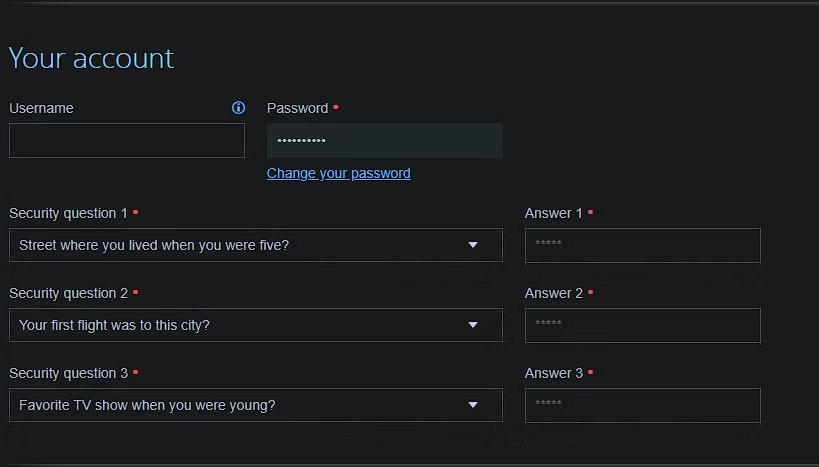
While your first instinct with both options is probably to answer honestly, it is not a good idea from a security standpoint. There are better ways to use these fields, whether you're forced to use them or want to use them yourself.
Use Random Passphrases for Security Questions
The problems with security questions are well documented. Since these questions often ask for publicly available information, anyone with malicious intent can easily obtain the answers.
Your mother's maiden name, favorite color, the street you grew up on, and similar information can be accessed by scouring social media and public profiles. Worse still, some security questions have a limited pool of answers; for instance, there are only a few possible favorite colors.
Therefore, the best way to use security questions is to provide dummy answers. You do not want to provide answers that are false but still relevant to the question, making them easy to guess. Instead, It is best to treat each security question like a different password field and choose a random passphrase that is nearly impossible to guess.
for instance, instead of lying that your mother's maiden name is "Griswold," your answer to the question might be "Gratifying Lambasted Narwhals." This is unrelated to the question and extremely difficult to guess, but not difficult to remember — one of the main advantages of passphrases over passwords.
Note : Some companies will ask you to answer a security question to verify when you call. Avoid using symbols and phrases that you cannot pronounce easily to avoid awkward situations on the phone.
Keep the Answers to Your Security Questions Safe
Ideally, It is best to store these generated answers in a password manager so you do not have to remember them. Using a password manager is essential to online security in many ways. If you're not already making your passwords more secure with a password manager, this is the best step you can take.
Depending on your password manager, there may be a specific option for security questions. If not, use the Notes field for that site (all password managers offer this option). Once you're logged in, simply copy and paste your passphrase.
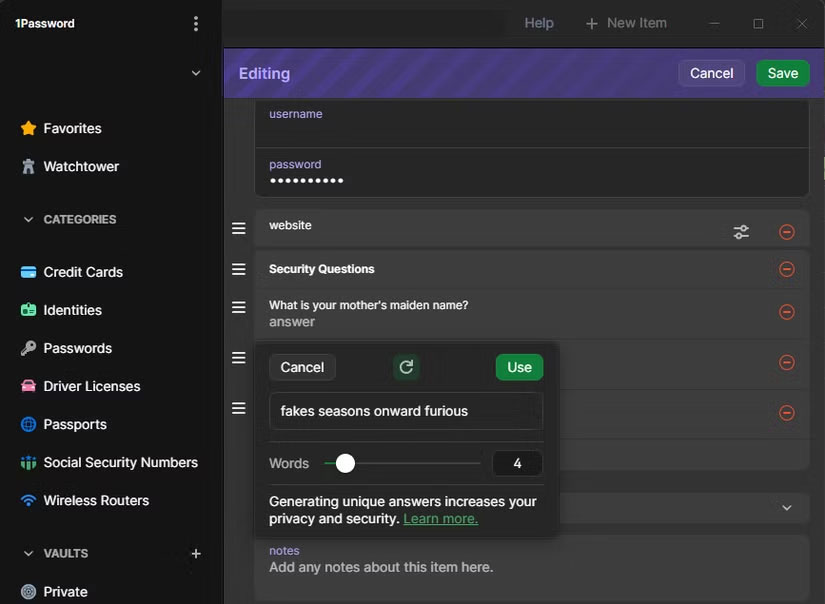
Warning : ensure you note which answer goes with which question, as the answer to a strong security question does not have any context!
Make Password Hints Meaningful Only to You
Password hints do not help anyone guess your password. The easiest way to do this is to use a password manager for everything and set your hint to "password manager".
Remember a strong master password for your password manager, so you do not have to worry about hints for other passwords. do not name the password manager you use, as this will reduce the number of applications a potential attacker will try to break into using your email address.
If you do not use a password manager for some reason, password hints are harder to use securely. In general, if a password is simple enough that you can describe it with a hint (like "childhood school plus dog's name"), it is too weak.
A better setup is to use a passphrase pattern that has an ambiguous meaning. You might choose to combine the second word of a song, the middle 5 words of a quote, or something similar – the more obscure the better. Your password hint could then be something like 'best quote' to tease your mind without giving it away.
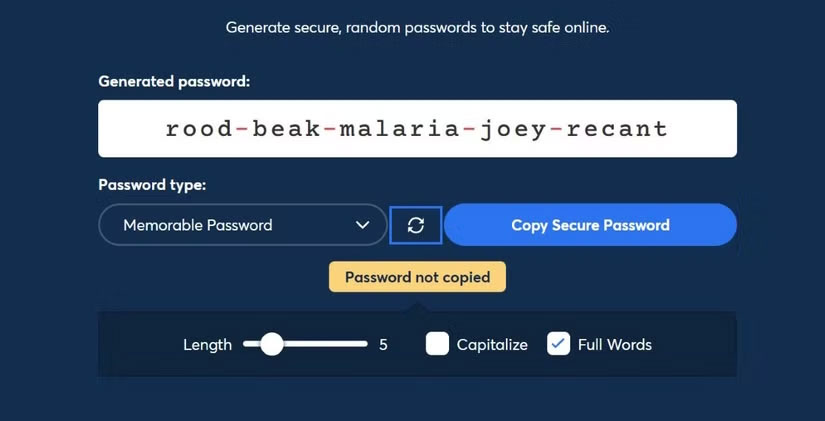
For your most important passwords, like your password manager's master password, you might consider making a physical backup. Then, the hint might provide a clue to where it is safe at home (e.g., "in the middle of the last book you read").
Which Option Should I Use?
The above advice is useful for accounts that require you to use security questions or password hints. But if you can, It is best to opt out of these options or turn them off. Any other two-factor authentication method is better than security questions; you're better off using an authenticator app.
It is best to review your account to disable security questions if possible or adjust your answers to make them stronger. This is especially true for accounts you've had for a long time, as they're more likely to be exempt from using security questions.
A particularly annoying case is security questions where you are limited to a drop-down menu. When you are stuck with these, you still should not answer honestly. Also, It is best to choose questions that only you know the answer to, rather than questions that someone else could answer with public information.
Take United's security questions, for instance: Your favorite sea animal is a better question than your best friend's birthday month, even if you make up the answer. There are only 12 months, while there are more types of sea creatures — plus, you're less likely to share the latter in person or online.
Everything about passwords is stronger when they're random. That goes for security questions and password hints. When you have to use them, create a random answer that you store in a password manager for safekeeping. And when you have the option, turn them off and use a stronger 2FA method.
FAQ
What should I prepare before I use password hints and security questions safely?
Review the requirements and options in the guide first. Having the correct device, app version, account access, or materials ready helps prevent avoidable errors.
How long does it take to use password hints and security questions safely?
The time depends on the task and your setup. Most basic steps can be completed quickly, while downloads, updates, scans, or troubleshooting may take longer.
What should I do if the steps do not work?
Repeat the instructions in order, confirm that your software or device is supported, and check permissions, connectivity, and available updates before trying again.
Related Articles
 How to Create Security Questions Nobody Can Guess6 minutes read
 Password Security: Check the Security of the Password3 minutes read
 Frequently Asked Questions About the Default Password6 minutes read
 Set BIOS and UEFI Password to Protect Data on Your Windows 108 minutes read
 Set Password, Password Protect USB Data Safely4 minutes read
 Instructions for Resetting Apple ID Security Questions5 minutes read
Reader Comments 0
Sign in with email or Google to join the discussion.