Table of Contents
This guide provides a practical overview of Review Lenovo Ideapad S540 Laptop: a Safe Option, including its main features, benefits, limitations, and important considerations.
In fact, this is a rather tedious laptop, but the necessary features still allow the device to work perfectly.
First, we have the screen. IdeaPad S540 owns a 15.6-inch Full HD screen (1920x1080), brightness is sufficient, standard colors and has good contrast.
 The screen of the machine for colors and good contrast
About configuration, IdeaPad S540 owns Intel Core i5-8265U chip, comes with 8GB RAM, 128GB SSD hard drive and a 1TB HDD. This device also has an Nvidia GeForce MX250 GPU.
This is a fairly reasonable CPU set as it can balance between power supply and consumption. The i7 chip may be a bit wasteful and the i3 chip is too weak. 8GB of RAM is sufficient for almost any task on the computer and the MX250 GPU will provide the amount of graphics you need to complete the day's tasks. The device can also play some light titles like PUBG Lite and CS: GO.
In addition, IdeaPad S540 has a 128GB SSD and a 1TB HDD. This is a great combo for users because the Windows Supported operating systems and the necessary applications can be installed on the SDD drive, taking advantage of the speed of this hard drive. And other parts can be stored on HDD, 1TB is too comfortable for the average user.
The device uses a fingerprint sensor to unlock and take photos.
The design of the device, as well as the configuration, is quite simple and reasonable. The device is silver gray, the Lenovo logo sits modestly on the side of the device and the hinge allows opening the device 180 degrees.
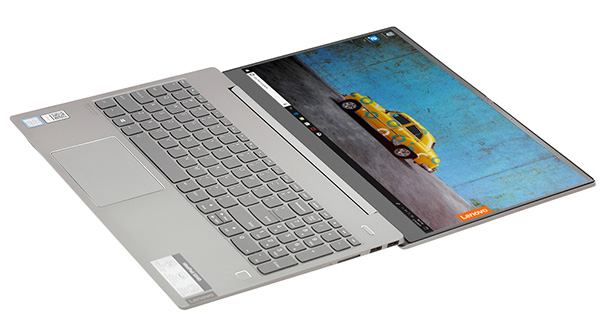 Machine can open 180 degrees
The connectivity ports are full including: 2 USB 3.0 ports, 1 USB-C port, 1 HDMI port, 1 SD card slot and 1 3.5mm headphone jack.
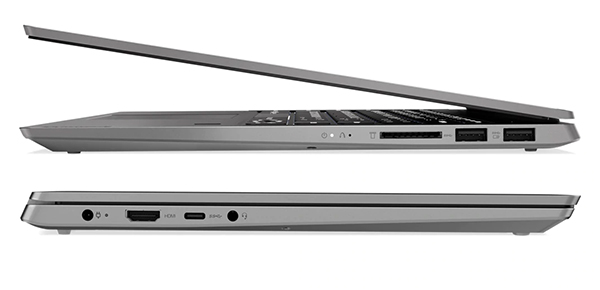 The connection port on the IdeaPad S540
When opening about 20 to 30 Chrome tabs, Photoshop at the same time with Word, the machine still does not have the phenomenon of lag lag. However, this is when you install the application on an SSD, perhaps the speed of the machine will be slightly different if you choose to install programs on the HDD.
Radiator fans sometimes run strong, but those are only times when the device has to work at full capacity.
The weak point on this machine is the battery life, a little shorter than expected. On average, IdeaPad S540 allows about 2 to 3 hours of use on a single charge, the duration is relatively good because Photoshop and Chrome are two super battery-consuming programs. However, when compared to other laptops, the battery of this machine seems a bit more drained.
Overall, the Lenovo IdeaPad S540 is a reasonably priced machine, configured just enough to work. It's not a strong war horse, but few laptops of the same price range can keep up with this machine.
FAQ
What should I know about Review Lenovo Ideapad S540 Laptop: a Safe Option?
Focus on the key features, requirements, limitations, and practical use cases explained in this guide.
How do I get the best results with Review Lenovo Ideapad S540 Laptop: a Safe Option?
Follow the recommended steps, use current software or information, confirm compatibility, and review settings before major changes.
Are there any risks or limitations?
Potential limitations depend on compatibility, data quality, cost, privacy, support, and how the product or method is used.
Related Articles
 Lenovo Ideapad Gaming 3 Detailed Review: the Perfect Match!13 minutes read
 Review Lenovo Ideapad L340: the Right Gaming Laptop for9 minutes read
 Review Lenovo Ideapad Laptop S145-14IIL-81W600AQVN3 minutes read
 Review Lenovo Ideapad Gaming 3 - Successor to L340?7 minutes read
 Lenovo Introduced G Series Laptops and New IdeaPad Z4 minutes read
 Laptop 4K Screen of Lenovo Is About to Be Sold3 minutes read
Reader Comments 0
Sign in with email or Google to join the discussion.