Table of Contents
Explore ram prices are skyrocketing.
With rising RAM prices, wasting RAM is becoming even more costly
Although many people don't consider RAM to be storage memory (because it's true that it isn't), it is essentially still memory – and like all other types of memory, it has limits. When RAM is full, the system will start to slow down, stuttering, freezing, or micro-stuttering may occur during gameplay.
Ideally, if your work or game requires more RAM than you currently have, the obvious solution is to buy more. Previously, this advice was quite reasonable because RAM was generally one of the more affordable components.
But that's no longer the case. You've probably heard the term 'RAM-pocalypse' lately. To illustrate the severity of the situation, a 32GB DDR5 RAM module that cost $93 in January 2025 is now listed at $350 at Best Buy and $326 on Amazon.
Realistically speaking, unless you can find a good deal on used RAM or are willing to spend a lot of money, the more sensible option right now is to wait for prices to drop. However, many believe that will take at least 1–2 years, and even then, RAM prices are unlikely to return to the 'affordable' levels they were before the RAM-apocalypse.

Background applications are the biggest RAM hoggers
It may sound obvious, especially to those who are tech-savvy, but not everyone realizes just how quickly background apps accumulate.
About 10–15 years ago, a background application typically only occupied 50–100MB of RAM, considering that most computers at the time only had 2GB or 4GB of RAM. But as hardware became more powerful, applications also grew larger.
Nowadays, familiar names like Discord or Spotify can comfortably consume hundreds of MB of RAM. This is intentional, to keep data readily available in memory so that when you switch songs or reply to messages, the application responds instantly without lag.
Additionally, Windows has a number of background services that you might consider disabling.
Although the RAM figures in Task Manager aren't always perfectly accurate, and Windows often prioritizes the application running in the foreground, the reality is that every app running in the background takes up space in the limited RAM – while doing nothing useful.
They also consume CPU resources, which is why many people have a habit of closing all work applications, even RGB software, before playing demanding games.
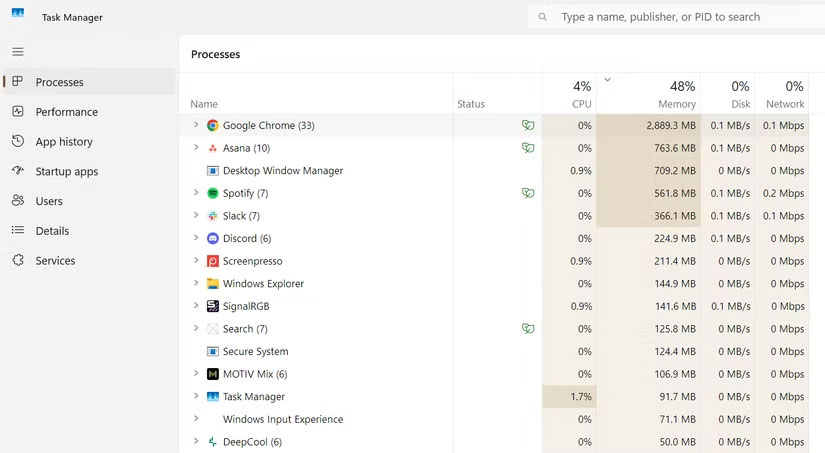
If you only have 16GB of RAM or less, and frequently leave apps running in the background, you'll notice a significant difference when you clean up unnecessary processes. Even better, disable apps that automatically start with Windows to avoid forgetting to turn them off later.
Discord has long been known for being a "RAM hog." There was even controversy when Discord deployed a patch that automatically restarted the application when RAM usage reached 4GB. The development team later explained that this was only a temporary solution to a bug affecting a small number of users.
If you're short on RAM but still need Discord to play games with friends, using Discord on your phone is a worthwhile option.
Small habits that can significantly save RAM
A significant limitation of the software is memory leaks – a fairly common problem when applications run for a long time, are poorly optimized, or encounter errors.
Simply put, a memory leak occurs when a program allocates memory but doesn't release it when it's no longer in use. That portion of RAM is 'used up unnecessarily,' causing the amount of available RAM for the system to decrease over time.
From background tools and work applications to games – all can experience this issue.
Therefore, if you play Red Dead Redemption 2 for several hours straight, try exiting the game and reopening it after a while. This simple method helps free up memory and significantly reduces micro-stutter.
Additionally, when you're not using an app, don't just minimize it – close it completely. This helps prevent an app from accidentally becoming a background process, silently consuming RAM.
Should you use RAM cleaning software?
RAM cleaning software has long had a bad reputation, often considered bloatware – something older people tend to install because it sounds useful.
However, some argue that in rare cases, when an application has a memory leak or Windows hasn't fully freed up RAM, these tools can still be helpful. Of course, effectiveness depends on the configuration, so the safest approach is to try a reputable tool and assess for yourself whether it improves performance.
With RAM more expensive than ever, using it wisely is crucial. Reducing background applications, occasionally restarting apps, games, or even Windows, will help you last longer until you're ready to upgrade.
Final Thoughts
Understanding ram prices are skyrocketing makes it easier to evaluate the information and apply the most relevant recommendations. Focus on the key points above and verify details that may change over time.
FAQ
What is ram prices are skyrocketing?
Explore ram prices are skyrocketing.
What key points does this article cover?
The article focuses on With rising RAM prices, wasting RAM is becoming even more costly, Background applications are the biggest RAM hoggers, Small habits that can significantly save RAM, with practical explanations and examples.
How can you use this information in practice?
Use the explanations to compare options, verify important details, and make a more informed decision. Apply the recommendations that best match your goals and situation.
Related Articles
 Simple Ways to Speed up Old Smart Tvs: Make Your TV Run Fast and Smooth Like6 minutes read
 How to Turn on and Turn Off Smooth Scrolling on Opera3 minutes read
 How to Save Money When Upgrading Your Smart TV8 minutes read
 Android Tips: 8 Steps to Keep Your Phone Running Like New8 minutes read
 Speed up Your Computer: Tips to Speed up the Gaming Machine7 minutes read
 Smooth Pure Android Smartphone, Beautiful Design, Genuine Sale from4 minutes read
Reader Comments 0
Sign in with email or Google to join the discussion.