Table of Contents
Picasa Has Added Picnik Photo Editing Tool is easier to understand when the core ideas are paired with practical examples. The sections below explain the topic clearly, highlight useful steps, and point out details that can prevent common errors.
Competition in the field of free online photo storage is further heated after Google's new move .
Google recently announced that it has integrated the online photo editing tool Picnik acquired by the group in early March on Picasa online photo hosting website.
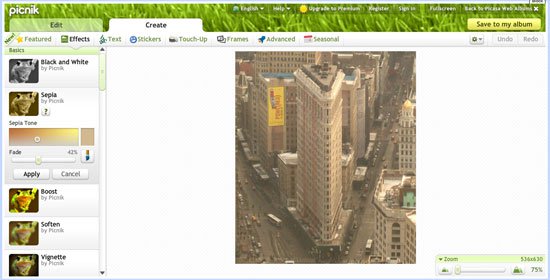 Picasa has integrated Picnik online photo editing tool
Currently, Picasa users will see an edit button in the upper left corner of the images. Clicking on the photos will open a new window displaying some simple and advanced image editing options.
Simple editing options allow users to change the shape of a photo by rotating, cropping or resizing an image. This site also provides tools to change the color and brightness of photos.
Some of the other photo editing features can be found via the ' Create ' tab, which provides advanced photo editing features similar to desktop photo editing applications like Adobe Photoshop.
Before Picnik was acquired by Google, those who wanted to use advanced photo editing features paid $ 25. These features are currently free to use on the Picasa website.
Picnik integration can make Google compete equally with online photo hosting sites that offer editing features. However, Google's Picasa also lost to other photo hosting websites like Yahoo's Flickr in its ability to share photos with social networks.
FAQ
What is Picasa Has Added Picnik Photo Editing Tool?
Competition in the field of free online photo storage is further heated after Google's new move.
Why is Picasa Has Added Picnik Photo Editing Tool important?
A clear understanding of Picasa Has Added Picnik Photo Editing Tool helps you make informed decisions, avoid common mistakes, and use the relevant tools or techniques more effectively.
How should beginners approach Picasa Has Added Picnik Photo Editing Tool?
Start with the fundamental concepts, follow the examples step by step, and test each change in a safe environment before applying it to important systems or data.
Related Articles
 Picasa 3.9.141.303: Free and Effective Photo Editor6 minutes read
 Instructions to Add Watermark, Rotate, Flip Photos with Picasa3 minutes read
 Google's Photo Management and Editing Software in Vietnamese: Photos3 minutes read
 Best AI Photo Editing Tools10 minutes read
 How to Edit Photos Online on Doka. Photo4 minutes read
 Picasa 3.5: Add Face Classification Feature7 minutes read
Reader Comments 0
Sign in with email or Google to join the discussion.