Table of Contents
Photomath is a mobile app that scans a math problem with your phone’s camera and shows a worked solution when it recognizes a supported problem. You can also enter an expression in its calculator. Download it for iPhone or Android from the official Photomath download page.
How to scan a problem
- Open Photomath and allow camera access when prompted.
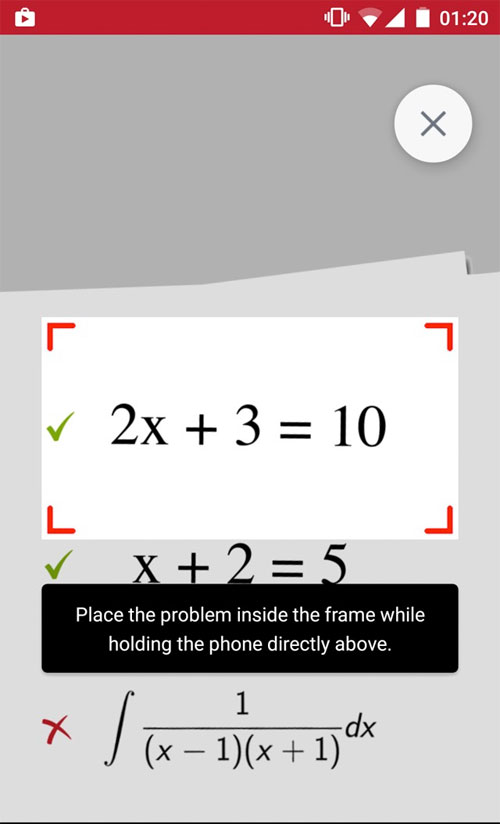
- Center one complete problem in the scan area. Make sure fractions, parentheses, and exponents fit in the frame.
- Check that the app read the same problem you see on paper. If it missed a minus sign or interpreted a fraction incorrectly, scan again in better light or enter the expression manually.
- Open the solution steps. Compare them with your work line by line to find the first place the two methods differ.
What the app can help with
Photomath covers problems from arithmetic and fractions through algebra, trigonometry, and calculus. Depending on the problem, it can show a graph or offer more than one solution method. Basic solution steps are free. Photomath Plus adds more detailed explanations and support for selected textbook exercises.

Use the steps to check your reasoning
Try solving the problem first. If your answer differs from Photomath’s, check which step changed the solution. For a linear equation, try substituting the proposed answer back into the original. For a problem with fractions or square roots, check the original restrictions as well. This guide to equivalent equations explains why some algebra steps can introduce or lose solutions.





Reader Comments 0
Sign in with email or Google to join the discussion.