Table of Contents
The best math tool depends on the job. Use a symbolic calculator when you need dependable algebra or calculus operations, a graphing tool when you need to inspect a function, and a conversational tutor when you need hints or a different explanation. No app should replace checking the domain, assumptions, units, and final result.
This guide compares seven tools without declaring one permanent winner. Features and access limits change, so verify the live plan before subscribing.
Quick comparison
| Tool | Best use | Input options | Main caution |
|---|---|---|---|
| Gauth | Photo-based homework help across several school subjects | Text, calculator input, and photos | Check recognition and every displayed step |
| ThetaWise | Guided tutoring, practice, and visual lessons | Chat, photos, and documents | Use hints before requesting a complete solution |
| Mathway | Fast answers and worked solutions across common math courses | Typed expressions and photos | Availability of detailed steps can depend on platform or plan |
| Wolfram|Alpha | Symbolic computation, exact forms, graphs, and advanced topics | Natural language, math input, and supported photo input | Results can be compact and still require interpretation |
| ChatGPT | Conversational explanations and follow-up questions | Text, images, and supported files | Can make arithmetic or reasoning errors; verify independently |
| Symbolab | Structured steps, practice, and graph-supported solutions | Math notation and natural-language input | Do not copy steps without understanding why they are valid |
| Maple Calculator | University-level symbolic math and 2-D or 3-D visualization on mobile | Typed, handwritten, and camera input | Its broad capability may be more than a beginner needs |
1. Gauth: scan a problem and inspect the steps
The original article calls this product “Guardian AI,” but the correct name is Gauth. It covers mathematics along with subjects such as physics and chemistry. Its mobile workflow can recognize a photographed problem and return a formatted answer with steps.
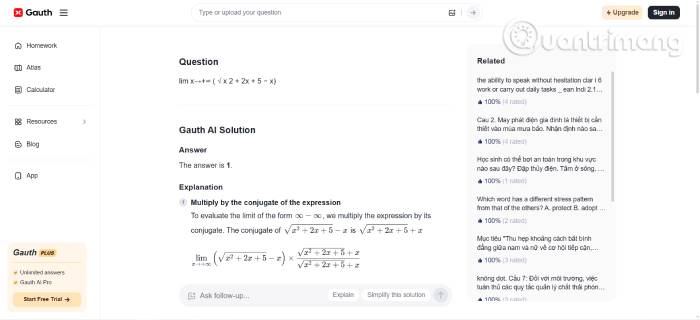
The source incorrectly says that Gauth does not support image scanning. Its current app explicitly supports photo input. That convenience also creates a common error: a faint exponent, minus sign, fraction bar, or integration bound can be recognized incorrectly. Compare the transcribed expression with the photo before reading the solution.
Best for
- students who receive problems on worksheets or in textbooks;
- checking a method after making an independent attempt; and
- basic through advanced school subjects where a step-by-step explanation is more useful than a bare answer.
2. ThetaWise: guided tutoring and generated lessons
ThetaWise focuses on learning rather than only producing an answer. Tutor Mode can guide the student with questions and hints, while its video-lesson feature can generate a narrated visual explanation from a topic, photo, or document. It also offers chats and practice quizzes.
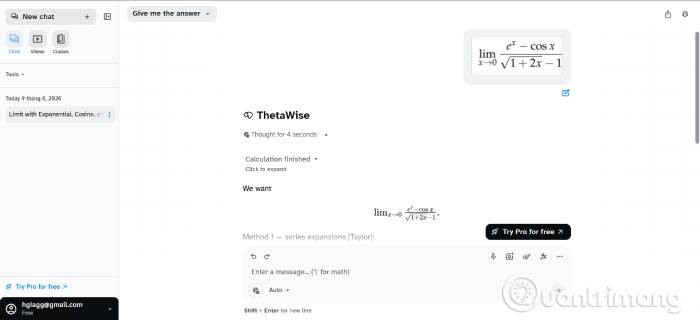
This is a good choice when the obstacle is conceptual: why a method applies, how to begin, or what prerequisite is missing. Ask for one hint at a time, explain your own next step, and request correction. That process produces more learning than immediately revealing the entire solution.
3. Mathway: quick solving across common subjects
Mathway provides calculators for algebra, trigonometry, calculus, statistics, linear algebra, graphing, and other topics. Users can type an expression or upload a photo, then inspect the result and available steps.
Its simple subject-based interface is helpful when you know what kind of problem you have and want to check a calculation quickly. Access to detailed explanations has varied by platform and plan, so confirm what is included before paying. More importantly, test whether the steps explain the rule used or simply display transformations.
TipsMake's earlier guide to web tools for solving math problems includes Mathway and other conventional calculators that may be sufficient when a conversational tutor is unnecessary.
4. Wolfram|Alpha: computation and mathematical structure
Wolfram|Alpha is a computational knowledge engine rather than a general chatbot. It can solve equations, simplify expressions, compute derivatives and integrals, work with matrices and differential equations, and display exact forms, alternate forms, plots, and related mathematical properties.
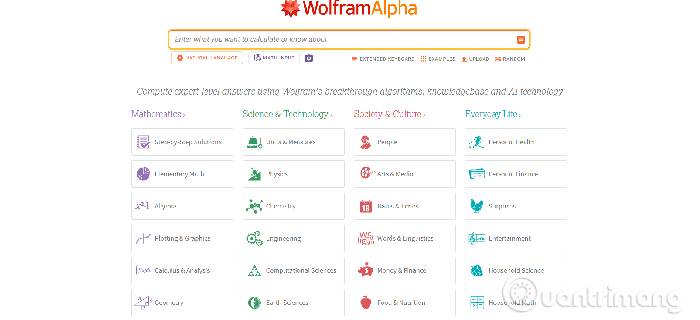
Choose it when exact symbolic computation or a graph matters. Enter assumptions explicitly—for example, whether variables are real, positive, or integers—and read the input interpretation at the top of the result. A correct computation for a misinterpreted expression is still the wrong answer to your question.
Useful verification checks
- Substitute an equation's proposed roots back into the original equation.
- Differentiate an antiderivative to recover the integrand.
- Compare an exact result with a numerical approximation.
- Inspect a graph for excluded points, asymptotes, and the relevant domain.
- Check units and assumptions in applied problems.
5. ChatGPT: explanations and follow-up questions
ChatGPT is useful when you want to ask why a step works, request a simpler example, or continue a conversation about a misconception. Its Study Mode is designed to guide learning with questions and can reference uploaded notes, worksheets, PDFs, or a photo of a math problem.
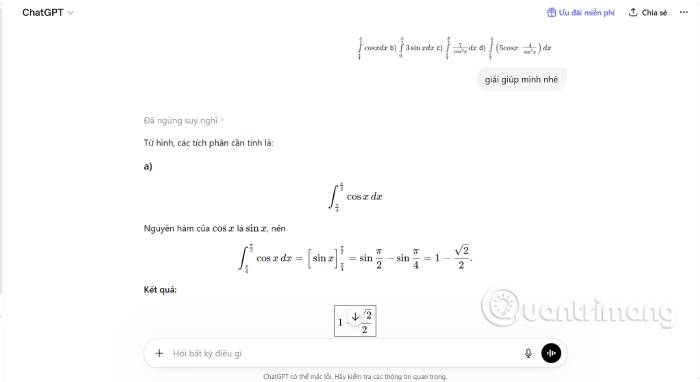
A general-purpose language model can confidently make a sign error, drop a condition, invent a theorem name, or continue from a flawed premise. Ask it to state the original expression, assumptions, and verification step. For important symbolic results, reproduce the calculation with a dedicated system such as Wolfram|Alpha, Symbolab, or Maple Calculator.
A better tutoring prompt
I am learning this topic, so do not give the final answer yet.
1. Restate the problem and list the known information.
2. Ask me what approach I would try.
3. Give one hint at a time.
4. Check each step I write.
5. When I finish, verify the result independently and show any domain restrictions.
6. Symbolab: structured steps and graph-supported learning
Symbolab provides subject-specific solvers, detailed steps, explanations, graphs where appropriate, practice material, and an AI math chat. It covers topics from arithmetic and algebra through calculus, differential equations, linear algebra, and statistics.
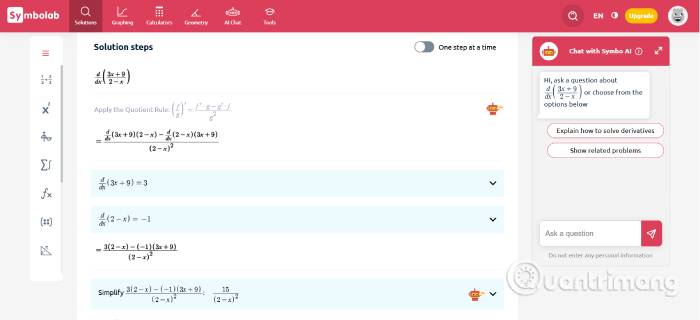
It is especially helpful when you want a conventional sequence of transformations. Before moving to the next line, name the rule used—factoring, substitution, chain rule, row operation, or another property—and confirm that its conditions hold. Multiple displayed methods are valuable only when you compare why each method works.
7. Maple Calculator: a free mobile front end to Maple math
Maple Calculator is a free mobile app powered by Maplesoft's Maple engine. It accepts typed, handwritten, and camera input; provides answers and steps for supported problems; and produces interactive 2-D and 3-D graphs. It can handle systems of equations, limits, derivatives, integrals, matrices, and differential equations.
The original article incorrectly says there is no free version. Maple Calculator itself is free on iOS and Android, while the full desktop Maple product is separate commercial software. Choose the app for symbolic computation and visualization; choose a simpler tool if you only need arithmetic or elementary algebra.
For graph-focused alternatives, see TipsMake's guide to function graphing applications.
How to choose the right math tool
- Use Gauth or Mathway when the quickest input is a photo and you want to inspect a worked solution.
- Use ThetaWise or ChatGPT Study Mode when questions, hints, and alternative explanations are the priority.
- Use Wolfram|Alpha, Symbolab, or Maple Calculator when symbolic computation, exact forms, domain information, or graphing matters.
- Use two different types of tool for a high-value check—for example, a conversational explanation followed by a symbolic verification.
Students comparing a wider range of study software can also review TipsMake's list of AI tools for high school and university students.
Use a solver to learn, not just submit
- Write down what the problem asks and any restrictions.
- Attempt the first step without assistance.
- Ask the tool for a hint or use it to check that step.
- Work through the method and annotate why each transformation is valid.
- Verify the final result by substitution, differentiation, estimation, graphing, or another independent method.
- Close the solution and solve a similar problem from memory.
Follow the rules set by the instructor, exam, or institution. A tool may be allowed for practice but prohibited on graded work. If AI assistance is permitted, disclose it in the required form and remain responsible for every line you submit.
Related Articles
 AI Math Scanner- Math Solution10 minutes read
 PhotoMath - Math Solving Application Using Camera5 minutes read
 3 Best Math Solving Applications on the Phone4 minutes read
 Effective Mobile Math Solutions6 minutes read
 11 Tips to Solve Math Simple but Extremely Interesting5 minutes read
 Best Math Solving Software3 minutes read
Reader Comments 0
Sign in with email or Google to join the discussion.