Table of Contents
This guide provides a practical overview of Paper Size in Photoshop, including its main features, benefits, limitations, and important considerations.
So now let's find out the size of paper in Photoshop.

Paper size in Photoshop
A4 size is the most commonly used paper size today, in any field. To have a good design on A4 size paper, you not only need to care about the length of the length, the width, but also the consideration of choosing Pixel.
The standard size for A4 size paper is: 210 x 297 mm = 21 x 29.7 cm = 8.27 x 11.69 inches .
The higher the PPI (Pixel per Inch), the more detailed and quality the image on the paper, depending on the needs we choose. The following is a Pixel spreadsheet in A4 size:
A4 PPI (Pixel per inch)
Horizontal (Pixel)
Vertical (Pixel)
72
595
842
96
794
1123
150
1240
1754
300
2480
3508
600
4960
7016
720
5953
8419
1200
9921
14032
1440
11906
16838
2440
19843
28063
2880
23811
33676
For sizes of other sizes, the ISO standard states: the ratio of the height to the width of the paper size is √2 (square root of 2), each subsequent paper size will be equal to half of the previous paper size. That (length of width after suffering = width of previous format).
Summing up the sizes of current paper sizes:
Paper size
Vertical x Horizontal
(unit: mm)
Vertical x Horizontal
(unit: inch)
4A0
1682 x 2378 mm
66.2 x 93.6 in
2A0
1189 x 1682 mm
46.8 x 66.2 in
A0
841 x 1189 mm
33.1 x 46.8 in
A1
594 x 841 mm
23.4 x 33.1 in
A2
420 x 594 mm
16.5 x 23.4 in
A3
297 x 420 mm
11.7 x 16.5 in
A4
210 x 297 mm
8.3 x 11.7 in
A5
148 x 210 mm
5.8 x 8.3 in
A6
105 x 148 mm
4.1 x 5.8 in
A7
74 x 105 mm
2.9 x 4.1 in
A8
52 x 74 mm
2.0 x 2.9 in
A9
37 x 52 mm
1.5 x 2.0 in
A10
26 x 37 mm
1.0 x 1.5 in
To make it easier to imagine, you based on the following figure, according to the rule, A0 is the largest format, dividing A0 into A1, dividing A1 into A2.
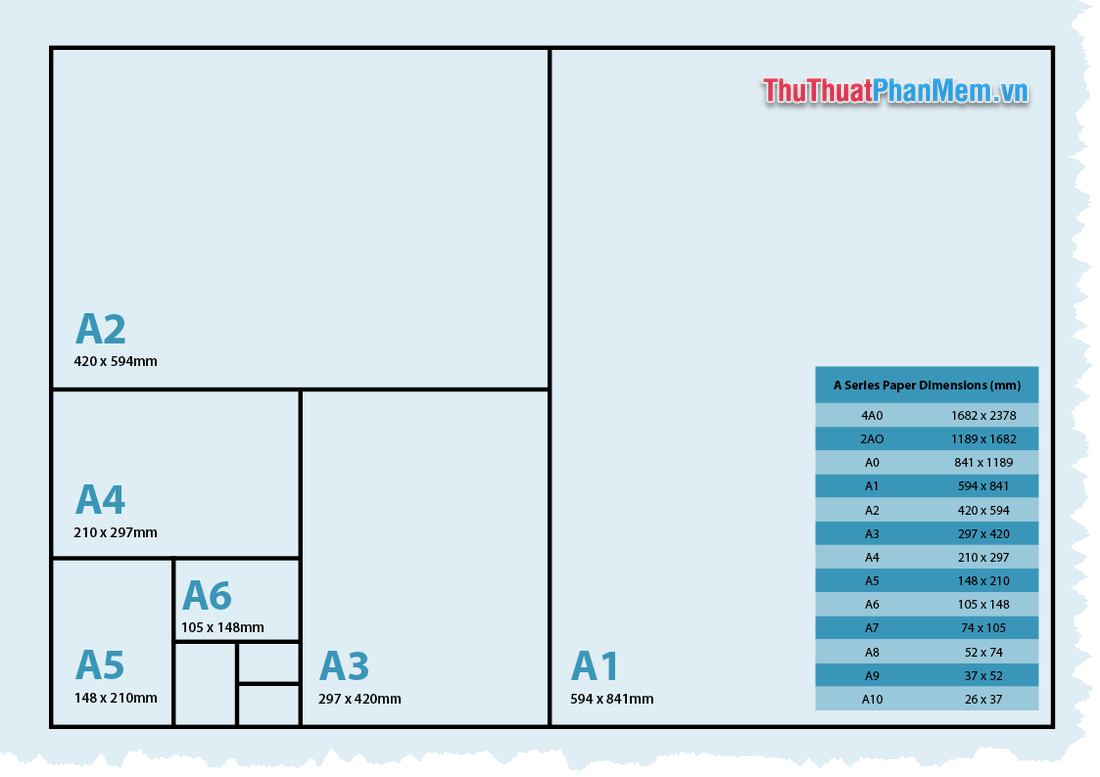
Above is information about the size of paper sizes in Photoshop. Thank you for watching the article!
FAQ
What should I know about Paper Size in Photoshop?
Focus on the key features, requirements, limitations, and practical use cases explained in this guide.
How do I get the best results with Paper Size in Photoshop?
Follow the recommended steps, use current software or information, confirm compatibility, and review settings before major changes.
Are there any risks or limitations?
Potential limitations depend on compatibility, data quality, cost, privacy, support, and how the product or method is used.
Related Articles
 How to Create a New File in A3 or A4 Paper Sizes in Photoshop3 minutes read
 Size of Paper Size A0, A1, A2, A3, A4. How Many Mm, Inch?4 minutes read
 What Is the Size of A5 Paper? How to Select and Print A56 minutes read
 How to Create A3 and A4 Paper Sizes in Photoshop5 minutes read
 What Is the A0 Paper Size? How to Select, Print A0 in7 minutes read
 How to Rotate Paper Size in Excel: How to Rotate Excel Paper Size4 minutes read
Reader Comments 0
Sign in with email or Google to join the discussion.