Table of Contents
This updated guide explores new YouTube music feature makes sharing lyrics easy with practical details, clear explanations, and useful takeaways. Have you ever wanted to share the lyrics of a song you like with your friends? YouTube Music 's new feature update lets you do just that. Now, you can pick your favorite lines, customize them, and post them to social media.
How YouTube Music's Lyrics Sharing Feature Works
Using the YouTube Music lyrics sharing feature is easy. Just launch the YouTube Music app, play a song, and tap the Lyrics tab at the bottom. When you find a part you like, tap the Share button.

Select specific lyrics on the Select Lyrics page and choose Next . This feature lets you share only a portion of the song.
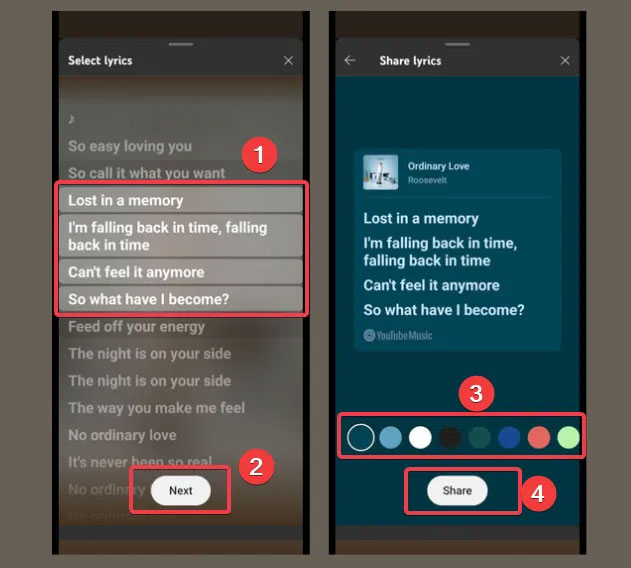
Then, customize the lyrics by adding a colorful background from the available options. Now, tap the Share button to post directly to Snapchat, Instagram, or other available platforms. You can download the image for later viewing.
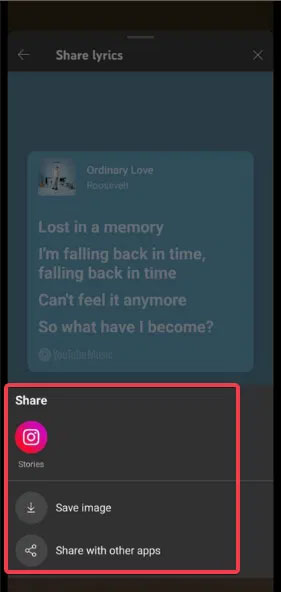
This feature is simple to use and is similar to Spotify's lyrics sharing feature, Still, you can customize YouTube lyrics, unlike other Android lyrics apps.
Why Is It Important to Share Lyrics on YouTube Music?
Sharing lyrics on YouTube Music isn't just another feature, it is a great trick to help YouTube Premium and Music improve relevance. Here's why it matters:
- This feature puts YouTube Music in competition with Spotify and Apple Music, both of which have had this feature for a while, so it helps YouTube Music continue to grow.
- This feature helps express your social emotions - express your mood or feelings through song lyrics to connect with friends.
- Help with song discovery, as shared lyric links can take friends directly to the track on YouTube Music.
- This customization feature is perfect for young users who love to post eye-catching tags on social media.
YouTube Music is growing rapidly, and this update shows they're serious about keeping up with the competition.
Some Additional Information About the New Feature Launch
YouTube Music's lyrics sharing feature is currently only available on Android, but it may be coming to iOS and desktop soon. Also, note that this feature is rolling out gradually, so it is not available to all Android users yet. Those who have it will need YouTube Music version 8.15.51 or later on Android.
Also, YouTube Music recently added better volume controls to keep songs at the same volume, so no more annoying toggles.
So, if you're thinking of ditching Spotify, check out this quick process to transfer your Spotify playlists to YouTube Music.
While YouTube Music's lyrics sharing feature has its limitations on Android, it is still stylish enough to make sharing lyrics fun and engaging. By the way, you can upload and listen to your own songs. So if you have this feature on your app, launch it and show off your favorite lyrics to the world in style.
FAQ
What is the main takeaway about New YouTube Music Feature Makes Sharing Lyrics Easy?
The key is to understand the core idea, compare the available options, and apply the practical guidance that matches your situation.
What should beginners know about New YouTube Music Feature Makes Sharing Lyrics Easy?
Start with the essential steps and terminology. Avoid changing advanced settings until you understand how they affect performance, privacy, cost, or compatibility.
How can I use this information in practice?
Follow the relevant section in order, test one change at a time, and confirm the result before moving to the next step or recommendation.
Related Articles
 How to Display Lyrics Automatically on YouTube?6 minutes read
 How to Share YouTube Music Over Time3 minutes read
 Listen to Music on YouTube? You Should Not Ignore These 5 Websites8 minutes read
 How to Enable Translated Lyrics and Pronunciation in Apple Music3 minutes read
 Instructions for Separating Music and Lyrics on Moseca: Key Facts6 minutes read
 How to Upload Personal Music to Youtube Music3 minutes read
Reader Comments 0
Sign in with email or Google to join the discussion.