Table of Contents
This guide provides a clear, practical overview of "Latest Muffin Start Code and How to Redeem Code". It organizes the most useful details, explains important considerations, and highlights the steps or choices that matter most.
Latest Muffin Departure Code
Summary of giftcode and how to redeem code
- muffin0303
- muffiin0303
- MUFFIN
- SUPERMUFFIN
- MUFFINGOGO
- MUFFIN555
- MUFFINCREATOR
- DUALBLADE
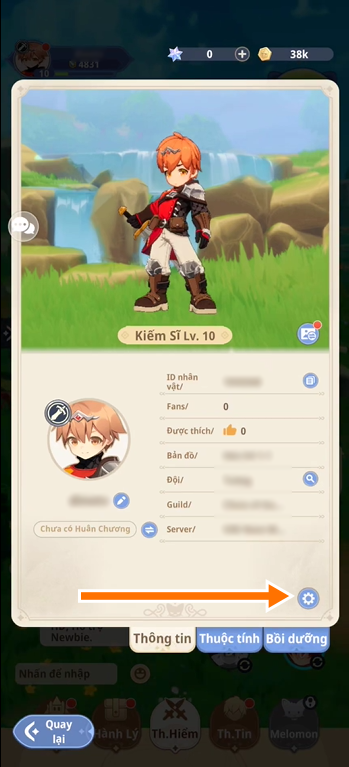
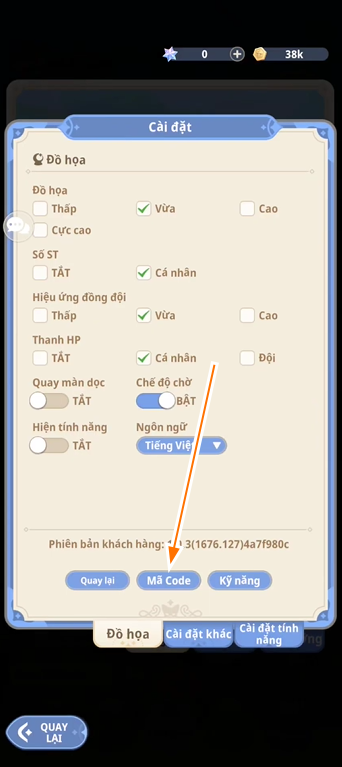
The way to redeem the code is simply to select the avatar > Settings icon > Redeem Code/Redeem Gift > enter the code and redeem the reward.
| Giftcode | Reward when redeeming code | Code status |
muffin0303 |
Redeem this code to get a certain amount of Star Gems, Summoning Platforms, Raw Materials, Gold. | Brand new |
muffiin0303 |
Redeem this code to get a certain amount of Star Gems, Summoning Platforms, Raw Materials, Gold. | Brand new |
MUFFIN |
Redeem this code to get a certain amount of Star Gems, Summoning Platforms, Raw Materials, Gold. | Brand new |
SUPERMUFFIN |
Redeem this code to get a certain amount of Star Gems, Summoning Platforms, Raw Materials, Gold. | Brand new |
MUFFINGOGO |
Redeem this code to get a certain amount of Star Gems, Summoning Platforms, Raw Materials, Gold. | Brand new |
MUFFIN555 |
Redeem this code to get a certain amount of Star Gems, Summoning Platforms, Raw Materials, Gold. | Brand new |
MUFFINCREATOR |
Redeem this code to get a certain amount of Star Gems, Summoning Platforms, Raw Materials, Gold. | Brand new |
DUALBLADE |
Redeem this code to get a certain amount of Star Gems, Summoning Platforms, Raw Materials, Gold. | Brand new |
How to redeem code for rewards
Quick Guide
- Step 1: Open the game and wait for it to download.
- Step 2: select the profile icon in the upper left corner.
- Step 3: select the gear icon (Settings) to open settings.
- Step 4: Select "Redeem Code/Redeem Gift".
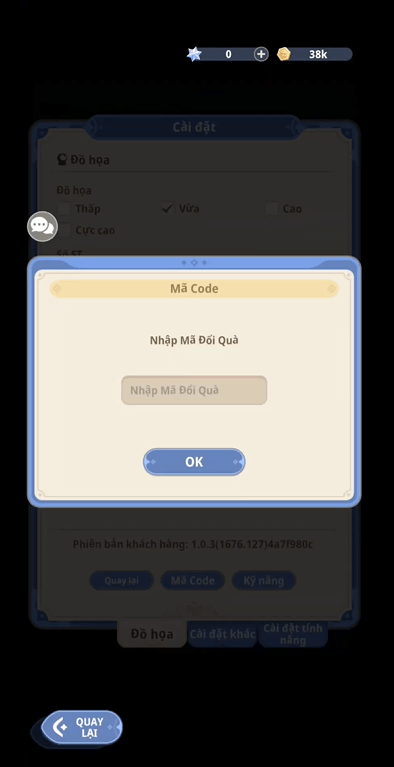
- Step 5: Enter the giftcode and click confirm, the reward will be sent via the in-game mailbox.
Detailed instructions with pictures
Step 1: Select Avatar > select Settings icon as shown below.
Step 2: Select Code.
Step 3: Enter all giftcodes in the code table above into the code content box and select Redeem Rewards.
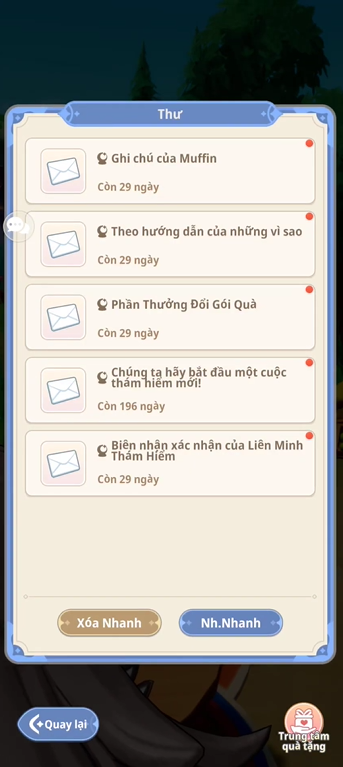
Step 4: Return to the main screen, check all the exchanged letters from the giftcode by selecting Barracks > Mailbox.
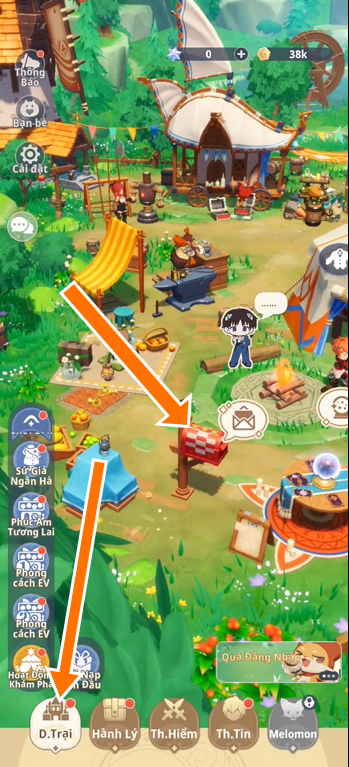
Step 5: Here, select Receive Quickly to receive the reward in the entire message.
Reasons why you can't redeem code for rewards
You may encounter the following problems when changing the code:
- The code has expired, especially if it is a giftcode from previous events.
- Game code is not valid for Vietnamese version, only applicable for global version.
- Giftcode has been used before, each code is usually only used once.
- Account level or condition requirements not met.
- Technical error or server problem, you can report the error via the comment section for support.
How to get more giftcode
To get more giftcodes, you can:
- Follow the game's official social media page, if available (no specific page found yet, but can be contacted via email app@weplaysoft.com according to information from Google Play).
- Participate in events or promotions organized by Weplay Software.
- Check regularly on game pages like this page of TipsMake.com, we will regularly update giftcodes for you to redeem codes for rewards.
- Join the player community, if any, to share game codes and leveling experiences on social networking sites like Facebook, Instagram, Threads.
FAQ
What should you know about latest Muffin Departure Code?
Summary of giftcode and how to redeem code
What should you know about quick Guide?
Step 1: Open the game and wait for it to download.
What should you know about detailed instructions with pictures?
Step 1: Select Avatar > select Settings icon as shown below.
What should you know about reasons why you can't redeem code for rewards?
You may encounter the following problems when changing the code:
Related Articles
 Latest Jujutsu Seas Code and How to Redeem: Complete Guide4 minutes read
 Latest Capybara Go Codes and How to Redeem Them14 minutes read
 The Latest Reawakened Code and How to Redeem It4 minutes read
 Basketball: Zero Giftcode Latest, Constantly Updated and How to5 minutes read
 Latest Strinova Code and How to Redeem Code4 minutes read
 Latest Tay Du Mini Code and How to Redeem Code for Rewards5 minutes read
Reader Comments 0
Sign in with email or Google to join the discussion.