Table of Contents
Jujutsu Seas codes can award race spins, clan spins, or temporary EXP boosts. Enter them through the game's settings menu, after completing any community requirements shown by the game. Code availability can change, and a code listed online is not proof that it will still redeem on your account.

Codes to check
Recent code listings report the following examples. Availability can differ from a tracker’s listing, so use the in-game redemption result as the final check.
| Code | Reported reward |
|---|---|
260KLIKESXMAS | 10 Race Spins |
270KTHUMBSUP | 10 Clan Spins |
280KLIKESXMAS | 10 Clan Spins |
NEWUPDATE | 25 Clan Spins |
250KLIKES | 25 Race Spins |
4MVISITS | 30-minute EXP boost |
Do not pay another player or share your Roblox password to obtain a public game code.
How to redeem a code
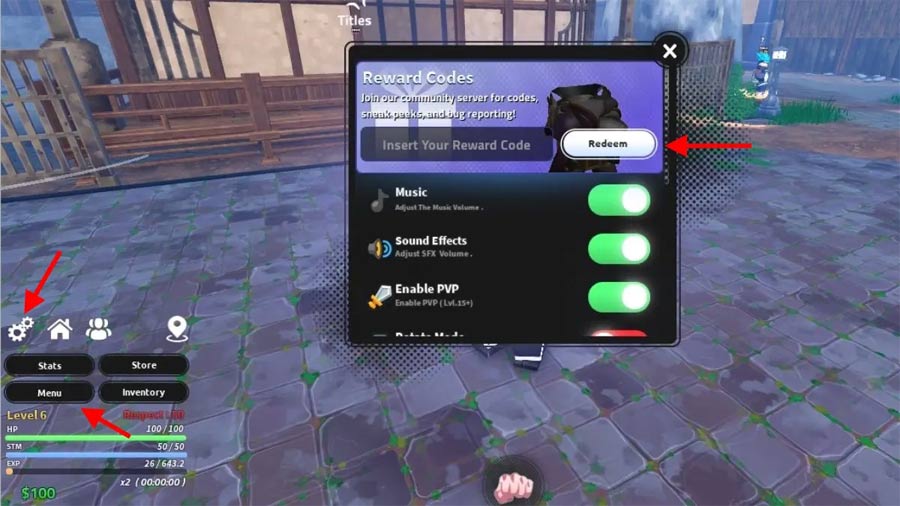
- Open the Jujutsu Seas experience on Roblox.
- Follow any stated requirement to like the experience or join its official community.
- Launch the game and select Menu in the lower-left corner.
- Select the gear icon to open settings.
- Paste one code into the code box, preserving capitalization and removing extra spaces.
- Choose Redeem and read the result before entering another code.
Older codes are not guaranteed to work
The following earlier codes should be treated as an archive, rather than a current working list. Third-party sources disagree about some older codes and possible reactivations.
10KLIKESS200KVISITS150KVISITS5KFavsssss5KLIKESSSLEZGO10kCOMMUNITYMEMBERS2KLIKESNICE75kVISTTTSSDAY3GIFTJUJUTSUPEAK1Kheart1KlikesEnjoyJujutsuSeasOtakuRTQRahumiSteveVLXAlpha
If redemption fails
Check spelling, capitalization, the correct game, and whether you already claimed the code. An unmet community requirement is different from an expired code. If the game gives a specific error, follow that message rather than repeatedly submitting the same entry.
Find new announcements through the community links on the official Roblox experience page. Use those links to identify the developer's community rather than joining a similarly named group from an unverified search result.





Reader Comments 0
Sign in with email or Google to join the discussion.