Table of Contents
This updated guide explores how a clean Windows 11 install may improve performance with practical details, clear explanations, and useful takeaways. Back in March 2024, Microsoft proposed an interesting approach for new Windows 11 PCs: Smart App Control (SAC) that not only enhances security but also improves performance — but only on clean installations.
Smart App Control: Lighter, Faster Thanks to " Active " Mechanism
Launched with Windows 11 version 22H2 (September 2022), SAC works by blocking malicious apps before they run, eliminating the need for continuous file scanning. Microsoft explains:
The advantage of Smart App Control is that it has a lighter impact on PC performance. Because the app blocks dangerous apps before they run, it does not need to scan files continuously. This reduces the load on the system, allowing you to work or play games without lag. Meanwhile, traditional antivirus software sometimes consumes more resources because of continuous file scanning and processes.
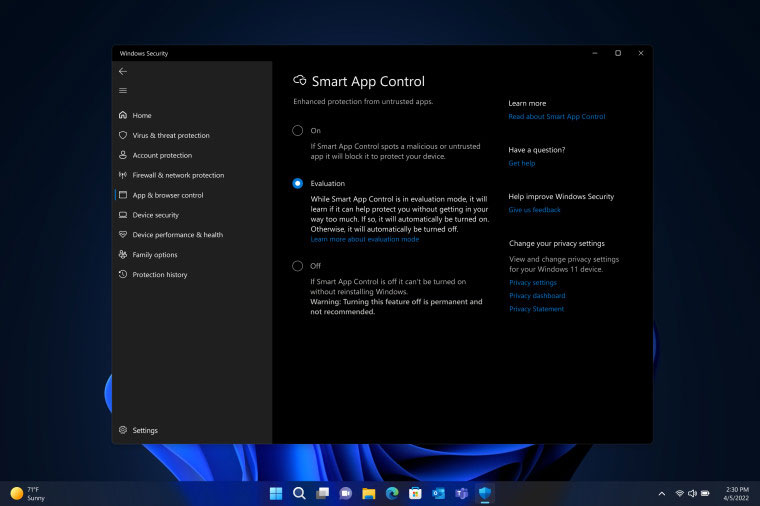
According to Microsoft, SAC is a proactive anti-malware solution, different from the reactive mechanism of conventional antivirus software. Thanks to that, SAC brings two benefits:
- Better system performance.
- Neutralize new threats based on suspicious behavior, learning from machine learning and the cloud.
Smart App Control blocks suspicious apps before they cause harm. Traditional antivirus software reacts after a threat has already arrived—it is great at identifying and removing known malware, but can miss new or sophisticated threats.
Still, SAC does have its drawbacks. A support article from Broadcom points out that SAC sometimes causes performance degradation because of bugs. Notably, Broadcom says Microsoft does not provide specific guidance on how to fix these situations.
Old Windows Is Still " Better " in Performance?
This discussion is even more meaningful when many users still appreciate the performance of older Windows versions like 8.1/8 even though they are inferior in interface and features compared to Windows 11.
Microsoft Tip: If you want the smoothest Windows 11 experience, perform a clean install to enable Smart App Control and optimize system resources.
FAQ
What is the main takeaway about How a Clean Windows 11 Install May Improve Performance?
The key is to understand the core idea, compare the available options, and apply the practical guidance that matches your situation.
What should beginners know about How a Clean Windows 11 Install May Improve Performance?
Start with the essential steps and terminology. Avoid changing advanced settings until you understand how they affect performance, privacy, cost, or compatibility.
How can I use this information in practice?
Follow the relevant section in order, test one change at a time, and confirm the result before moving to the next step or recommendation.
Related Articles
 Microsoft Officially Reveals Detailed Performance Evaluation Results4 minutes read
 6 Important Steps to Take After a 'Clean' Install of Windows 119 minutes read
 How to Speed up Your Computer, Improve Windows Performance6 minutes read
 Guide to Clean up Windows 10 Computer Junk to Increase Capacity and Speed4 minutes read
 8 Things to Remember Before Performing a Clean Install of Windows7 minutes read
 Cleaning: an Effective Way to Help Your Computer 'Live' More6 minutes read
Reader Comments 0
Sign in with email or Google to join the discussion.