Table of Contents
This guide provides a clear, practical overview of Microsoft releases 'improved version' PC health check app, with useful context, important details, and straightforward takeaways for everyday readers.
However, a newly launched product certainly cannot always work perfectly, 100% accurately. Based on feedback from the Windows Insiders community, Microsoft has decided to temporarily 'recall' PC Health Check to make tweaks and improvements to make it more appropriate.
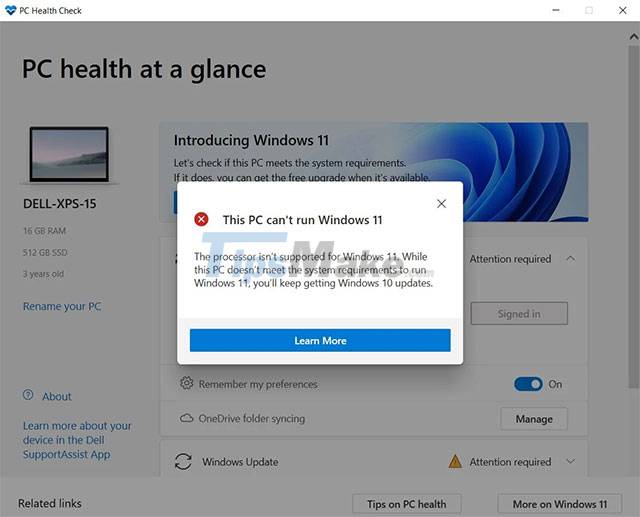
By the end of August, the Redmond company has released a preview version of the tweaked PC Health Check application to the Windows Insiders user community. The new version significantly improves the Windows 11 compatibility check feature on general hardware platforms.
In it, relevant information will be displayed more fully, and at the same time, the process of checking the conditions to meet Windows 11 has also changed. Notably, the app will now also provide users with direct links to relevant support articles, including potential remedial steps, as shown below.
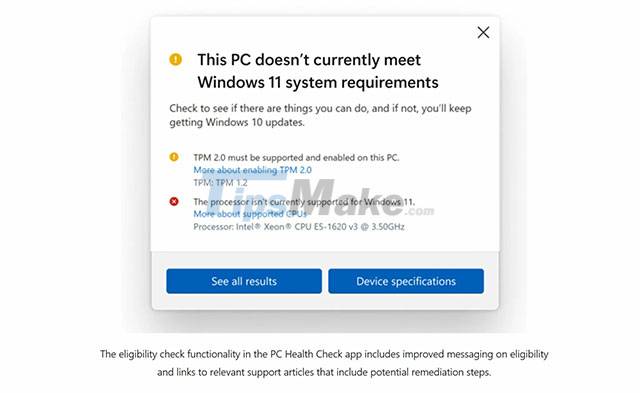
Currently, after collecting full feedback from the Insiders community, combined with additional updates for newly supported processors, Microsoft has officially re-released the PC Health Check application for all users.
You can download and experience the new Windows PC Health Check application completely free of charge HERE.
Key Takeaways
Use the information above as a practical reference for Microsoft releases 'improved version' PC health check app. Review each step carefully, confirm any requirements, and choose the option that best fits your situation.
FAQ
What does this guide explain about Microsoft Releases 'Improved Version' PC Health Check App?
It explains the main concepts, practical considerations, and useful steps related to Microsoft releases 'improved version' PC health check app without requiring advanced knowledge.
Who can benefit from learning about Microsoft Releases 'Improved Version' PC Health Check App?
This information is useful for readers who want a clear overview, practical guidance, and reliable steps related to Microsoft releases 'improved version' PC health check app.
What should I check before applying this information?
Review the requirements, confirm that your device, software, or situation matches the instructions, and back up important data before making major changes.
Related Articles
 Microsoft Releases PC Health Check App for Windows 10 in4 minutes read
 Microsoft Is Forcing Windows 10 Users to Install the PC4 minutes read
 How to Check the PHP Version6 minutes read
 Simple Way to Have a Home Health Checkup in Just 1 Minute2 minutes read
 Hard Drive Check: How to Check Hard Drive Health in 3 Ways4 minutes read
 How to Check the Version of Microsoft Office You Are Using Is 32-Bit5 minutes read
Reader Comments 0
Sign in with email or Google to join the discussion.