Table of Contents
This article provides a clear overview of Manage, View & Delete Saved Passwords on Coc Coc Browser, with the main facts, useful context, and practical details organized for easy reading.
You will save time when logging into saved accounts. Many users have known about saving passwords in the browser but do not know the details of password management.
this guide will help you know more details about managing passwords stored on Coc Coc browser.
Step 1: First, click Coc Coc in the upper left corner and select Settings .
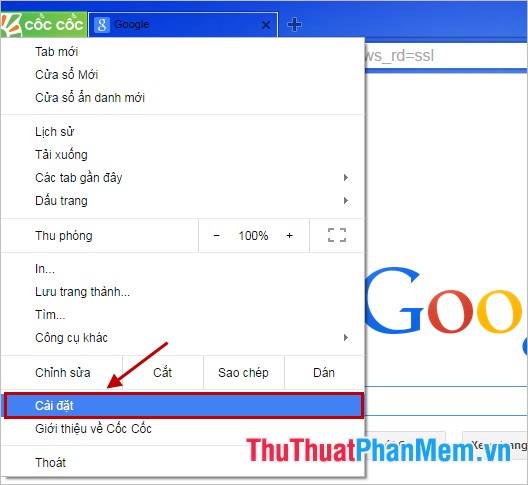
Step 2: In the Settings section, drag the vertical scroll bar to the bottom of the page and select Show advanced settings .

Step 3: If you may need to enable the password saving feature every time you log in to your accounts, then check the box next to Proposal to save your web password in the Password and forms section .

Step 4: To manage saved passwords, select Manage password .

At this time, all websites with the account and password you have saved in the browser will be displayed. you may need to review the password of any account, you just need to click the website, that account name, then the password appears in the display , click Show to view the saved password.
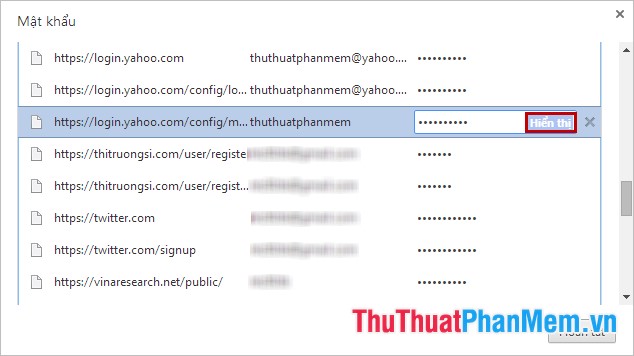
If you may need to delete without saving your account and password on any site, you just need to click the X in the same line as the account name to delete.
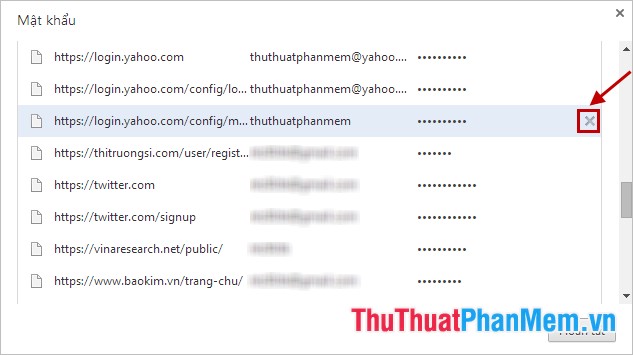
In the Never saved is the website that you have chosen not to save the password, you may need to delete any page from this list, you just need to press the X to delete.

After performing the operations you click Finish to save changes.
So you have managed passwords saved on Coc Coc browser, you can delete passwords saved on the browser quickly. The above article introduces on Coc Coc browser and with Google Chrome browser you also do the same. Good luck!
FAQ
What is the main focus of Manage, View & Delete Saved Passwords on Coc Coc Browser?
The article explains the most important facts, context, and practical details related to Manage, View & Delete Saved Passwords on Coc Coc Browser.
Who may find this information useful?
It is useful for readers who want a clear overview, practical context, and a better understanding of the subject.
What should readers verify before taking action?
Check current product versions, official requirements, regional availability, and any details that may have changed since the original publication.
Related Articles
 How to View and Quickly Delete Saved Passwords on Chrome9 minutes read
 How to View the Password, Delete the Saved Password on Chrome5 minutes read
 How to View Saved Passwords on iPhone and Edit Passwords Easily6 minutes read
 How to View Saved Passwords in Web Browsers3 minutes read
 Instructions for Viewing Saved Passwords on Bchrome2 minutes read
 How to Manage Saved Passwords on Microsoft Edge: View, Delete7 minutes read
Reader Comments 0
Sign in with email or Google to join the discussion.