Table of Contents
Learn how to learn about the new Google sheets with clear steps, practical tips, and troubleshooting guidance for a reliable result.
What's new in Google Sheets?
Google Sheets is similar to Google Spreadsheets; however, it has some interesting new features. Here are some of the most useful and important ones:
- Work offline . Google Sheets allows you to set up offline access in the Chrome browser. Once you've done this, you can create and edit spreadsheets from Chrome even when you don't have an internet connection. Google Sheets will automatically sync and update when you reconnect to the internet.
- Filter views . In Google Sheets, you can apply filter views, which will filter the spreadsheet shared with you without disturbing other users who may be working on it. You can also name and save multiple filter views so you don't have to recreate them every time you want to filter your data.
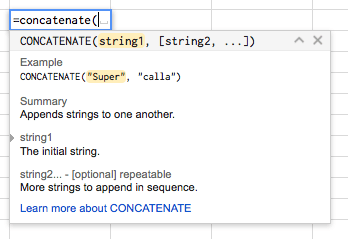
- Function help . When you start typing a formula into Google Sheets, you'll see a pop-up dialog box like the one below. This dialog box will suggest and identify functions and their arguments. You'll also see a link to follow if you need more information about a function.
- Custom number formatting . In Google Sheets, if you don't like the available number, currency, or date formatting options, you can create your own. Your new formatting will even be saved to the number formatting drop-down menu, so you'll be able to easily reuse it.
- Custom rules for conditional formatting . You may have used conditional formatting in Excel or Google Sheets to change the formatting of cells based on the data they contain. Google Sheets lets you create rules for conditional formatting based on custom formulas, and these formulas can call on data outside the cell you are formatting.
- Add-ons for Google Sheets . You may already be familiar with Google Drive's add-on store. Now, Google Sheets also has its own add-on store. You can access it by clicking the Add-ons menu in any Google Sheets spreadsheet and selecting Get Add-ons .
Some frequently asked questions
How do I switch to the new Google Sheets?
All your new and existing spreadsheets will automatically be in the new Google Sheets format—you don't have to do anything.
How can I tell if a spreadsheet is in the new or old format?
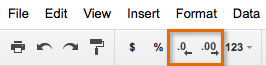
The new format actually looks similar to the old format. The easiest way to know which state your spreadsheet is in is to check the Decrease decimal places and Increase decimal places buttons at the top of the spreadsheet. If you see them, your spreadsheet is in the new format. If not, it's in the old format.
Is it still possible to create spreadsheets in the old format?
No. Google switched to the new format in 2014. They converted all new and existing spreadsheets to the new format.
Is it possible to use Google Sheets on mobile devices?
Yes. In fact, Google Sheets has its own app, which can be downloaded from Google Play (for Android) or the App Store (for iOS devices). You can also continue to access Google Sheets through the Google Drive app or your device's browser.
Final Thoughts
Use this guide as a practical checklist for how to learn about the new google sheets. Work through the steps in order, verify each result, and adjust the options to match your needs.
Related Articles
 Tricks Using Google Sheets Should Not Be Ignored7 minutes read
 How to Create Graphs, Charts in Google Sheets5 minutes read
 Google Sheets: Things You Need to Know Before Using It6 minutes read
 Sort and Filter Data: Explained8 minutes read
 How to Align Spreadsheets Before Printing on Google Sheets3 minutes read
 Familiarize Yourself with Spreadsheets, Rows, Columns, and Cells11 minutes read
Reader Comments 0
Sign in with email or Google to join the discussion.