Table of Contents
Explore keyboard Shortcuts to Rotate your PC Screen, including key concepts, practical steps, useful tips, and common questions.
Keyboard Shortcuts to Rotate Your PC Screen: Overview
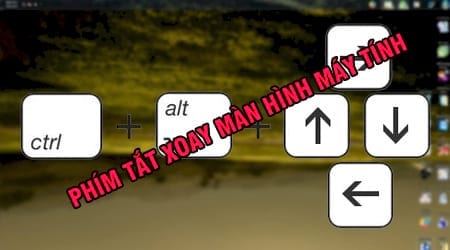
Keyboard shortcuts to rotate your computer screen: landscape, inverted, 180 degrees, 90 degrees.
As introduced in a previous article, TipsMake shared with readers how to fix the inverted computer screen error and received quite positive feedback. Readers who don't know how can refer back to the article on fixing the 180-degree inverted computer screen error. Now, we will guide you through a simpler way to fix this error using simple keyboard shortcuts as follows:
Ctrl + Alt + Left Arrow : Corresponds to Portrait mode, meaning the screen is horizontal, with the Taskbar on the right side of the screen. Ctrl + Alt + Right Arrow : Corresponds to Portrait (flipped) mode. Ctrl + Alt + Up Arrow : Returns the screen to normal mode, corresponding to Landscape mode. Ctrl + Alt + Down Arrow : Inverts the screen, corresponding to Landscape (flipped) mode.
So, with the keyboard shortcuts introduced above, you now know another easy way to fix a laptop screen that has rotated 180 degrees back to its normal state, right? Please note that the method may vary slightly depending on different operating system versions or graphics card models.
Furthermore, during your daily computer use, you'll likely want to share interesting things or helpful tips with others but don't know how. In such situations, using screen recording software is a top priority. You can refer to our article on screen recording software to learn more about how to use it and its features. Good luck!
FAQ
What should you know about keyboard shortcuts to rotate your pc screen?
Explore keyboard Shortcuts to Rotate your PC Screen, including key concepts, practical steps, useful tips, and common questions.
Do the steps or features vary by device or software version?
They can. Menu names, available settings, and compatibility may differ by device, region, account type, or software version, so check the options shown on your own screen.
What should you do if the recommended method does not work?
Repeat the steps in order, confirm that the requirements are met, and restart the relevant app or device when appropriate. Also check for updates and review any error message before trying again.
Related Articles
 4 Software to Rotate Video in Reverse, Tilt 90, 180 Degrees Best8 minutes read
 How to Rotate Images Backwards, Horizontally on Computers Without4 minutes read
 Instructions for Rotating Videos Are Inverted and Inclined by VLC4 minutes read
 How to Rotate Text in Excel: Rotate the Word on Excel4 minutes read
 Pubg Keyboard Shortcuts - All the Pubg Keyboard Shortcuts You Need to Know3 minutes read
 How to Rotate a Table in Word (Rotate a Table 90 Degrees in Word)7 minutes read
Reader Comments 0
Sign in with email or Google to join the discussion.